Pixel Flow Level 806 Solution | Pixel Flow 806 Walkthrough
How to beat Pixel Flow Level 806: Video solution & walkthrough. The fastest way to pass Pixel Flow 806.
Is this the wrong level layout?🤔
Pixel Flow randomizes levels for different players. Don't worry, just upload a screenshot of your board, and our AI will find the correct video instantly.

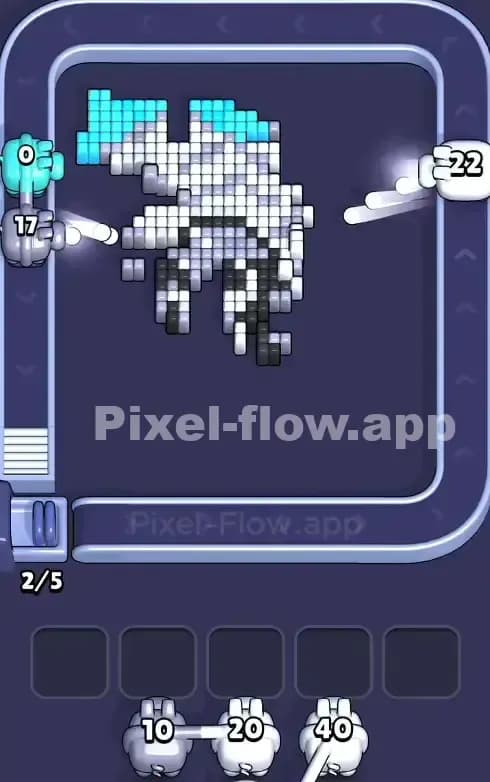
Pixel Flow Level 806 Walkthrough
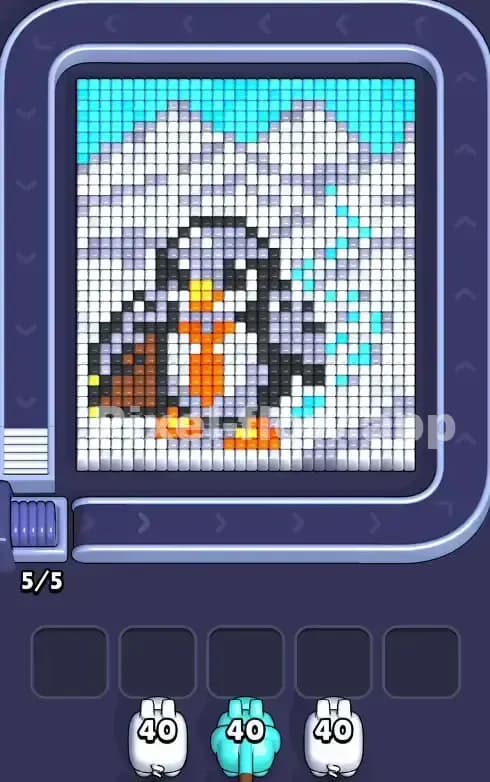
This level features a dapper penguin standing amidst a frozen, snowy mountain range. The board is dominated by a massive quantity of White pixels representing the snow and ice, with a strip of Cyan/Light Blue sky at the very top. The penguin itself is a mix of Dark Grey, Black, and bright Orange accents for its beak, feet, and tie.
To beat Pixel Flow Level 806, you simply need to peel back the massive snowdrifts to expose the penguin hidden in the center. The rules remain standard: match the pig color to the pixel color. Because the color blocks here are huge and contiguous, you won't struggle with ammo management as much as in chaotic, scattered levels. Fortunately, this is not a very hard level. It is a test of patience, not precision.
Pixel Flow Level 806 Overview
The scene is almost monochromatic at first glance. You are looking at a chilly landscape where a penguin, oddly dressed in a business tie, is waiting for you to clear the path. The background feels heavy. Massive white peaks rise on the left and right, creating a valley shape that cradles the character.
Notice the asymmetry in the sky and snow effects. The top of the board is a solid bar of Cyan sky, but looking to the right of the penguin, you will see scattered Cyan pixels mixed into the white snow. These look like falling snowflakes or magical sparkles. This is important. While the left side is solid white mountain, the right side is a checkerboard of white and blue. This creates a "shielding" effect where you might need to clear specific blue pixels to reach the white ones behind them, or vice versa.
Step by step solution walkthrough for Pixel Flow Level 806
First Color Zone to Erase in Pixel Flow Level 806
You must start with the White snow. This is the only logical opening move.
Look at your starting queue. You likely have White Pigs with high Ammo counts (around 40). The bottom half of the screen and the massive mountain slopes are solid blocks of white. There is no risk here. I start by shaving off the snow directly under the penguin’s feet and the large drifts on the far left.
Erasing the white first is critical because it occupies the "outermost" layer of the voxel art. Until you remove the snow, you cannot access the Dark Grey body of the penguin or the Light Grey shadows of the mountains. If you see a Cyan Pig early, aim for the top row sky immediately to clear that distinct strip, but prioritize White to keep your Waiting Slots empty.
How to pass Pixel Flow Level 806 without power ups or boosters
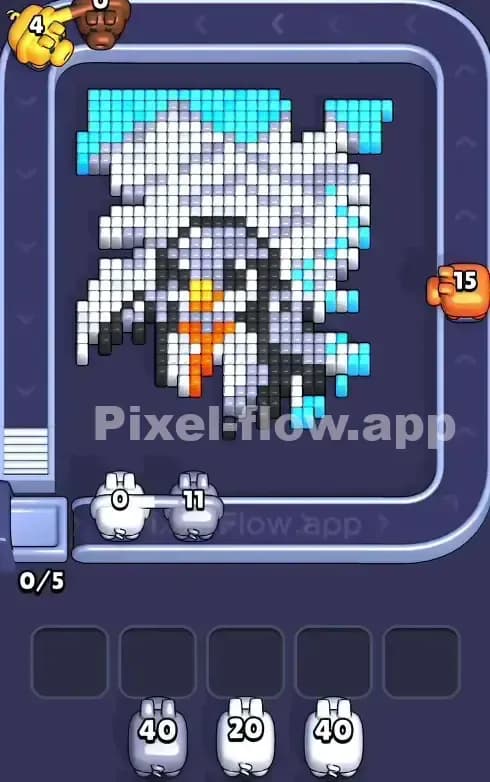
Once the white snowdrifts are significantly reduced, the board looks like a half-melted slush pile. You will see the jagged outline of the penguin and the remaining Light Grey pixels that add shading to the mountains. This is the danger zone.
At this stage, your queue will start offering Dark Grey or Black pigs intended for the penguin. Do not drop them into the conveyor belt unless you have a clear shot.
The trap in Pixel Flow Level 806 is the "mountain shading." The Light Grey pixels often sit between the white snow and the dark penguin. If you haven't cleared enough white, your Grey Pigs will have nothing to shoot and will clog your slots.
Focus entirely on the perimeter. Do not try to snipe the penguin's belly yet. Clear the Cyan sparkles on the right side and the Light Grey mountain shadows. If a Black Pig appears and the penguin is still blocked by grey shading, put that pig in a Waiting Slot. Do not panic. You have five slots. Use them to hold the penguin-colored pigs while you use the next available White or Grey pig to finish cleaning the background.
Last Details You Clean Up in Pixel Flow Level 806
The end game is satisfyingly simple. By now, the mountains are gone. The penguin is floating in the void.
The final layers are the Black outline and the Orange accessories. The Orange tie and beak are usually buried deep, often the very last layer. You will likely end up with an Orange Pig or two sitting in your slots for a while. That’s fine. Once the Dark Grey body is erased, the Orange pixels become valid targets.
Watch out for the penguin's feet. Sometimes a stray White or Grey pixel hides right between the feet, blocked by the orange toes. Ensure you clear the area between the legs before you dump your final Orange ammo, or you might find yourself with a clogged board and one single white pixel laughing at you. Clear the feet area, then pop the tie. Level complete.