Pixel Flow Level 833 Solution | Pixel Flow 833 Walkthrough
How to beat Pixel Flow Level 833: Video solution & walkthrough. The fastest way to pass Pixel Flow 833.
Is this the wrong level layout?🤔
Pixel Flow randomizes levels for different players. Don't worry, just upload a screenshot of your board, and our AI will find the correct video instantly.

Pixel Flow Level 833 Walkthrough
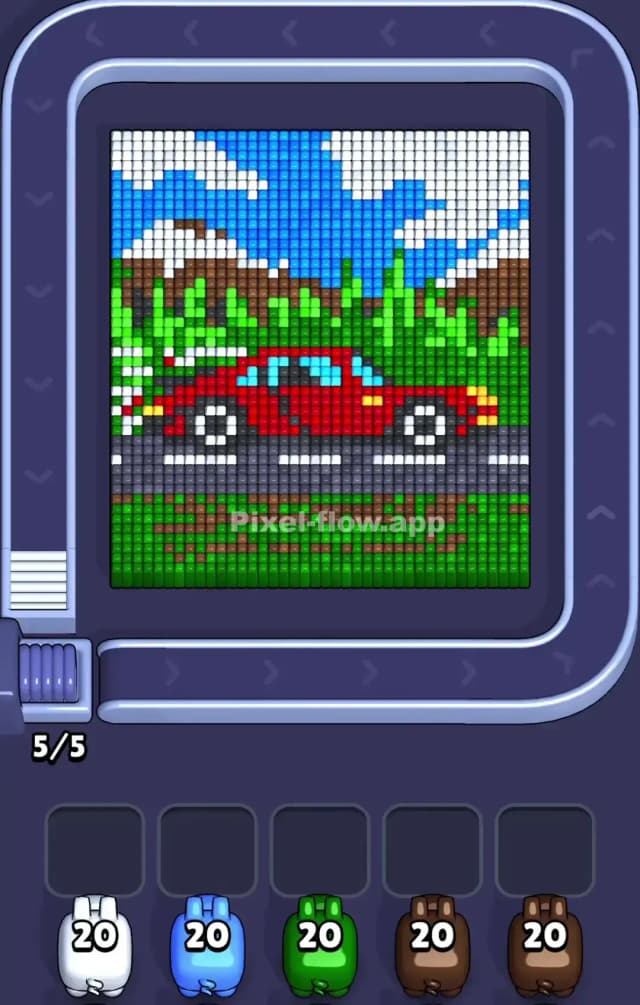
This level features a classic road trip scene: a bright red sports car speeding along a grey asphalt road. The setting is scenic, with a huge patch of green grass in the foreground, rolling green hills behind the car, brown mountains in the distance, and a bright blue sky filled with fluffy white clouds.
The rules remain standard: match the colored pigs to the voxel blocks. However, the density of this level makes it tricky. You have heavy blocks of single colors (sky, grass) mixed with intricate details (the car wheels, the mountain peaks). Because the layers overlap significantly—especially the car sitting on the road and in front of the hills—you need to be careful not to clog your waiting slots with pigs that can't reach the background layers yet. Is it a very hard level? Not extremely, but it is deceptively easy to fail if you ignore the layering logic. It's a solid medium-hard challenge.
Pixel Flow Level 833 Overview
Think of this picture as a stack of postcards. At the very front, you have the bottom strip of green grass and the grey road. Sitting directly on top of that road is the red sports car. Behind the car are the green bushes/hills. Behind those are the brown mountains. And finally, the blue sky and white clouds form the back wall.
The image is visually split into horizontal bands:
- Top Band: Blue sky and white clouds. Very open, easy to clear.
- Middle Band: The brown mountains and green bushes. This is where it gets messy because the colors interlock.
- Bottom Band: The red car, grey road, and foreground grass. This is dense.
The asymmetry here is subtle but important. The left side has more white cloud coverage and complex mountain shapes. The right side is slightly cleaner with more solid green. The car itself is central but spans most of the width, acting as a "blocker" for everything behind it. You cannot reach the middle of the mountains until that red car is gone.
Step by step solution walkthrough for Pixel Flow Level 833
First Color Zone to Erase in Pixel Flow Level 833
I strongly recommend starting with the Grey Road or the Bottom Green Grass.
Here is the narrative and logical reason:
- The Foundation: The grey road and the bottom grass are the literal foreground. Nothing is hiding in front of them.
- Ammo Dump: These areas are solid blocks. A Grey pig or a Green pig can drop a massive amount of ammo here without getting stuck. If you pick a Red pig for the car first, it might clear the car body but get stuck with leftover ammo because the wheels or windows (black/blue) break the flow.
- Opening the Middle: Clearing the grey road immediately exposes the bottom edge of the background layers, giving you more surface area to work with later.
Alternative: If Grey isn't available, Blue (Sky) is a safe bet. It’s the background, but often the top edge is exposed immediately. Clearing the sky reduces visual noise and separates the mountains from the top frame.
How to pass Pixel Flow Level 833 without power ups or boosters
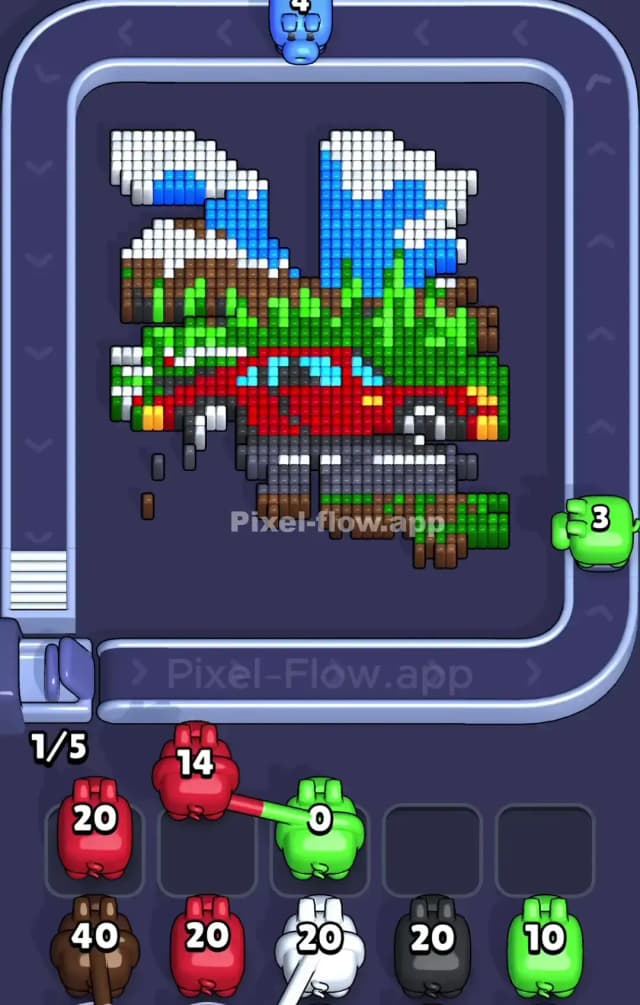
Once you’ve stripped away the road and the sky, the picture looks chaotic. You’ll have a floating red car body, jagged brown peaks, and patches of green bush. This is the danger zone.
- The Red Car Trap: The red car looks big, but it’s thin. It sits in front of green bushes. If you use a Red pig now, ensure you can clear the entire car. If the pig has 20 ammo and the car only has 18 pixels exposed, that pig will sit in your slot and clog you. Count roughly before you tap.
- The Brown/Green Tangle: The mountains (brown) and bushes (green) mix heavily in the middle layer. Prioritize Green here. Why? Because green exists in both the foreground grass (if any is left) and the mid-ground bushes. It has the most valid targets. Clearing Green usually breaks the connection between the mountains and the car, isolating the shapes.
- Ignore the White Clouds: Leave the white clouds for later if you can. They are often scattered and small. White pigs tend to get stuck easily in Level 833 because the clouds are separated by blue sky. Wait until the blue is gone so the white blocks merge into larger, accessible chunks.
Last Details You Clean Up in Pixel Flow Level 833
As you reach the end, you are likely left with the "details" that were buried deep or were too small to prioritize earlier.
- The Wheels: The black/white pixels of the car wheels often survive until the end because they are surrounded by the red chassis and grey road. Once the road and car are gone, these float in space.
- Mountain Peaks: The very tips of the brown mountains often have single pixels of white (snow) or distinct brown shapes that were hidden by clouds.
- Windows: The light blue car windows. These are often a different shade than the sky. Don't confuse them.
Your final moves will likely be a Black pig (for the tires/details) or a specific White pig cleaning up the last scraps of cloud or wheel highlights. Watch your slots—don't let three pigs with 2 ammo each block you from finishing a simple 5-pixel job.