Pixel Flow Level 881 Solution | Pixel Flow 881 Walkthrough
How to beat Pixel Flow Level 881: Video solution & walkthrough. The fastest way to pass Pixel Flow 881.
Is this the wrong level layout?🤔
Pixel Flow randomizes levels for different players. Don't worry, just upload a screenshot of your board, and our AI will find the correct video instantly.
Pixel Flow Level 881 Walkthrough
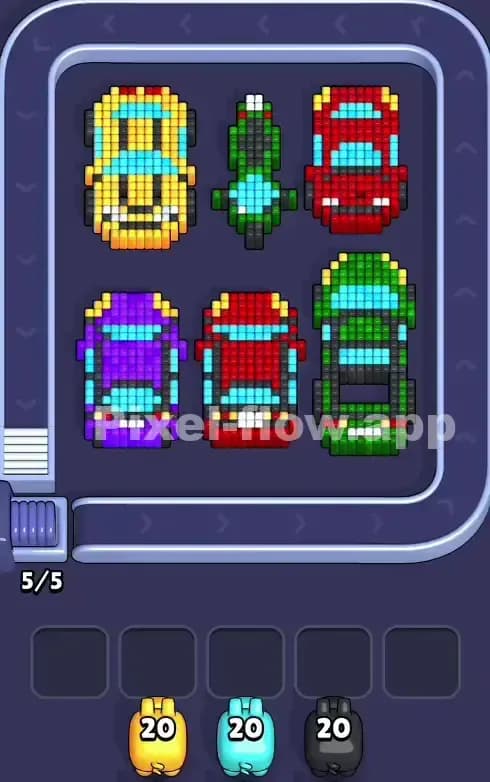
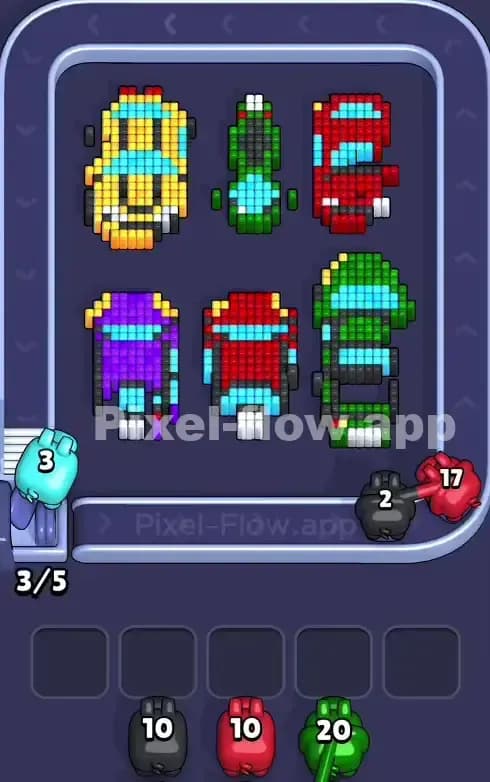
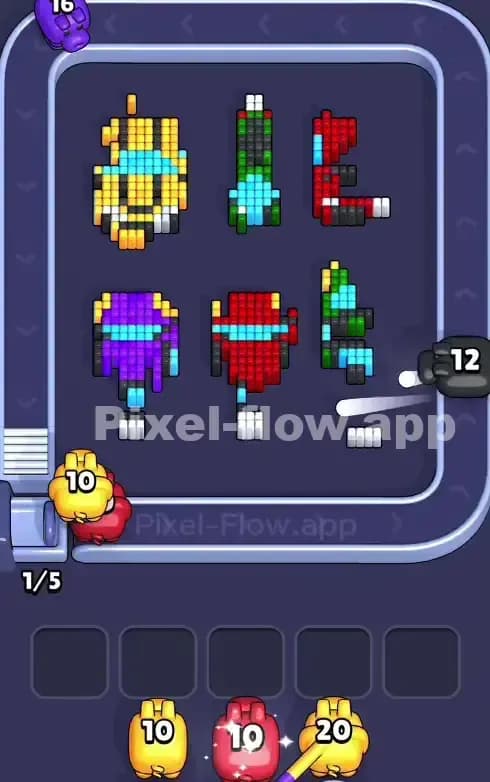
This level features a tidy little parking lot scene. You have six vehicles arranged in a 2x3 grid. The top row holds a yellow muscle car, a skinny green motorcycle, and a red sports car. The bottom row has a purple coupe, a smaller red sedan, and a green convertible. To beat Pixel Flow Level 881, you need to strip away these vehicle bodies to reach the shared colors underneath, primarily the black tires and the cyan windows. Because the vehicles are distinct islands, you have to be careful about not clogging your slots with colors that only exist on one specific car you haven't touched yet. This is a very hard level because the colors are scattered across six separate objects rather than one big block.
Pixel Flow Level 881 Overview
Imagine a top-down view of a busy parking lot. Each vehicle is its own separate island of pixels. This separation is the main danger. In many levels, hitting a "Red" block might clear a huge swath of the screen. Here, the red on the top right car is totally separate from the red on the bottom middle car. They don't touch.
The board is symmetrical in layout but not in color. The left side is heavy on Yellow and Purple. The center is Green and Red. The right is Red and Green. The most critical asymmetry is the motorcycle in the top center. It’s much thinner than the cars, meaning it has fewer "body color" pixels (dark green) and exposes its black tires and cyan windshield much faster than the bulky cars. That skinny bike is your weak point to exploit.
Step by step solution walkthrough for Pixel Flow Level 881
First Color Zone to Erase in Pixel Flow Level 881
Focus on Red or Green immediately. Here is why:
- Red: It appears on two separate cars (top right, bottom middle). This gives you a large surface area to dump Red ammo. If you see a Red pig, grab it. It will likely clear the hoods and roofs of two vehicles simultaneously, opening up the black tires underneath.
- Green: Similarly, green appears on the motorcycle (top center) and the convertible (bottom right). The motorcycle is especially fragile. A single Green pig can often strip most of the bike's body away, quickly revealing the cyan windshield and black tires.
Avoid starting with Purple or Yellow if you can help it. They each only appear on one car (Yellow top left, Purple bottom left). If you get a pig with 20 ammo for one of those, it might stall out because there simply aren't enough surface pixels to absorb all the shots at once, forcing the pig into your waiting slots.
How to pass Pixel Flow Level 881 without power ups or boosters
Once you've stripped the main body paint (the primary Red, Green, Yellow, and Purple layers), the board will look like a scrapyard. You'll see floating windows (Cyan) and tires (Black/Dark Grey) everywhere.
At this mid-stage, your biggest enemy is the Cyan (windows). Every car has them, but they are often buried deep inside the car chassis. You might see a Cyan pig come down the conveyor belt while only 2 or 3 Cyan pixels are actually visible on the board.
- Do NOT pick up Cyan pigs early. Let them loop around if possible. Only pick them up when you have exposed the windshields of at least 3 vehicles.
- Prioritize Black/Grey pigs now. The tires are usually on the outer edges or just under the first layer of paint. Clearing the tires often breaks the "outline" of the car, giving you better access to the white headlights or interior pixels.
If your slots fill up, look at the White pixels. These are the headlights. They are tiny targets. If a White pig clogs a slot, you need to focus exclusively on clearing the front bumpers of the cars to give that pig a target.
Last Details You Clean Up in Pixel Flow Level 881
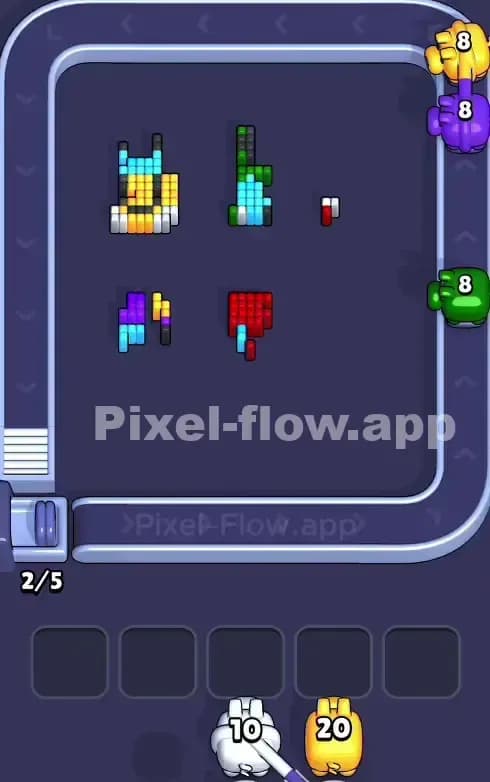
The end of Pixel Flow Level 881 is usually a cleanup of "floating" bits. You will likely be left with:
- Stray Headlights: The single white pixels at the front of the cars often get missed because they are so small.
- The Motorcycle Handlebars: The top center bike has grey/silver handle details that are easy to overlook.
- Rear Windows: Sometimes the back windows (Cyan) remain hidden until the very last roof tiles are gone.
Save a generic, low-count pig (or a color you know is coming) for these specific spots. Don't waste a 20-ammo pig on a single leftover white headlight pixel. Wait for the belt to bring you a better match or use a nearly-empty pig already in your slot. Precision counts here.