Pixel Flow Level 893 Solution | Pixel Flow 893 Walkthrough
How to beat Pixel Flow Level 893: Video solution & walkthrough. The fastest way to pass Pixel Flow 893.
Is this the wrong level layout?🤔
Pixel Flow randomizes levels for different players. Don't worry, just upload a screenshot of your board, and our AI will find the correct video instantly.



Pixel Flow Level 893 Walkthrough
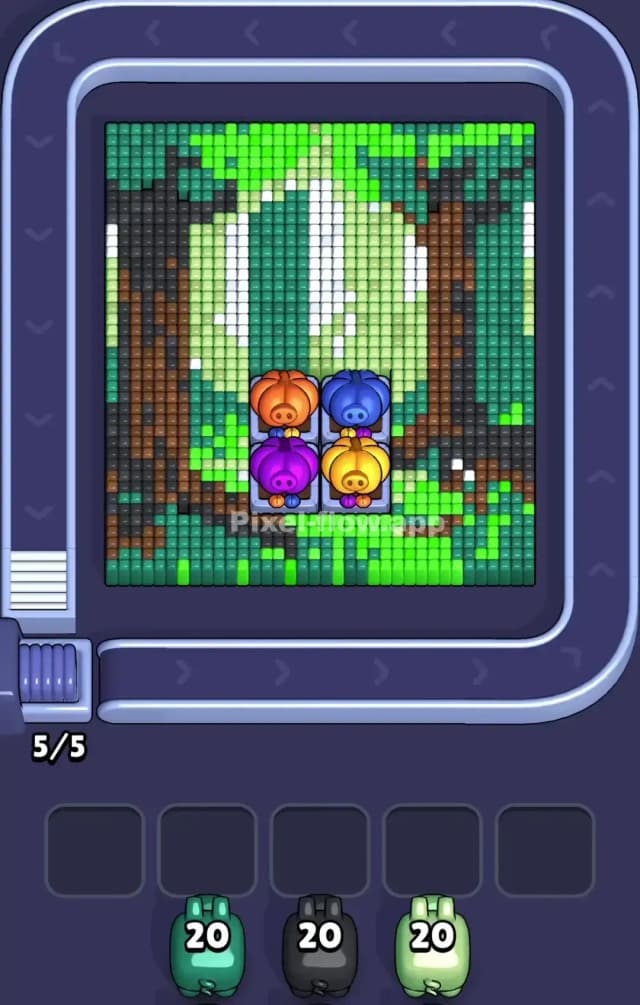
This level is a dense, spooky forest scene that centers around a strange cluster of four pumpkin-like objects. Unlike simpler levels where you just peel an onion, Pixel Flow Level 893 forces you to work around a central obstruction while managing a very messy palette of greens. You have dark forest green, bright lime green, pale mint green, and white, plus the dark black/brown of the tree trunks.
The rule to beat Pixel Flow Level 893 is strict ammo management. You cannot just grab every green pig you see. You have to verify which shade of green is currently exposed on the outer layer. Because the shades are so similar, this is a very hard level. Mistaking the "mint" pig for the "lime" pig will clog your waiting slots instantly.
Pixel Flow Level 893 Overview
The artwork here depicts a haunted grove. You have two massive, dark tree trunks framing the left and right sides of the board. Between them is a glowing, ethereal light made of white and pale green voxels. Sitting right in the bottom-center of the screen are four colorful pumpkin-heads (Orange, Blue, Purple, Yellow) on pedestals.
These pumpkins are not targets. They are obstacles. They sit there permanently, blocking line-of-sight for your pigs. This adds a nasty asymmetric challenge. Your pigs traveling along the bottom conveyor belt cannot shoot straight up through the pumpkins. They have to wait until they turn the corner to the left or right vertical belts to hit the pixels hiding behind those pumpkins.
Visually, the board is heavy on the sides (the trees) and bright in the center. The colors feel muddy and confused, which is the main difficulty driver. The dark greens of the leaves blend into the black of the tree bark, making it hard to see where one layer ends and the next begins.
Step by step solution walkthrough for Pixel Flow Level 893
First Color Zone to Erase in Pixel Flow Level 893
The first zone you need to attack is the Dark Grey/Black tree trunks on the flanks.
Here is the logic: The board is vertically oriented. The tree trunks on the left and right are the tallest, outermost structures. If you look at your starting queue (often containing Black or Dark Teal pigs), these correspond to the bark.
I prioritize the Black pigs immediately because those tree trunks act as "walls" protecting the inner greens. Until you shave down the black voxels on the far left and right, you cannot get good angles on the deep green foliage. Also, clearing the black pixels creates "holes" in the structure. These holes are vital. They allow your future green pigs to shoot through the front layer and hit matching blocks that might be hiding deeper in the mix. If you ignore the black trunks, you end up with a solid wall of green that requires a specific angle to hit, and you'll likely run out of conveyor belt space waiting for that angle.
How to pass Pixel Flow Level 893 without power ups or boosters
The mid-game of Pixel Flow Level 893 is where most players lose. At this point, the tree trunks are half-gone, and the board looks like a jagged mess of three different green shades.
You will see:
- Bright Lime Green: Usually on the upper canopy.
- Dark Forest Green: Mixed near the remaining trunk pieces.
- Pale Mint/White: Starting to peek through the center.
The danger here is the "Green Trap." You will see a green pig and think, "Great, lots of green targets!" But if you pick a Pale Green pig when only Bright Green blocks are exposed, that pig will drop into your waiting slots. Do this three times, and you have no room to maneuver.
To survive without boosters, stop the conveyor belt constantly. Do not tap a pig unless you can trace a straight line from its current position to a block of the exact matching color. If a pig is Pale Green, but the only clear path is to a Bright Green block, let the pig ride the belt. Let it loop around. Patience is the only way to beat the color overlap in Pixel Flow 893.
Also, watch out for the pumpkins in the bottom center. Pigs stuck in the bottom-middle of the belt are useless for hitting the center of the picture because the pumpkins block the shots. You must let your pigs ride to the upper corners of the belt. The top-left and top-right corners give the best diagonal firing lines to clear out the mess behind the pumpkins.
Last Details You Clean Up in Pixel Flow Level 893
The end of the level is all about the "Ghost Light" in the center. Once the trees and heavy foliage are gone, you will be left with a vertical strip of White and Pale Mint pixels directly in the middle.
This is the cleanup phase, but it's annoying. These central pixels are often shielded by a few stray dark pixels you missed earlier. You usually need a specific White pig (often carrying only 10 ammo) to finish the job.
The final few cubes are almost always hiding directly behind the pumpkin props or at the very top edge of the frame. Keep your waiting slots empty for the White pigs. If you have clogged your slots with leftover Black or Dark Green pigs from the start of the level, you will lose here. You need those empty slots to bank the White pigs while you wait for the belt to rotate them into a firing position that bypasses the pumpkins. Clear the center, and the level ends.