
Pixel Flow Van with Flames Level Solution | Pixel Flow Van with Flames Walkthrough
How to beat Pixel Flow Van with Flames Level: Video solution & walkthrough. The fastest way to pass Pixel Flow Van with Flames .
Is this the wrong level layout?🤔
Pixel Flow randomizes levels for different players. Don't worry, just upload a screenshot of your board, and our AI will find the correct video instantly.


Pixel Flow Van with Flames Level Walkthrough
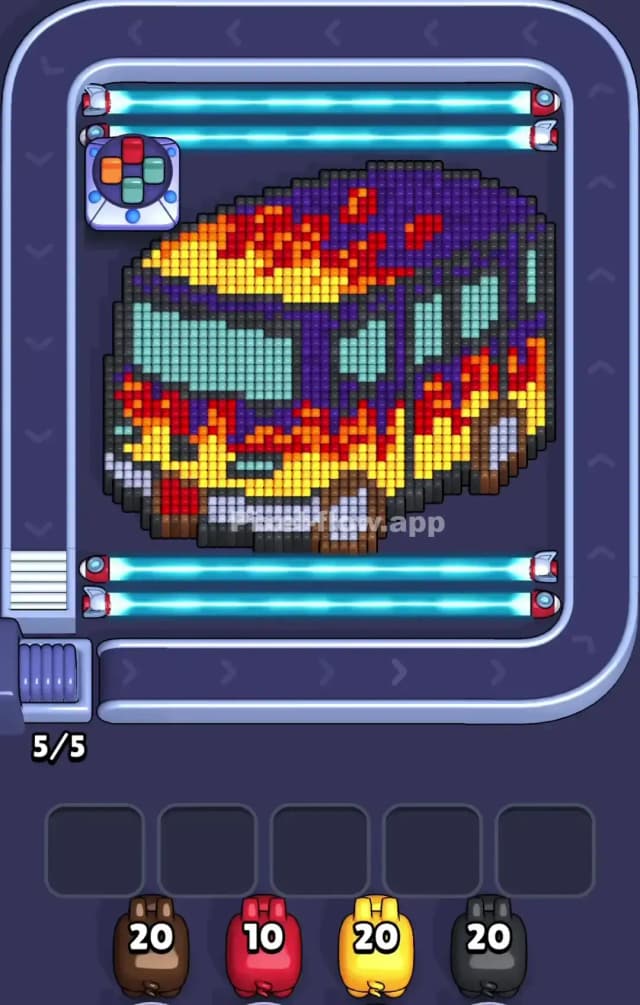
Van with Flames Level features a chunky, voxel-style bus decked out with a hot-rod flame paint job. The mix of bright yellows and reds against deep purples makes for a cluttered board where depth is hard to judge.
Your main challenge here isn't speed, but layer discipline. You have huge blocks of color (yellow flames, purple roof) that overlap confusingly. If you shoot the wrong layer first, your pigs will jam the waiting slots, and you'll run out of room before you hit the core.
Is this level hard? It is not very hard, but it is tedious. It punishes impatient tapping. You must clear the "closest" paint layers before touching the body of the vehicle.
Pixel Flow Van with Flames Level Overview
The artwork depicts a stylized touring bus or van, angled so you see the front grille and the long passenger side. It has a "flame" decal aesthetic: bright yellow and red fire licking up the sides of a dark purple chassis.
- The Front (Bottom Left): This area is dense with detail—bumpers, headlights, and the start of the flame pattern. It’s tricky because grey bumper blocks sit right next to yellow flame blocks.
- The Roof (Top Right): Mostly dark purple with splotches of red fire. This area is deceptively thick. It looks flat, but there are often 2-3 layers of purple stacked here.
- The Windows: These are light teal/cyan. They are usually buried deep. You cannot clear these until you strip away the purple frames surrounding them.
Asymmetry Warning: The left side (front of the bus) is "taller" in terms of voxel stack height than the rear. Focus your early efforts on shaving down the front bumper and windshield area to flatten the board out.
Step by step solution walkthrough for Pixel Flow Van with Flames Level
First Color Zone to Erase in Pixel Flow Van with Flames Level
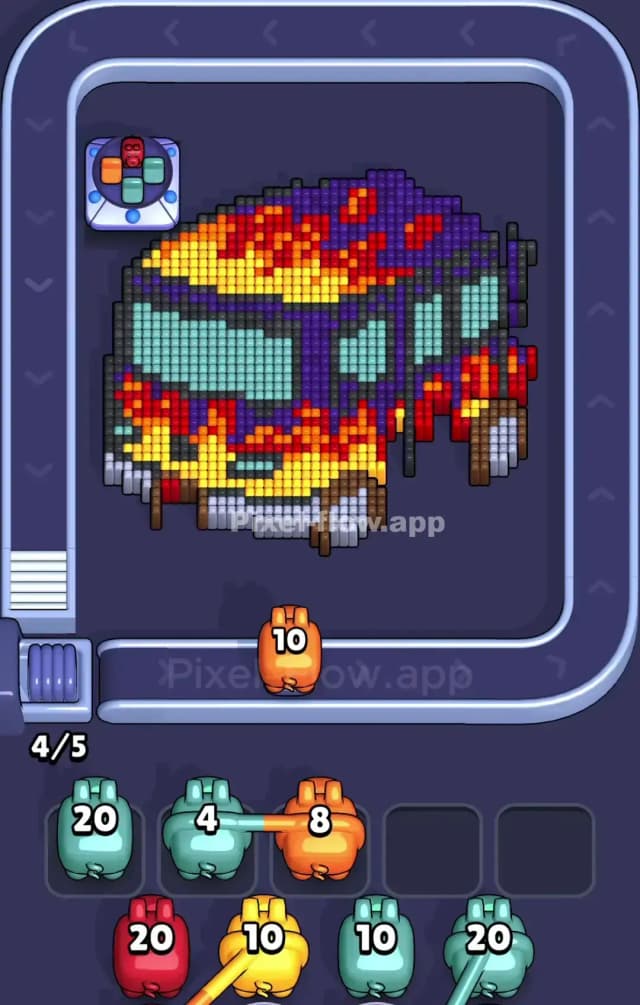
I start by targeting the Yellow Flames on the lower front bumper and side panels.
Here is the narrative logic: The yellow blocks are the "outermost" decal layer. They sit on top of the purple body and obscure the grey bumper details. If you look closely at the bottom-left corner, the yellow blocks are jutting out towards you.
Use your Yellow Pigs immediately when they appear on the belt. Aim specifically at the bottom-left corner and the bright strip running along the bottom edge. Clearing this yellow "skirt" exposes the grey mechanical parts of the wheels and bumper, which opens up two colors at once for your next moves. Do not waste ammo shooting the yellow spots on the roof yet; they are likely behind purple blocks and might result in a "miss" or wasted slot.
How to pass Pixel Flow Van with Flames Level without power ups or boosters
Once you strip the initial yellow layer, the bus looks like a wreck. The mid-game is dangerous because the Dark Purple and Red blocks interlock tightly on the roof.
- The Purple Trap: You will see a lot of Purple Pigs. It is tempting to spam them at the roof. Don't. Look for the "pillars" between the windows. These vertical purple lines need to be cleared to expose the teal glass. If you ignore the pillars and just shoot the roof, you'll have leftover purple ammo clogging your slots because the roof blocks might be hiding behind a stray red voxel.
- The Teal Window Priority: As soon as you see Teal/Cyan pigs, prioritize the windshield (front large window). This is a massive block of a single color. Clearing it creates a huge "hole" in the center of the artwork, allowing you to see exactly which purple or red blocks are actually reachable on the inside walls of the bus.
- Grey Matters: The wheels and bumper are Grey. These are low-quantity blocks. If a Grey pig appears and you have a clear shot at a wheel, take it immediately to get that pig off your board. Grey pigs are notorious for getting stuck in slots because they often only have 1 or 2 valid targets available at a time.
Last Details You Clean Up in Pixel Flow Van with Flames Level
The end game usually leaves you with the Dark Purple remnants of the rear roof and the Red spots that were highest up on the bus.
- The Rear Corner: The back-right corner of the bus often hides a single column of purple or black blocks that are hard to see against the dark background. Check this corner constantly.
- The Roof Ridge: The final few cubes are almost always red or purple bits on the very top ridge of the bus. Because of the isometric angle, a block here might look like it's in the "middle" but is actually the farthest point away. Save a high-ammo pig of the matching color for this final sweep to ensure you don't get stuck with 1 cube left and zero slots.