Pixel Flow Level 763 Solution | Pixel Flow 763 Walkthrough
How to beat Pixel Flow Level 763: Video solution & walkthrough. The fastest way to pass Pixel Flow 763.
Is this the wrong level layout?🤔
Pixel Flow randomizes levels for different players. Don't worry, just upload a screenshot of your board, and our AI will find the correct video instantly.

Pixel Flow Level 763 Walkthrough
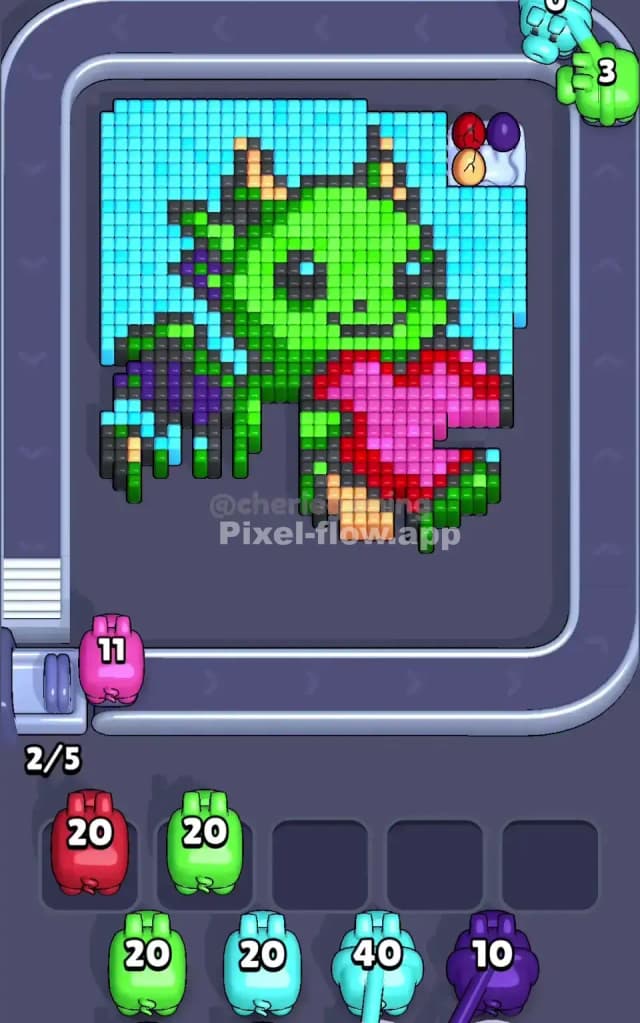
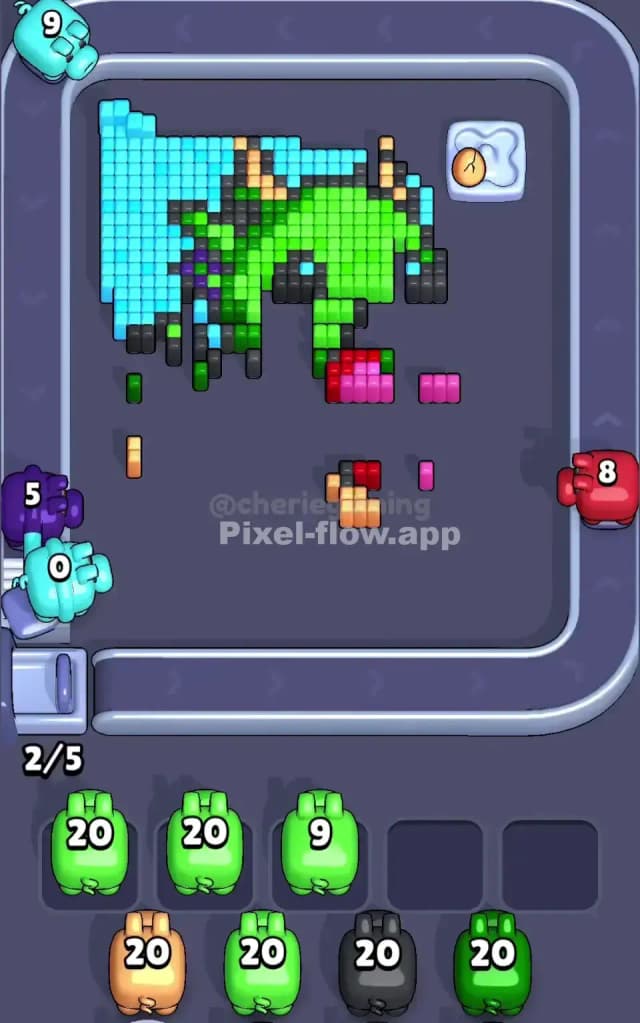
This level features a cute, chunky green baby dragon holding a red heart, completely encased in a massive block of light blue sky. Your job is to chip away that sky to reach the dragon's green scales, then dig deeper to clear the black outlines and the purple wing accents. The rules for Pixel Flow Level 763 are standard but punishing: you have five waiting slots at the bottom. You must match the colored pigs from the conveyor belt to the pixel blocks on the board. If your slots fill up with pigs that have no valid targets, you lose.
Is this level hard? No. It is not very hard. However, it is tedious because of the sheer volume of cyan background blocks. You need patience, not luck.
Pixel Flow Level 763 Overview
The artwork here is adorable but deceptive. You are looking at a green dragon sitting centered on the board.
- The Massive Cyan Wall: The dragon is surrounded by a thick, uniform layer of light blue (cyan) pixels. This isn't just a border; it's a huge percentage of the total block count.
- The Dragon's Body: Once the blue is gone, you hit the main body: bright lime green. This makes up the head, torso, and tail.
- The Details: Buried inside the green are the dangerous colors: Black (outlines/eyes), Purple (wings), and Red (the heart). There are also tiny bits of beige/yellow on the horns and claws.
- Obstacles: Notice the Sensor Box sitting right on top of the heart in the lower right quadrant. This blocks access to the red pixels underneath until cleared. There is also a small "egg nest" looking cluster in the top right corner with some hidden colored eggs (Red, Purple, Beige, Pink).
The asymmetry here is vertical. The bottom half is cluttered with the Sensor Box obstacle, while the top half is mostly pure pixels. This means the top clears faster, leaving you with a stubborn mess at the bottom.
Step by step solution walkthrough for Pixel Flow Level 763
First Color Zone to Erase in Pixel Flow Level 763
Cyan (Light Blue). You have absolutely no choice here.
In Pixel Flow Level 763, the cyan background acts as a "lid" on the entire puzzle. You cannot reach the green dragon, the purple wings, or the black outlines until you shave off the top layer of sky. Prioritize every single light blue pig that comes down the conveyor belt.
- Logic: The cyan blocks are the "outermost" layer. If you take a green pig too early, it will sit in your slot uselessly because the green pixels are buried under the blue.
- Strategy: Watch the conveyor belt. If you see a cluster of cyan pigs, grab them immediately. Do not clutter your waiting slots with Black or Red pigs yet; they have almost zero targets in the first 20% of the match.
How to pass Pixel Flow Level 763 without power ups or boosters
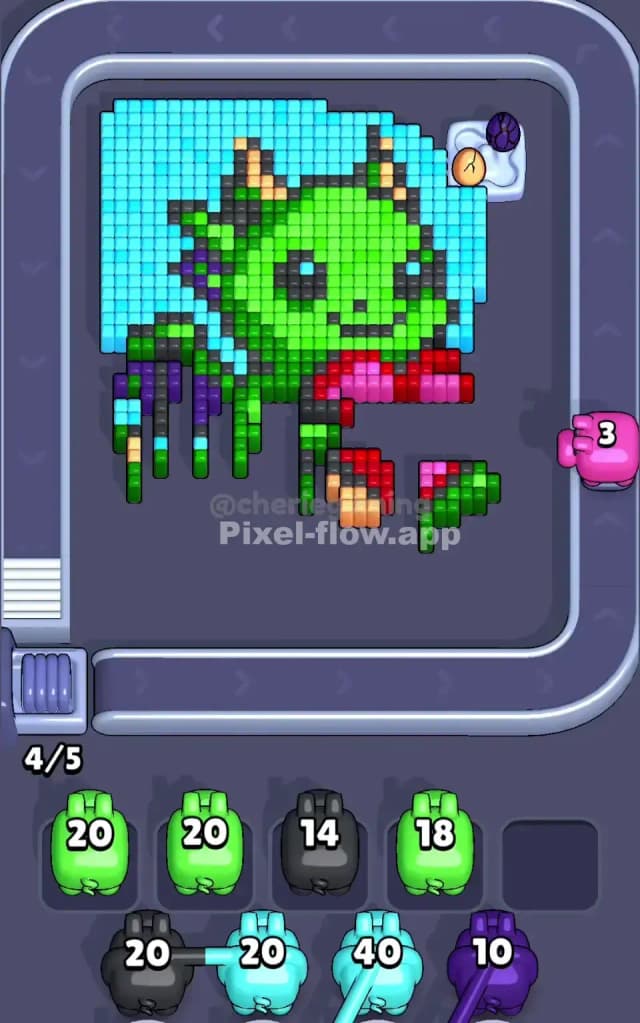
Once the blue sky is mostly gone, the level enters its dangerous middle phase. The dragon looks half-eaten, and you have access to multiple colors at once: Green, Black, and some Purple. This is where players lose by clogging their slots.
- Prioritize the Sensor Box: As soon as the cyan clears around the heart area, focus on the Sensor Box. It usually requires specific colors to "unlock" or destroy nearby blocks to deactivate. Clearing the blocks around it often helps.
- The Green Flood: After the blue is gone, the Green layer is the next biggest obstacle. It covers the deep details. If you have a choice between a Green pig and a Red pig, take the Green pig. Why? Because Green pixels are abundant and available. Red pixels are scarce and often hidden deep in the heart or the top-right egg nest. A Red pig in your slot is a wasted slot until the very end.
- Ignore the "Rare" Colors: You will see Beige and Pink pigs on the belt. Do not touch them until you see beige or pink pixels exposed on the board. These are the deepest layers (horns, egg details). If you grab a beige pig early, it will sit in your tray for 50 moves, blocking a slot you need for Green or Black.
- The Black Outline Trap: Black pigs are useful mid-game. The dragon's outline is extensive. However, don't overfill on Black. One Black pig usually has enough ammo (often 15-20 shots) to clear a huge chunk of outline. You rarely need two Black pigs active at once.
Last Details You Clean Up in Pixel Flow Level 763
The endgame of Pixel Flow Level 763 is messy. You will likely be left with:
- The Heart: A small cluster of red and pink pixels in the dragon's hands.
- The Top Right Corner: That weird little nest with the colored eggs (Red, Purple, Beige).
- Scattered "Deep" Pixels: The eyes (black/white) and the horn tips (beige).
At this stage, your board is mostly empty space. Precision matters. Only pick a pig if you can draw a direct line from the pig to a visible pixel of that color. If you grab a Purple pig for the last 3 purple blocks on the wing, but you can't see them yet? You just killed a slot. Keep your slots empty. Only grab the specific color needed to kill the last few voxels. The very last block is usually a random beige bit on a horn or a pink bit in the heart. Stay sharp.