Pixel Flow Level 245 Solution | Pixel Flow 245 Walkthrough
How to beat Pixel Flow Level 245: Video solution & walkthrough. The fastest way to pass Pixel Flow 245.
Is this the wrong level layout?🤔
Pixel Flow randomizes levels for different players. Don't worry, just upload a screenshot of your board, and our AI will find the correct video instantly.



Pixel Flow Level 245 Walkthrough
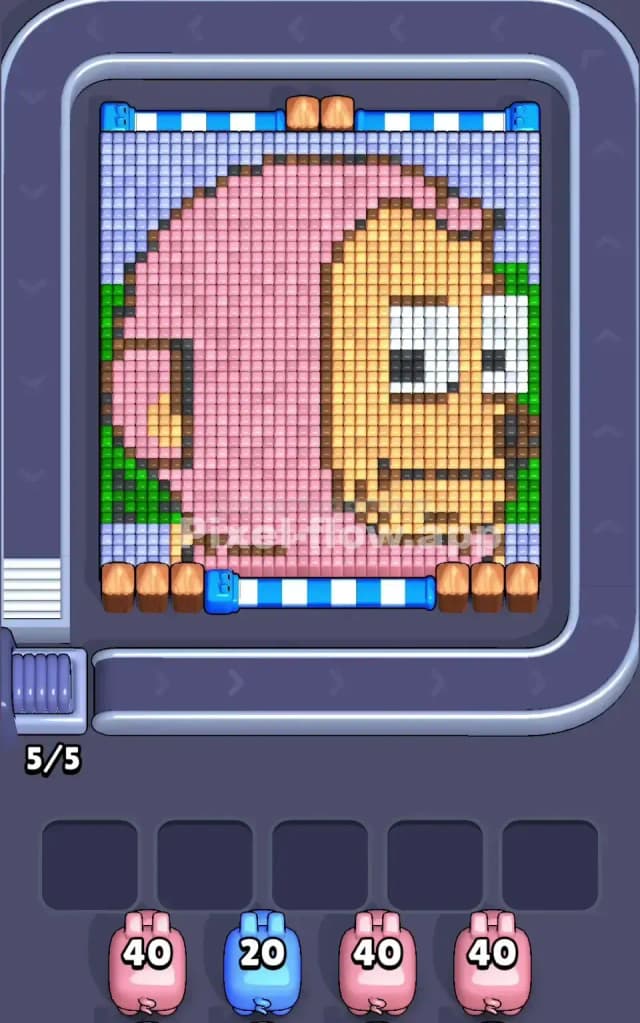
This level features a large portrait of a character wearing a pink monkey costume or hood. The main colors are a massive block of pink (the hood), a central tan area (the face), and a light blue background sky. Green foliage peeks out from the sides.
The rule to beat Pixel Flow Level 245 is strict: you must clear the outer layers of the costume and sky to access the deeper pixels. You cannot just shoot blindly. If you spam pink pigs before the pink blocks are actually exposed on the "surface" layer, those pigs will jam your waiting slots. Is it hard? Yes, it is a very hard level because the large, uniform color blocks can trick you into overcommitting resources too early.
Pixel Flow Level 245 Overview
The artwork depicts a goofy character, possibly a monkey or a kid in a costume, looking off to the right. The dominant feature is the massive pink hood that wraps around the left side and top of the head. The face is a flat, vertical slab of tan/beige pixels right in the center-right.
The background is a soft light blue, framing the top and sides. Note the asymmetry: the left side has a heavy vertical strip of green leaves behind the pink hood, while the right side has just a sliver of green. This matters. The left side is "thicker" with obstacles.
The layout is deceptive. It looks like big, easy blocks of color. However, the game layers these blocks. The light blue sky often acts as a "lid" over other colors. Until you peel back that blue border, you can't hit the pink or green underneath effectively.
Step by step solution walkthrough for Pixel Flow Level 245
First Color Zone to Erase in Pixel Flow Level 245
Start with the Light Blue Sky.
Why? Look at the top edge and the top-left corner. The light blue pixels form a protective rim around the main pink hood. If you try to send Pink pigs immediately, they will waste ammo hitting only the few exposed pink pixels on the front, or worse, they'll have no valid targets because the blue blocks physically block the shot path to the pink layers behind them.
- Prioritize Blue Pigs: Clear the top horizontal row and the top-left corner. This "uncaps" the artwork.
- The Green Trap: Once the blue is gone from the left edge, you will expose a vertical wall of Green. Don't ignore it. That green strip on the far left acts as a bumper. Clear it with Green pigs as soon as it is exposed to open up a clear shooting lane for the massive pink section.
How to pass Pixel Flow Level 245 without power ups or boosters
By the mid-game, the top blue rim and the left green foliage should be gone. You are now staring at the core of the level: the giant Pink Hood and the Tan Face.
- The Pink Surge: This is the most dangerous phase. You likely have multiple Pink pigs with high ammo counts (40+). Do not send them all at once. Send one Pink pig. Watch it work. It will carve a hole in the hood. Only send a second Pink pig when the first is nearly empty or has cleared a path to deeper pink layers. If you clog the slots with three Pink pigs, you might find you suddenly need a Tan pig to clear the face, but have no slot for it.
- The Tan Face: The face is vertically stacked. It’s a clean target, but it's often blocked by the pink "cheeks" of the hood. You usually have to alternate. Clear a layer of Pink to expose the side of the Tan face. Then send a Tan pig to shave off the face.
- Slot Management: Keep at least two slots open at all times. This level gives you high-ammo pigs (40 ammo). They stay on the board a long time. If you fill your slots with high-ammo pigs that currently have no targets, you are dead.
Last Details You Clean Up in Pixel Flow Level 245
The end of Pixel Flow 245 usually leaves you with the "eyes" and the bottom chin area.
- The Eyes: These are white and black pixels buried deep in the Tan face. You usually can't even touch them until 80% of the Tan is gone. Save your White/Black pigs (or low-count pigs) for the very end.
- The Chin: There is often a stubborn row of brown or dark pixels at the very bottom of the face or hood that gets ignored because the pigs focus on the big blocks above. Make sure you don't forget to send a pig specifically for that bottom row if the auto-aim isn't catching it.
- Victory Lap: Once the face is gone, any remaining background blue or green bits on the far right usually clean up easily. Just ensure you haven't trapped a high-ammo pig in a slot with only 2 pixels left to shoot.