Pixel Flow Level 456 Solution | Pixel Flow 456 Walkthrough
How to beat Pixel Flow Level 456: Video solution & walkthrough. The fastest way to pass Pixel Flow 456.
Is this the wrong level layout?🤔
Pixel Flow randomizes levels for different players. Don't worry, just upload a screenshot of your board, and our AI will find the correct video instantly.
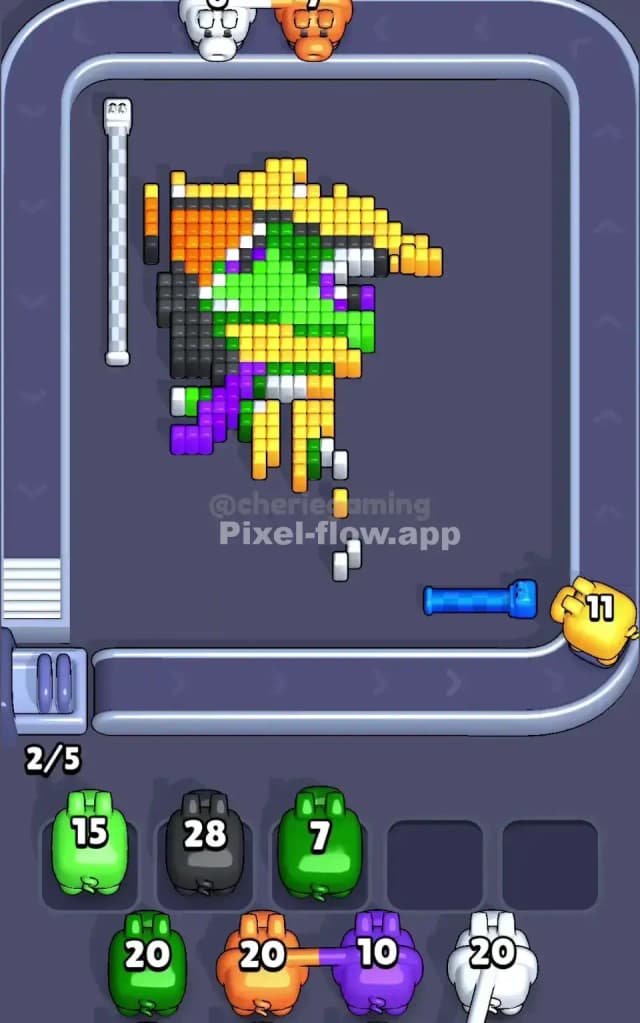

Pixel Flow Level 456 Walkthrough
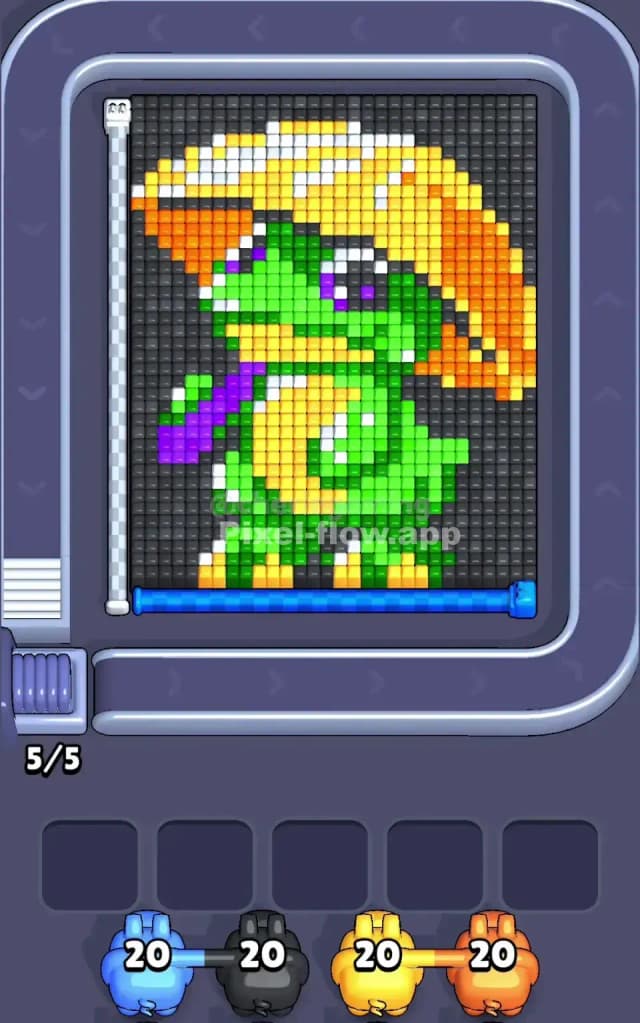
Pixel Flow Level 456 features a detailed character portrait of a green lizard or dinosaur wearing a massive, two-toned mushroom hat. The primary colors here are Black (background), Green (skin), Yellow and Orange (hat/belly), and small accents of Purple (scarf) and White (highlights).
The rule set is strict: you must clear the outer layers to hit the inner voxels. Because the background wraps the entire figure, you are forced to deal with the perimeter before you can touch the character's core. Due to the high number of overlapping colors and the specific layering of the hat, I judge this level as very hard.
Pixel Flow Level 456 Overview
Imagine a little green traveler caught in the rain. That’s the vibe of Pixel Flow 456. The central figure is a cute, green-skinned reptile. He’s protecting himself with a gigantic yellow and orange canopy—likely a mushroom cap or a stylized umbrella—that dominates the top half of the screen. Around his neck, a bright purple scarf trails off to the left.
The composition is heavily weighted toward the top. That mushroom cap is thick. It acts as a roof over the rest of the level. The background is a solid wall of dark grey/black voxels that encases the lizard completely.
Asymmetry plays a huge role here. The hat tilts heavily to the right, meaning the orange and yellow layers are thicker on that side. The left side is messier, cluttered by the purple scarf and the lizard's tail or arm. This imbalance means your strategy for the left side of the board must differ completely from the right side. On the right, you smash through big blocks. On the left, you snipe small details.
Step by step solution walkthrough for Pixel Flow Level 456
First Color Zone to Erase in Pixel Flow Level 456
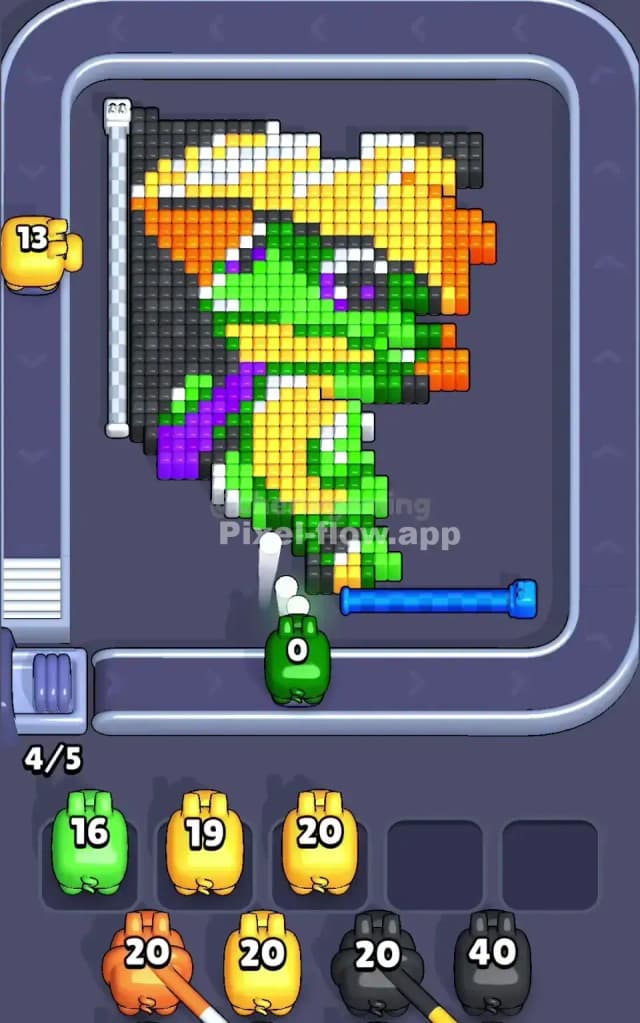
I start by shaving off the Black Background immediately. This is non-negotiable.
Narratively, you are carving the statue out of the stone block. Logically, the black voxels form a "U" shape around the lizard. If you ignore the black pigs, they will pile up in your waiting slots while you uselessly wait for green or yellow pigs that can’t reach their targets yet. The black layer is the outermost shell.
Focus your attention on the left and right columns first. The black background is deepest here. By clearing the vertical columns of black, you expose the edges of the orange hat and the green skin. Do not worry about the black pixels between the legs just yet; focus on the massive chunks on the sides to free up board space. If you see a Black Pig with high ammo (20+), grab it instantly. It will empty its entire clip in seconds, keeping your slot rotation healthy.
How to pass Pixel Flow Level 456 without power ups or boosters
Once the black frame is gone, the picture looks half-destroyed. The "roof" (the hat) is floating, and the lizard's body is exposed. At this mid-level stage, you face a critical danger: The Purple and White Trap.
The purple scarf and the white eye highlights are very small voxel groups. They are low-quantity targets.
- The Trap: You will see Purple and White pigs roll down the belt. Do not pick them up immediately unless you are 100% sure their path is clear.
- The Reality: Often, a single yellow voxel from the hat will block the path to the purple scarf. If you pick up a Purple Pig too early, it will shoot once, hit the obstruction, and then sit in your waiting slot with 19 ammo left. That is how you lose.
Instead, prioritize the Yellow and Orange pigs. The hat is a massive, solid block. Even if you make a mistake, there is usually enough surface area on the hat to consume the ammo. Clear the top-right section of the hat (Orange) and the belly area (Yellow). This aggressive clearing of the "warm" colors reduces the total height of the puzzle, bringing the deeper green layers to the surface.
If your slots start to fill up, prioritize clearing a slot that has a Green Pig. The lizard's body connects almost everything. A Green Pig can usually find a valid target on the face or feet, acting as a safety valve to clear a jammed slot.
Last Details You Clean Up in Pixel Flow Level 456
You are in the endgame now. The hat is gone. The black void is gone. All that remains is a patchy green skeleton of the lizard and the tricky highlights.
The last few moves usually involve the White and Purple details you ignored earlier. Now that the yellow belly and orange hat rim are removed, the purple scarf is fully exposed. This is the safe time to grab those Purple pigs.
Watch out for the eyes. The eyes are often buried deep behind the green face layers. You might need one final Green Pig to shave off the nose before the White Pig can hit the eye glint. Don't rush. Look at the depth. If the white pixel looks "shadowed" by a green block, kill the green first. Your final move will likely be a single White or Black pig cleaning up a stray pixel near the feet or eyes that was hidden until the very end.