Pixel Flow Level 640 Solution | Pixel Flow 640 Walkthrough
How to beat Pixel Flow Level 640: Video solution & walkthrough. The fastest way to pass Pixel Flow 640.
Is this the wrong level layout?🤔
Pixel Flow randomizes levels for different players. Don't worry, just upload a screenshot of your board, and our AI will find the correct video instantly.



Pixel Flow Level 640 Walkthrough
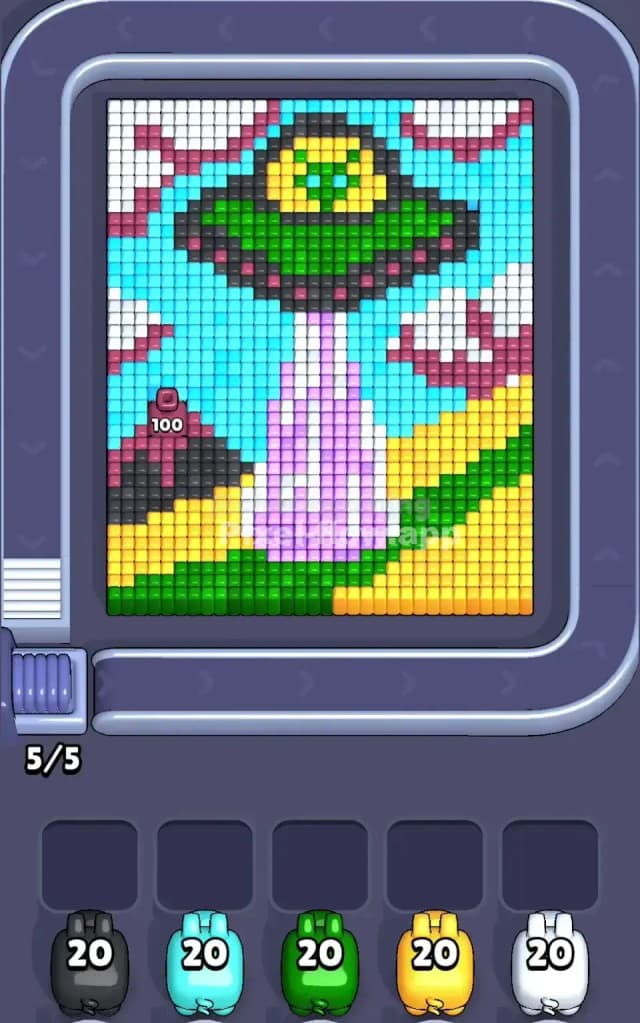
This level depicts a classic sci-fi scenario: a green and yellow UFO hovering over a farm, beaming up a column of purple light. The board is divided into distinct zones. You have the massive Cyan sky, the rolling Yellow and Green hills, and the central, highly patterned abduction beam.
The rules are standard: match the pig color to the pixel color to clear layers. However, the difficulty spikes because of the "dithered" (checkerboard) patterns in the beam and the clouds. These mixed pixels stop your pigs from clearing long lines, forcing them to drop into your waiting slots rapidly. Because of this central trap, I judge this as a very hard level.
Pixel Flow Level 640 Overview
The artwork tells a story of interruption. A peaceful landscape with a bright Cyan sky and fluffy White clouds is dominated by a large alien craft. The UFO sits top-center, sporting a Green hull and a Yellow cockpit dome. Beneath it, a vertical beam of light shoots down to the ground. This beam is not a solid color; it is a chaotic mix of Purple and White pixels, representing shimmering light.
To the left and right, you have Red and White clouds. The bottom of the board is grounded by Yellow wheat fields and Green grassy patches.
The board is asymmetrical in texture. The outer edges (sky and ground) are "smooth"—large blocks of single colors. The center (the beam and the ship’s rim) is "rough"—noisy clusters of alternating colors. This texture difference dictates your strategy. You must clear the smooth outer shell to survive the rough inner core.
Step by step solution walkthrough for Pixel Flow Level 640
First Color Zone to Erase in Pixel Flow Level 640
I start by aggressively targeting the Cyan sky and the Yellow fields.
Here is the logic: The pig queue in Pixel Flow Level 640 often throws mixed colors at you early, but looking at the board, Cyan and Yellow are the largest contiguous blocks. By clearing the Cyan sky first, you expose the edges of the UFO and the clouds. By clearing the Yellow fields at the bottom right, you create a "safe zone" at the bottom of the screen.
Do not try to attack the central beam (Purple/White) or the clouds (Red/White) initially. Those areas require you to rapidly swap between two colors. If you try to clear them while the screen is still full of Cyan sky, you will run out of waiting slots immediately. Clear the easy, solid background noise to buy yourself maneuvering room for the harder patterns later.
How to pass Pixel Flow Level 640 without power ups or boosters
Around the mid-game mark, the sky and ground will be mostly gone. You will be left with the floating UFO and the stubborn abduction beam. This is the danger zone.
The beam is a "checkerboard" of Purple and White. The clouds are a mix of Red and White. This means a White pig will shoot one pixel, hit a Purple/Red wall, and drop into a slot. To survive this without boosters:
- Prioritize the Green Saucer: The UFO body is a solid block of Green. If a Green pig appears, use it immediately to wipe out that large chunk. This removes a huge portion of the remaining pixels without clogging a slot.
- Toggle the Beam: You will likely need to keep one Purple pig and one White pig in your waiting slots simultaneously. Do not try to empty them all at once. Tap the White pig to clear a layer, then tap the Purple pig to clear the layer behind it. Alternate them rhythmically.
- Ignore the Black Rim: The UFO has a dark outline. Don't prioritize Black pigs until the Green body is gone. The Black pixels are too scattered and will just waste a slot if you pull them too early.
Last Details You Clean Up in Pixel Flow Level 640
The final moves of Pixel Flow Level 640 are usually messy. You will likely be left with the Black/Grey pixels that form the outline of the UFO and the "shadows" in the clouds.
At this stage, your slots should be mostly empty because you cleared the major colors. Be careful with the Red pixels inside the clouds. They often hide behind White pixels. Ensure you have a clear line of sight before deploying a Red pig, or it will just sit in your tray doing nothing. The level ends when you scrub the last few dark pixels from the UFO's rim.