
Pixel Flow Candle Level Solution | Pixel Flow Candle Walkthrough
How to beat Pixel Flow Candle Level: Video solution & walkthrough. The fastest way to pass Pixel Flow Candle .
Is this the wrong level layout?🤔
Pixel Flow randomizes levels for different players. Don't worry, just upload a screenshot of your board, and our AI will find the correct video instantly.



Pixel Flow Candle Level Walkthrough
This level is intimidating the moment it loads. You are staring at a fortress: four massive Blue Ice blocks with 300 HP each and two Wooden Doors with 200 HP each blocking the entire center of the grid. Underneath and around these obstacles is a hidden voxel image.
The rule for Pixel Flow Candle Level is patience. You cannot brute-force those 300 HP blocks immediately. You must surgically remove the exposed outer pixels to trigger layer shifts that eventually remove the blockades. Because the center is a "dead zone" initially, picking the wrong color pig will instantly clog your waiting slots. This is a very hard level because one mistake in the first 10 seconds forces a restart.
Pixel Flow Candle Level Overview
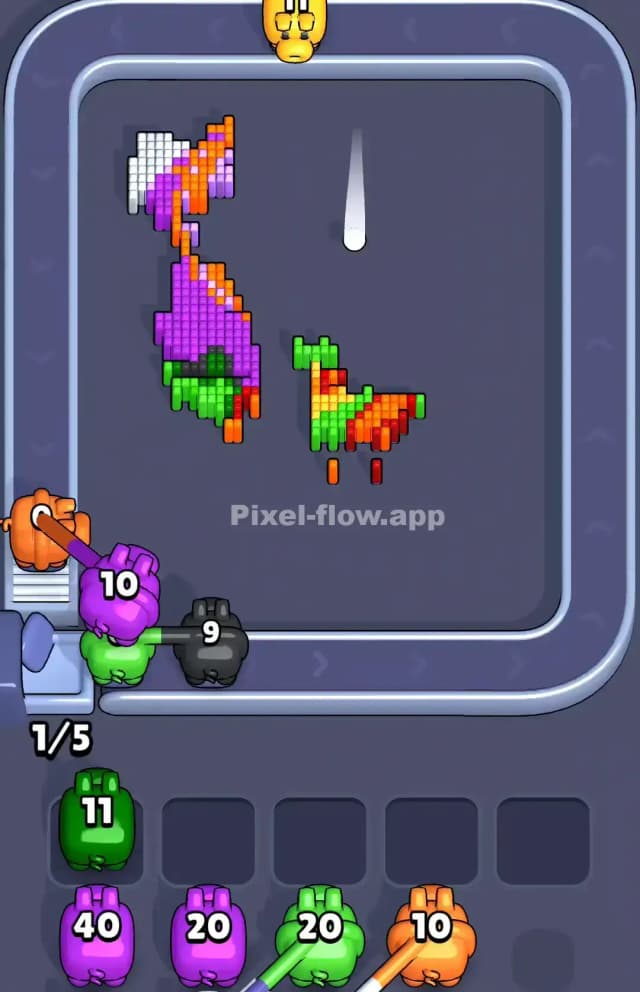
Hidden beneath that wall of ice and wood is a vibrant, mythical creature—likely a dragon or a phoenix. The artwork is dense and colorful. The wings are a mix of deep violets and lighter purples, framing the image on the left and right. The creature's body, which is totally hidden at the start, is a fiery mix of oranges, reds, and yellows.
The board is highly asymmetric in terms of danger. The perimeter is safe—it consists of white background pixels and the green tips of leaves or claws. The center is the danger zone. The ice blocks act as a fog of war. If you select a pig whose target color is buried under that ice (like the creature's red belly), the pig will do nothing but sit in your tray and ruin your run. The visual hierarchy dictates your strategy: Outer Edge first, Inner Core last.
Step by step solution walkthrough for Pixel Flow Candle Level
First Color Zone to Erase in Pixel Flow Candle Level
Your priority must be the White Background and the Purple Wing Edges.
Ignore the Red pig in your queue at the start. Do not touch it. Look at the board: do you see any red pixels? No. They are hiding behind the wooden doors. If you tap the Red pig, it has zero valid targets and will jam a slot.
Instead, clear the vertical columns of White pixels on the far left and right. These are the only "free" moves you have. Use the White (40 ammo) pigs to strip the sides down. Once the white is gone, focus on the Purple pixels that make up the outer curve of the wings. This whittles down the board from the outside in, ensuring every pig you pick actually spends its ammo.
How to pass Pixel Flow Candle Level without power ups or boosters
The mid-game of Pixel Flow 21 is the "Cracking Phase." Once you clear enough of the surrounding Purple and Green pixels, the game logic will eventually remove or lower the priority of the heavy Ice and Wood blocks, revealing the dragon's inner layers.
At this stage, you will see the creature's belly (Orange/Red) and the inner details of the wings (Light Pink/Lavender). The trap here is the Orange vs. Red confusion. The dragon's torso uses alternating stripes of orange, red, and yellow. It looks like a muddy mix.
Before you tap a pig, check the exact shade. A Red pig will not shoot Orange pixels. If the conveyor belt offers you a Red pig but the only exposed belly pixels are Orange, wait. Let the Red pig loop around. Only pick it when you are certain clear Red pixels are exposed and not covered by a layer of Orange or Yellow. Patience saves you from using boosters.
Last Details You Clean Up in Pixel Flow Candle Level
In the final stretch, the majestic dragon is fully revealed, but it’s messy. You will likely be left with stray voxels near the bottom claws or the tips of the wings.
The most annoying remnants in Pixel Flow Candle Level are usually single Dark Green pixels mixed into the wings or the White tips of the claws at the very bottom. These often get ignored because your eyes are drawn to the bright fire colors in the center. Scan the bottom row carefully. If you have a White pig with 40 ammo and only 2 white pixels left at the bottom, take the shot. It feels wasteful, but clearing that color completely is worth more than saving ammo. Clear the claws, then finish off the fiery belly to win.