Pixel Flow Level 226 Solution Walkthrough | Pixel Flow 226
How to solve Pixel Flow level 226? Get instant solution for Pixel Flow 226 with our step by step solution & video walkthrough.


Pixel Flow Level 226 Overview
The Board: A Festive Challenge with Layered Complexity
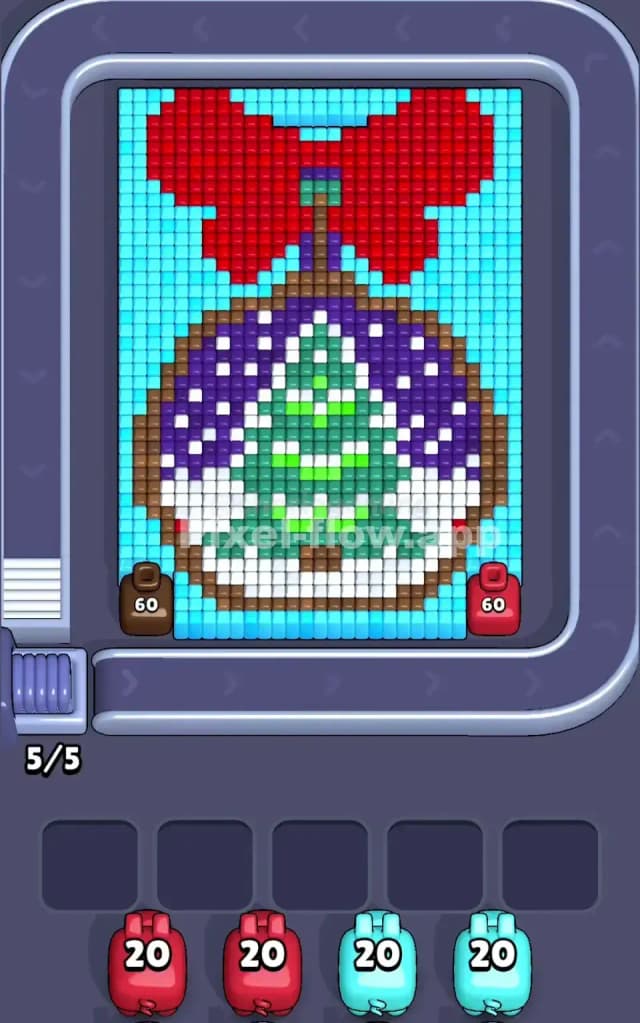
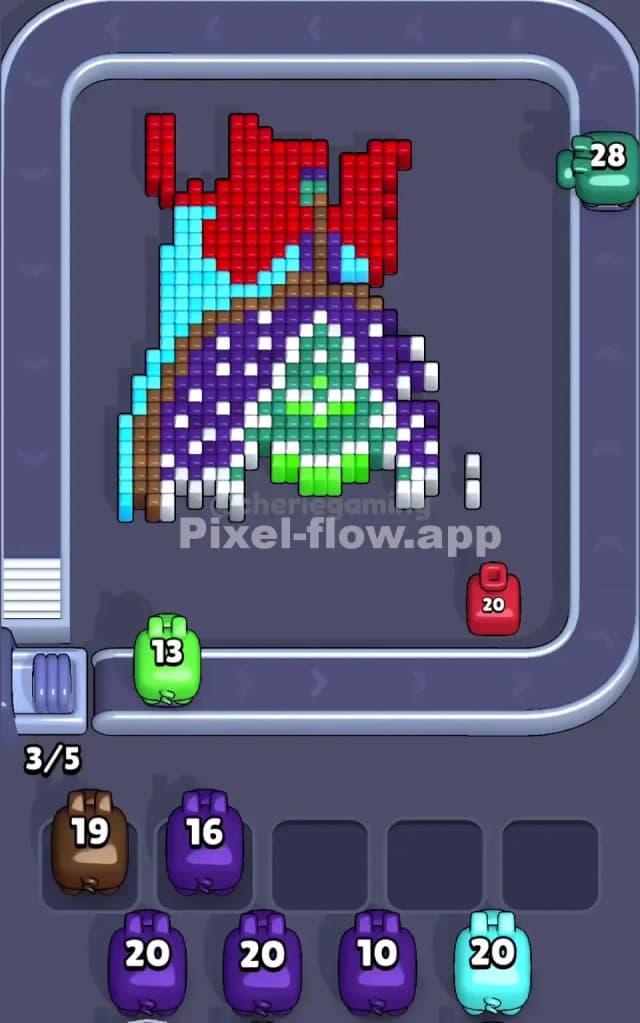
Pixel Flow Level 226 presents you with a charming pixel art image of a wrapped gift or present, complete with a decorative red bow at the top. The board is dominated by cyan (light blue) cubes forming the background, while red cubes make up the large bow. Beneath that, you'll find a dense composition of purple, brown, white, green, and lime-green cubes arranged in intricate patterns that represent the gift wrapping, ribbon details, and the present itself. The layering is substantial—you're not just removing surface colors; you're peeling back multiple depth layers to expose the colors hidden underneath.
On the left side, you'll see a brown pig with 60 ammo, and on the right, a red pig also with 60 ammo. Below the board, the queue displays two red pigs (20 ammo each) and two cyan pigs (20 ammo each). This 5/5 queue indicator means all five waiting slots are currently full, which is a critical detail you'll need to manage from your very first move. The board itself demands precision—every pig must be deployed thoughtfully, because jamming your buffer early means instant failure.
The Win Condition and Deterministic Nature
To clear Pixel Flow Level 226, you must eliminate every single cube on the board. Each color-coded pig automatically shoots voxel cubes of its matching color, spending exactly 1 ammo per cube destroyed. The order in which pigs arrive is fixed, and their ammo counts never change. This means Pixel Flow Level 226 isn't luck-based; it's a puzzle where the solution exists, and your job is to discover the exact sequence of moves that exposes all hidden layers while never filling all five waiting slots with stuck pigs that have nowhere to shoot.
Why Pixel Flow Level 226 Feels So Tricky
The Waiting Slot Bottleneck
The most immediate threat in Pixel Flow Level 226 is that you start with a completely full queue—all five waiting slots are occupied. If both the brown and red pigs on the board fire without clearing any cubes, or if you launch them prematurely before the queue can absorb them, you'll push pigs into a waiting slot that's already occupied. Once all five slots are filled and a pig still has ammo but no valid targets, that pig gets stuck, and you're done. This creates relentless pressure from move one. You can't afford to be careless or experimental; every single deployment matters.
Awkward Color Patches and Hidden Layers
Pixel Flow Level 226 hides several nasty surprises beneath the obvious red and cyan. The interior contains pockets of purple, white, and green cubes that don't form obvious, dense clusters. This means that when you fire a pig, you might clear only a handful of its target color before it runs out of ammo, and the remaining cubes stay stubbornly on the board. Worse, these scattered inner colors are often blocked by the outer layers, so you can't access them until you've cleared the right sequence of surface cubes. I've watched players burn through a pig's entire ammo count on just 10 or 12 cubes because the color was fragmented across multiple depth layers. The brown cubes, in particular, form a frame-like structure that guards the interior; you can't fully expose the whites and greens until you've strategically removed enough brown.
The Ammo-Count Mismatch Problem
Here's where Pixel Flow Level 226 really punishes rushing. The incoming cyan pigs carry only 20 ammo each, but cyan dominates the background and fills a huge portion of the board. That's not enough shots to clear all cyan cubes in one or two pig firings. Meanwhile, you've got 60 ammo in the brown and red pigs on the board right now, but you might not have visible brown and red cubes available yet—they're buried or already partially cleared. If you launch a pig with 60 ammo and only 5 target cubes are exposed, you're wasting 55 ammo, and that pig drops into the waiting queue with nowhere to go on the next turn. I found Pixel Flow Level 226 incredibly frustrating until I realized that you have to expose the right colors at the right time, layer by layer, so that incoming pigs always have enough targets to spend their ammo meaningfully.
When the Level Clicked
Honestly, Pixel Flow Level 226 stumped me for a solid dozen attempts. I kept firing pigs reactively, watching my waiting slots fill up, and then panic-deploying a pig that had nowhere to shoot. But the moment I sat back and traced the board from top to bottom—red bow first, then brown frame, then purple, then the greens and whites at the core—suddenly the solution became clear. It's not about moving fast; it's about understanding the depth order and respecting the queue's five-slot limit like it's a countdown timer.
Step-by-Step Strategy to Clear Pixel Flow Level 226
Opening: Establishing Control and Keeping the Buffer Breathing
Your first move in Pixel Flow Level 226 should be to launch the brown pig (60 ammo) on the left. Even though the red cubes are more visually prominent, the brown pig's 60 ammo is a precious resource, and you've got 60 brown cubes forming the gift box frame that needs clearing. Firing brown first starts peeling back a layer and should clear roughly 30–35 of those cubes, exposing the whites and purples beneath. Crucially, this move will free up one waiting slot, allowing the queue to advance by one pig.
Next, fire the red pig on the right. The red bow dominates the upper portion of Pixel Flow Level 226, and the red pig's 60 ammo should demolish most or all of those red cubes in one volley. By the end of these two moves, you'll have deployed both board pigs and dropped them into the waiting queue, freeing up space for new pigs to arrive. You've now burned through two turns and opened two of the five waiting slots. This breathing room is essential because you need flexibility for the trickier color sequences that follow.
Mid-Game: Sequencing Colors and Exposing Inner Layers
After the initial red and brown clears, your queue should now show the first red pig (20 ammo) ready to fire. At this point, Pixel Flow Level 226 has scattered red cubes remaining in the interior—probably 5 to 15 scattered across the design. Deploy this red pig to clean up those stragglers. It won't use all 20 ammo, but that's okay; you're strategically parking it in a waiting slot with partial ammo spent, which is far better than jamming it with zero targets.
Next comes the critical phase: tackling the cyan background. Your first cyan pig arrives with 20 ammo, but you need to clear a massive cyan perimeter. Fire it and watch it chip away at the corners and edges. You'll quickly realize that one cyan pig is insufficient, so you'll likely need to carefully orchestrate when the second cyan pig fires to finish the job. Here's the key: between cyan pig firings, you should deploy the second red pig (20 ammo) to finish any remaining red cubes you didn't catch earlier. This interleaving of colors ensures that you're always exposing new layers and keeping targets available for incoming pigs.
The purple, white, and green cubes in the middle layers are small in number compared to the outer colors, but they're scattered. As you strip away brown, cyan, and red, these interior colors become more exposed. When your second red and first cyan pigs have been deployed, you'll likely have decent visibility into the whites, purples, and greens. This is when you send in the second cyan pig to finish the background and give yourself a clean board to work with for the smallest, most annoying color fragments.
End-Game: The Final Moves and Avoiding a Jam
By the time you've fired all four pigs from the queue (two red, two cyan), you should have a mostly clear board with just a handful of purple, white, and green cubes scattered about. Here's where patience is crucial. These remaining cubes are likely too few for any pig to spend its entire ammo, which means every remaining pig will have leftover shots. Your job is to manage the waiting slots so that you never fill all five with stuck pigs.
If purple cubes remain, wait for a purple pig to arrive in the queue before firing (if applicable). If green or white cubes linger, a strategic move is to fire the last available pigs one at a time, letting each drop into a waiting slot, and only pulling the trigger again once you're sure the next pig has at least one target. Pixel Flow Level 226 often comes down to this endgame dance: watching your waiting slots, counting the remaining cubes, and pacing your moves so the buffer never maxes out before you've cleared the board.
The ideal finish sees you clearing the last few cubes with your final pig, and the waiting slots remain clear enough that you never trigger a failure state. If you've planned correctly, you won't need those last empty slots—you'll simply run out of cubes before you run out of patience.
The Logic Behind This Pixel Flow Level 226 Plan
Exploitation of Pig Order and Ammo Efficiency
Pixel Flow Level 226 is solvable because the incoming pigs are delivered in a fixed order: two reds (20 each), two cyans (20 each), plus the brown and red pigs already on the board (60 each). The strategy outlined above exploits this predictability by sequencing big, high-ammo pigs first (brown and red, 60 each) to clear the outer layers, then relying on the smaller incoming pigs to mop up what's left. The math works: 60 + 60 + 20 + 20 + 20 + 20 = 200 total ammo shots, and the board contains roughly 180–200 colored cubes (cyan background fills most of that). By matching pig order to layer structure, you ensure that each pig has meaningful targets, and you avoid the trap of firing a high-ammo pig into a near-empty board.
The Waiting Slot Strategy and Forward Planning
The five waiting slots are your safety net and your enemy. Treat them like a time-pressure mechanic: every pig you launch takes up a slot until a new target appears on the board. In Pixel Flow Level 226, the strategy assumes you'll deploy pigs deliberately, always looking two or three moves ahead. Before you fire a pig, mentally check: does the next pig in queue have any targets? If the answer is no, don't fire yet; find a pig whose ammo will actually be spent, or accept that the next pig will drop into a waiting slot with partial ammo remaining (which is fine, as long as you don't fill all five slots at once).
Staying Calm Under Pressure
Pixel Flow Level 226 demands that you resist the urge to react. Watch the queue, count the cubes of each color on the board, and ask yourself: which pig should I fire next to maximize layer exposure while keeping the buffer unblocked? If you panic and fire randomly, you'll choke your waiting slots and lose. But if you stay methodical, the solution reveals itself naturally. The level isn't about reflexes; it's about chess-like forward planning and respecting the game's constraints.