Pixel Flow Level 25 Solution | Pixel Flow 25 Walkthrough
How to beat Pixel Flow Level 25: Video solution & walkthrough. The fastest way to pass Pixel Flow 25.
Is this the wrong level layout?🤔
Pixel Flow randomizes levels for different players. Don't worry, just upload a screenshot of your board, and our AI will find the correct video instantly.


Pixel Flow Level 25 Walkthrough
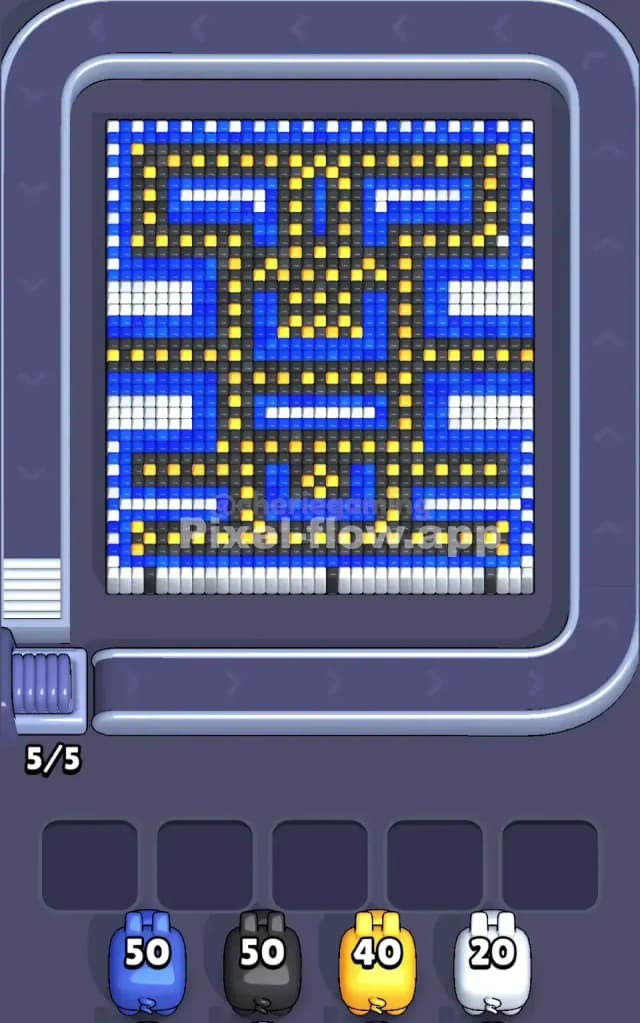
Pixel Flow Level 25 presents a dense, symmetrical block that resembles a tribal Tiki mask or perhaps a retro arcade spaceship viewed from above. The structure is heavily packed. You have a central column of Blue and Black, flanked by vertical stripes of White on the far left and right edges. Inside the main Blue body, you will see a distinct skeletal structure made of Black lines, dotted with bright Yellow "rivets" or pixels.
The rules here are deceptive. While you usually peel an onion from the outside in, Pixel Flow Level 25 has "stripes" of depth. The White bars on the sides act as fences. You cannot hit the Blue or Black pixels sitting directly behind those White bars until the White is gone. However, the center of the board is exposed Blue and Black, meaning you can work the middle while waiting to clear the edges.
Is this a hard level? I’d classify it as very hard purely due to the ammo constraints. You have heavy ammo for Blue (50) and Black (50), but very scarce ammo for White (20). If you waste White pigs on single blocks instead of waiting for a clean line, you will clog your waiting slots instantly.
Pixel Flow Level 25 Overview
The artwork in Pixel Flow Level 25 feels like a high-tech circuit board or a pixelated face. The dominant feature is the Blue background that fills the majority of the grid. Cutting through this blue field is a rigid Black framework. Think of the Black blocks as the "walls" of a maze and the Yellow blocks as the lights running through it.
The most dangerous part of this board is the perimeter. Look closely at the far left and far right columns. They are lined with vertical strips of White cubes, broken up by small gaps. There are also horizontal White bars protruding inward from the sides, like clamps holding the blue center in place.
These White clamps create a nasty uneven surface. The center of the board is flat, but the edges are bumpy. This asymmetry in depth means a pig shooting down the center column hits a completely different layer than a pig shooting down the side column. You have to constantly check which layer is "top" in every specific row.
Step by step solution walkthrough for Pixel Flow Level 25
First Color Zone to Erase in Pixel Flow Level 25
Your priority must be the White cubes on the flanks. This is non-negotiable.
Here is the logic: The White pixels are the "highest" layer on the outer edges. If you look at the white stripes, they physically block the Blue pixels underneath them. If you send a Blue pig down the far left column while those White stripes exist, the pig will find no targets and fall into your waiting slots.
Wait for the White pigs. They have only 20 ammo, which is dangerously low. Do not deploy a White pig unless it can clear a full row of 3 or 4 white blocks at once. You specifically want to target the long vertical stretches on the far left and right borders. Once you shear off those white "bumpers," the board becomes a uniform flat rectangle of Blue and Black. If you try to clear the center Blue first, you end up with a skinny, tall tower of garbage on the sides that becomes impossible to aim at later.
How to pass Pixel Flow Level 25 without power ups or boosters
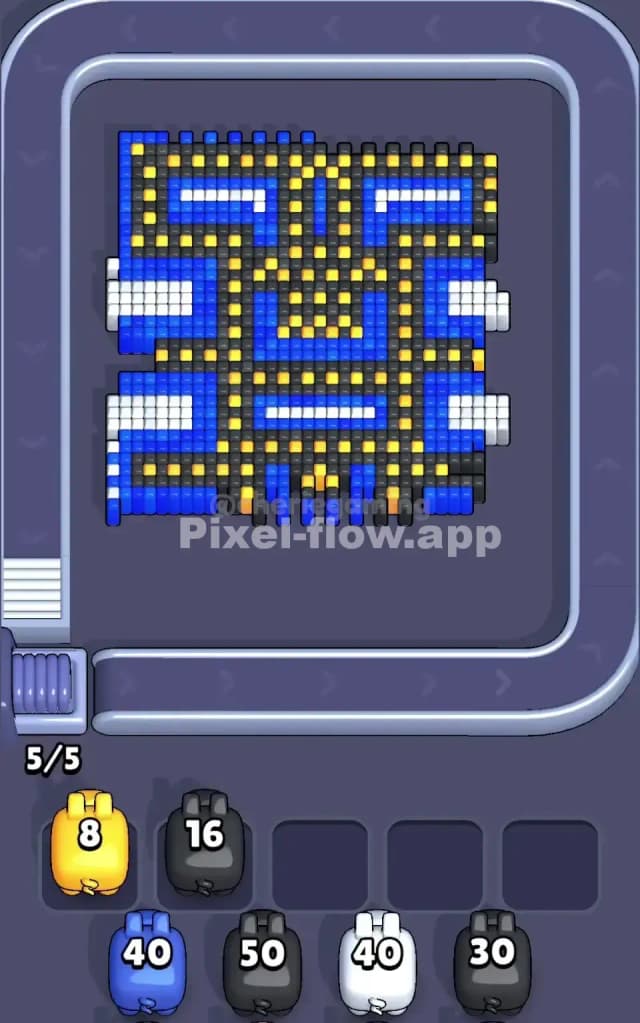
The mid-game of Pixel Flow Level 25 is where most players fail. At this point, the White is gone. You are staring at a messy mix of Blue background and the Black skeleton.
The trap here is the Yellow pixels.
You will see Yellow pigs roll down the conveyor belt. You will be tempted to use them because you see bright yellow dots on the screen. Don't. In the mid-game, those Yellow dots are usually buried inside or behind the Black framework. They are not surface-level yet. If you deploy a Yellow pig now, it will likely hit nothing and clog a slot.
Focus entirely on alternating Blue and Black.
- Blue First: Clear the large patches of "empty" blue space in the center top and center bottom. This exposes the sides of the Black lines.
- Black Second: Once the Blue is recessed, the Black lines will stand out as ridges. Use your Black pigs (50 ammo) to grind these ridges down.
- The Checkered Flag Pattern: Watch out for the section in the middle where Yellow and Black alternate like a checkerboard. You must clear the Black blocks here to act as a "key" that unlocks the Yellow blocks for later.
If your slots fill up with Yellow pigs, you have played too aggressively. You need to keep the board clear for Blue and Black pigs to do the heavy lifting until the picture looks like a ruined skeleton.
Last Details You Clean Up in Pixel Flow Level 25
In the final phase, the board looks sparse. The heavy Blue background is gone. The White sides are long forgotten. All that remains are the Yellow nodes that were previously hidden deep inside the structure.
This is the only safe time to unload your Yellow pigs. The Yellow blocks are often arranged in single-file lines or isolated dots. Because they are scattered, you cannot rely on long sweeping shots. You have to be precise.
Watch the corners. Sometimes a single stray Black pixel hides in the bottom-left or bottom-right corner, obscured by the visual noise of the Yellow dots. Ensure you have at least one Black pig in reserve (in your slots) for these stragglers. If you burn all your Black ammo on the main structure and leave one corner pixel alive, you will lose. Prioritize clearing the Yellows, but keep a Black pig on standby as insurance.