Pixel Flow Level 396 Solution | Pixel Flow 396 Walkthrough
How to beat Pixel Flow Level 396: Video solution & walkthrough. The fastest way to pass Pixel Flow 396.
Is this the wrong level layout?🤔
Pixel Flow randomizes levels for different players. Don't worry, just upload a screenshot of your board, and our AI will find the correct video instantly.
Pixel Flow Level 396 Walkthrough
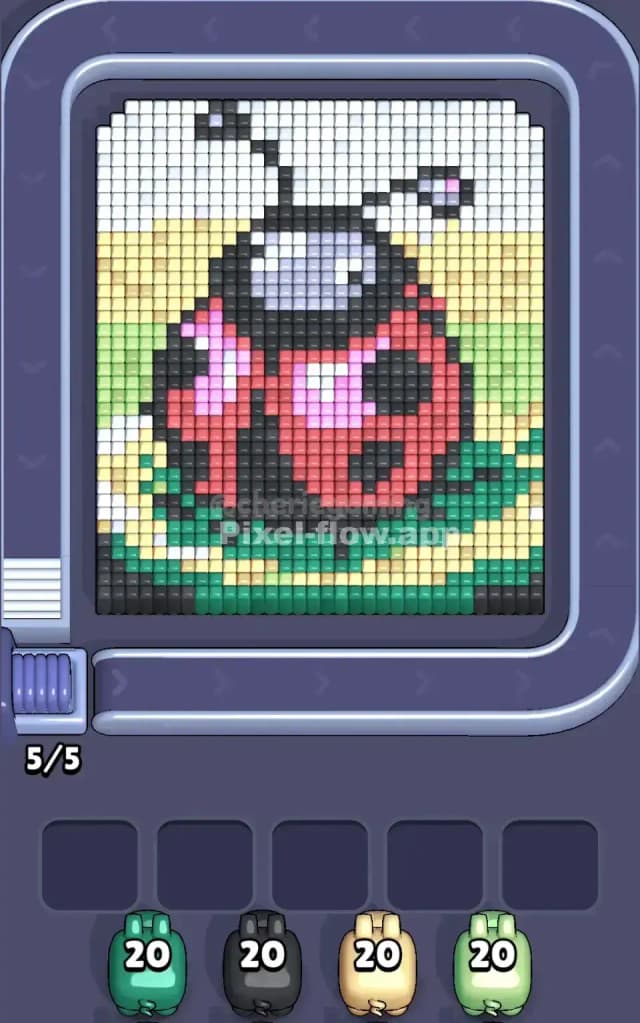
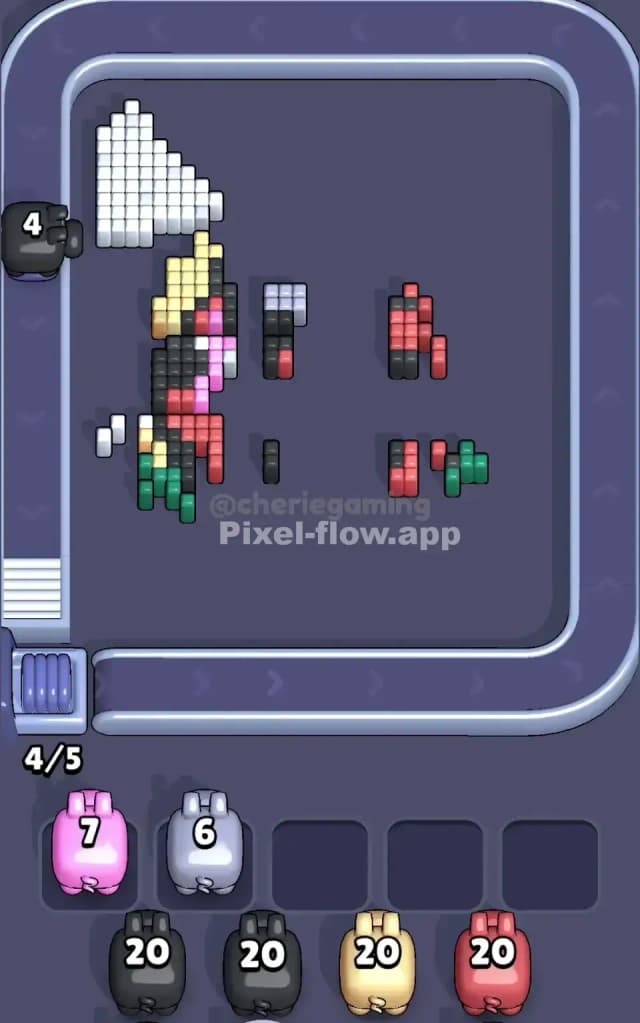
This level features a chunky, pixel-art Ladybug sitting on a large green leaf. The colors are stacked heavily, meaning you have a foreground character (the bug) and a multi-colored background (yellow fields and white sky) fighting for your attention. The board is dense. There aren't many gaps to shoot through initially.
To beat Pixel Flow Level 396, you must prioritize clearing the massive blocks of "filler" color—specifically the bottom leaf and the side backgrounds—before attacking the main character. If you try to drill through the center red shell too early, you will clog your slots with pigs that have no targets.
Is it hard? Yes. I would classify this as a very hard level. The mixture of large, sweeping color blocks and tiny, hidden detail pixels (like the pink reflections or the grey visor) creates a perfect storm for clogging your waiting area.
Pixel Flow Level 396 Overview
The artwork creates a garden scene. You have a large, round Ladybug dominating the center. It has a bright red shell with black spots and a black head. The bug is wearing what looks like a silver/grey visor or face mask (maybe it’s an astronaut ladybug?).
Beneath the bug is a thick slab of teal/dark green, representing a leaf. The background is split: the middle section is a pale yellow, possibly a field or a fence, and the top corners are white, representing the sky.
The asymmetry here is subtle but dangerous. The Pink highlights on the shell are only on the left side of the bug’s back. The Grey visor is strictly in the upper center. These unique colors are buried deep. Most of the board is symmetrical, but these specific "trap" colors will ruin your run if you pull those pigs before exposing the center layers.
Step by step solution walkthrough for Pixel Flow Level 396
First Color Zone to Erase in Pixel Flow Level 396
Your first move should be aggressive. Look at the bottom of the board. I start by attacking the Teal/Dark Green leaf base.
Here is the logic:
- Volume: The bottom leaf is a solid, continuous foundation. It spans almost the entire width of the board. A single Teal pig can unload almost all its ammo here without stopping.
- Safety: Because this color is at the very bottom, it doesn't block anything behind it. You aren't "digging" for it; it's right there in the front.
- Stability: Clearing the bottom row creates a clean visual break between the bug and the floor, making it easier to see where the Black outline begins.
If a Teal pig isn't immediately available, go for the Pale Yellow on the sides. Just like the green leaf, the yellow background is an "outer layer." Strip it away to isolate the ladybug in the middle.
How to pass Pixel Flow Level 396 without power ups or boosters
The mid-game of Pixel Flow Level 396 is where most players lose. This happens because the board looks open, but the specific pixels you need are still covered.
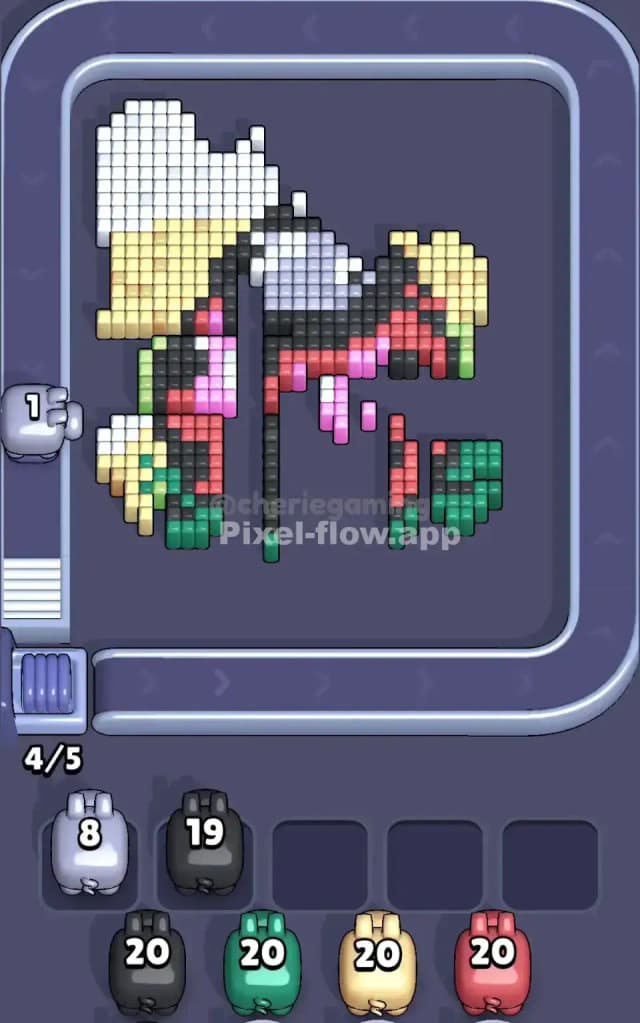
You will reach a point where the Ladybug is half-erased. You see floating columns of Red and Black. This is the danger zone.
The "Peel the Onion" Strategy: You must refuse to touch the inner details until the outer shell is gone. The Red shell and Black head are thick, multi-layer blocks. The Pink reflection and Grey visor are hidden inside or behind these blocks.
If you see a Pink or Grey pig coming down the conveyor belt, check the board immediately. Can you actually see pink or grey pixels? Often, in Pixel Flow Level 396, those colors are physically present but blocked by a layer of Red or Black pixels in front of them.
If the path is blocked, do not tap the pig. Let it pass and cycle back around. If you tap it, it will drop into a slot, fire zero shots, and sit there. You only have five slots. Two or three useless pigs will end your game.
Prioritize Black and Red pigs during this phase. They have the most targets and clearing them is the only way to expose the trap colors for later. Even if a Black pig only hits 5 blocks, it's worth it to peel back that layer.
Last Details You Clean Up in Pixel Flow Level 396
As you approach the end of Pixel Flow Level 396, the board usually looks like a scattered mess of vertical pillars.
The White blocks in the top left and right corners tend to survive the longest. They are often obscured by the Ladybug's black antennas. Once the antennas are gone, the white sky becomes easy to clean up.
The final few moves almost always involve the Grey visor pixels or the deep Black spots on the bug’s back. Because the black spots are holes in the red shell, they are often on the deepest layer (Layer 1 or 2). You might find yourself frantically waiting for a Black pig to finish off three distinct columns of pixels. Stay patient. Don't fill your slots with background colors (like Yellow) if you've already cleared the background. Wait for the specific color you need to snipe those last few voxels.