Pixel Flow Level 440 Solution | Pixel Flow 440 Walkthrough
How to beat Pixel Flow Level 440: Video solution & walkthrough. The fastest way to pass Pixel Flow 440.
Is this the wrong level layout?🤔
Pixel Flow randomizes levels for different players. Don't worry, just upload a screenshot of your board, and our AI will find the correct video instantly.


Pixel Flow Level 440 Walkthrough
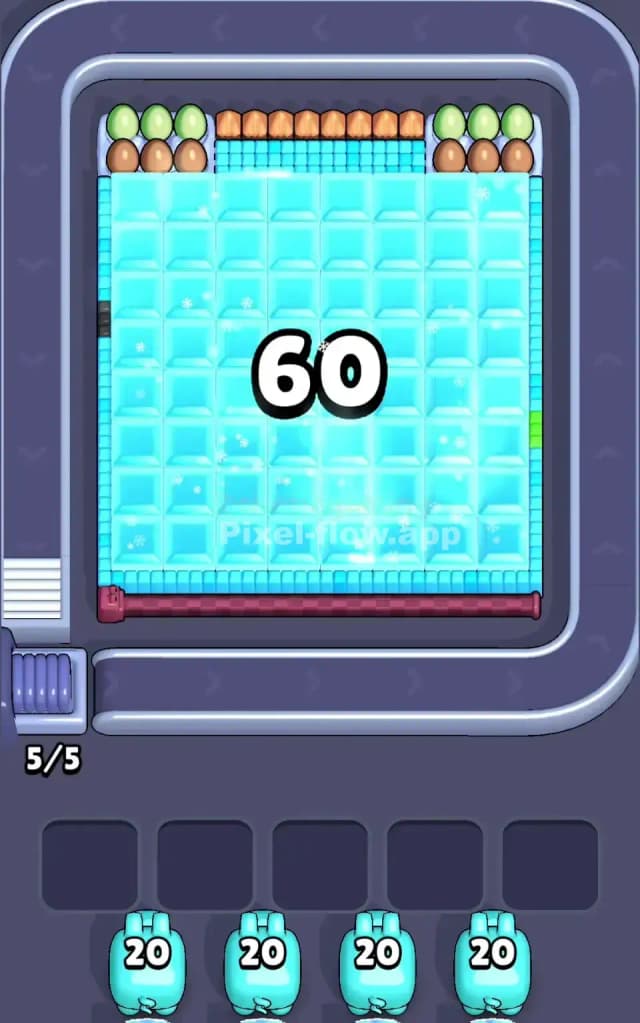
Pixel Flow Level 440 is a deceptive beast. At first glance, it looks like a simple block of ice, but underneath that frozen surface hides a complex little dragon scene. The main gimmick here is the sheer volume of "ice" (Light Blue) covering almost 90% of the board initially.
The rules are standard but tight:
- Match Colors: Use Light Blue pigs to clear the ice, Green pigs for the dragon's skin, etc.
- Manage Ammo: Pigs have limited shots (usually around 20). If they run dry, they vanish. If they have ammo but nothing to shoot, they clog your 5 waiting slots.
- Don't Jam: If all 5 slots are full of useless pigs, it's Game Over.
Is this level hard? Honestly, yes. I would classify it as very hard. The massive top layer of Light Blue creates a huge backlog of other colors in your queue. You have to be incredibly disciplined about ignoring non-blue pigs until the ice is shattered.
Pixel Flow Level 440 Overview
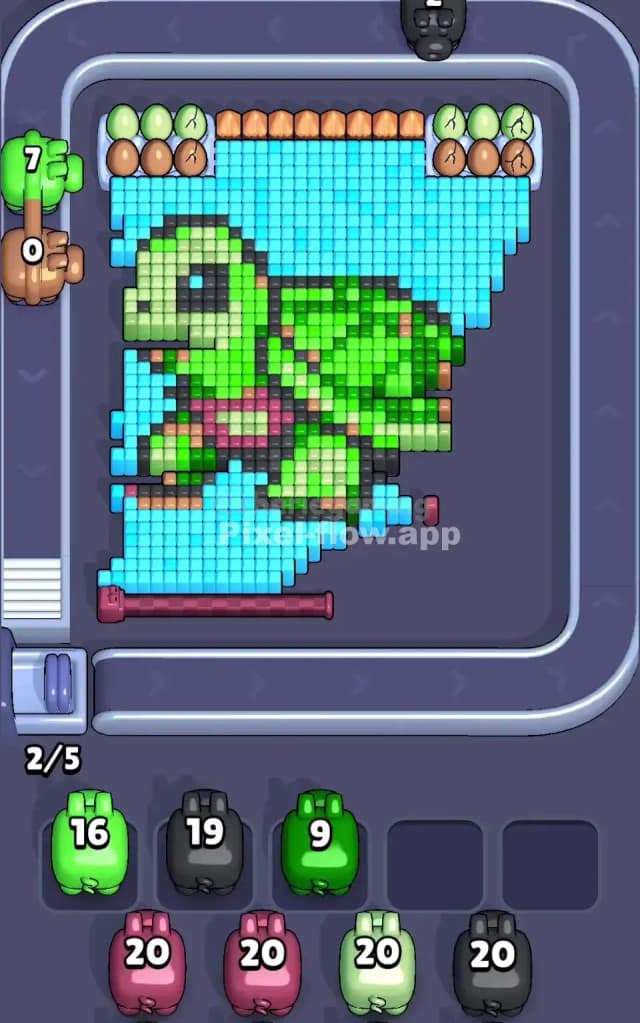
Imagine a cute, green baby dragon frozen in a solid block of ice. That's the story of Pixel Flow 440.
The scene is dominated by a monolithic Light Blue square that takes up the entire center of the grid. This isn't just a background; it's a foreground barrier. Buried beneath this cyan glacier is a Green dragon with darker green wings and a few brown/pink accents on its belly.
Above the ice block, you have a row of "eggs" or stones in muted greens and browns. These are tricky because they are visible from the start but are often blocked by the ice directly below them.
The asymmetry here is vertical. The top row (the eggs) is exposed. The rest is buried. The danger is the "waiting game." Your conveyor belt will offer you plenty of Green, Brown, and Black pigs early on. But if you take them, they have nowhere to shoot because the dragon is still frozen. The board forces you to dig deep before you can build wide.
Step by step solution walkthrough for Pixel Flow Level 440
First Color Zone to Erase in Pixel Flow Level 440
You absolutely must prioritize Light Blue (Ice).
Narratively, you are chipping away the ice to free the dragon. Logically, it’s the only move that makes sense. Look at the board: almost every pixel available to be hit is Light Blue.
- The Trap: You will see Green pigs (for the eggs/dragon head) and Brown pigs (for the top row) slide by on the belt. Let them pass. Even if you see a tiny corner of green exposed near the top left, do not grab a Green pig yet unless you are 100% sure it can empty its ammo immediately.
- The Strategy: Grab every single Light Blue pig you see. You need to clear that massive 8x8 (roughly) square of cyan blocks. Until the center is hollowed out, the other colors are just dead weight in your slot bar.
How to pass Pixel Flow Level 440 without power ups or boosters
Once you’ve cracked the main ice sheet, the level enters its dangerous "mid-game" phase. The picture now looks like a half-excavated fossil. You'll see the Green outline of the dragon's head and wings, but jagged shards of ice might still cling to the bottom or sides.
Here is where players lose:
- Partial Clearing: You might have a vertical strip of Light Blue left on the far right. If you grab a Blue pig now, it might only shoot 4 times and then sit in your slot with 16 ammo left. Check the count. If a pig has 20 ammo but only 5 targets, skip it. Wait until you have a fresh pig later or the board shifts.
- The Dragon's Skin: Now shift focus to Green. The dragon's face and body are the next largest chunks. Use the Light Green pigs to clear the face, then the Darker Green for the wings.
- The Top Row Hazard: Be very careful with the Brown/Tan "eggs" at the very top. These are often single-layer blocks. If you grab a Brown pig, make sure it can hit multiple targets. Often, the top row is blocked by the layer below it. Clear the layer below (usually Green or remaining Blue) to open up a clear line of sight to the top.
Last Details You Clean Up in Pixel Flow Level 440
As you approach the end, the dragon is mostly gone. You are left with the "bones" of the level.
- The Belly: There are small patches of Pink or Red on the dragon's belly/chest. These are low-quantity pixels. You only need one or two pigs for this. Don't hoard them.
- The Outline: The Black outline pixels are usually the final cleanup crew. They define the dragon's eye and edges. Save Black pigs for last. They usually snake around the whole figure, so one Black pig can often do a lot of work cleaning up scattered blocks.
- Stragglers: Watch out for single blocks of Light Blue hiding in the corners (bottom left or right). These are easy to miss. If you have a Blue pig with 1 ammo left stuck in your tray, hunt for these hidden corner pieces to clear the slot.