Pixel Flow Level 515 Solution | Pixel Flow 515 Walkthrough
How to beat Pixel Flow Level 515: Video solution & walkthrough. The fastest way to pass Pixel Flow 515.
Is this the wrong level layout?🤔
Pixel Flow randomizes levels for different players. Don't worry, just upload a screenshot of your board, and our AI will find the correct video instantly.

Pixel Flow Level 515 Walkthrough
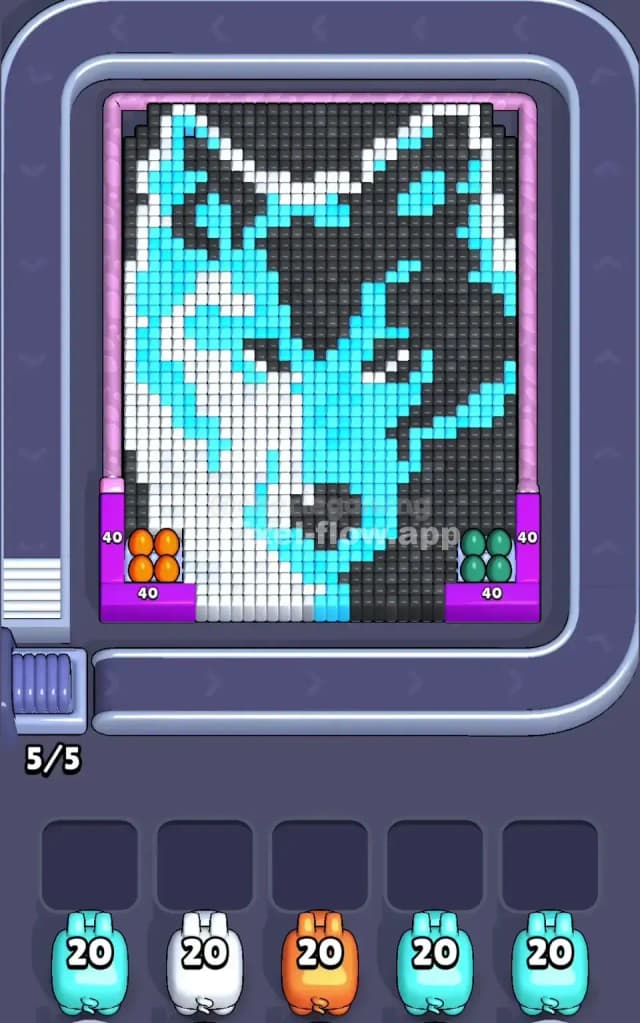
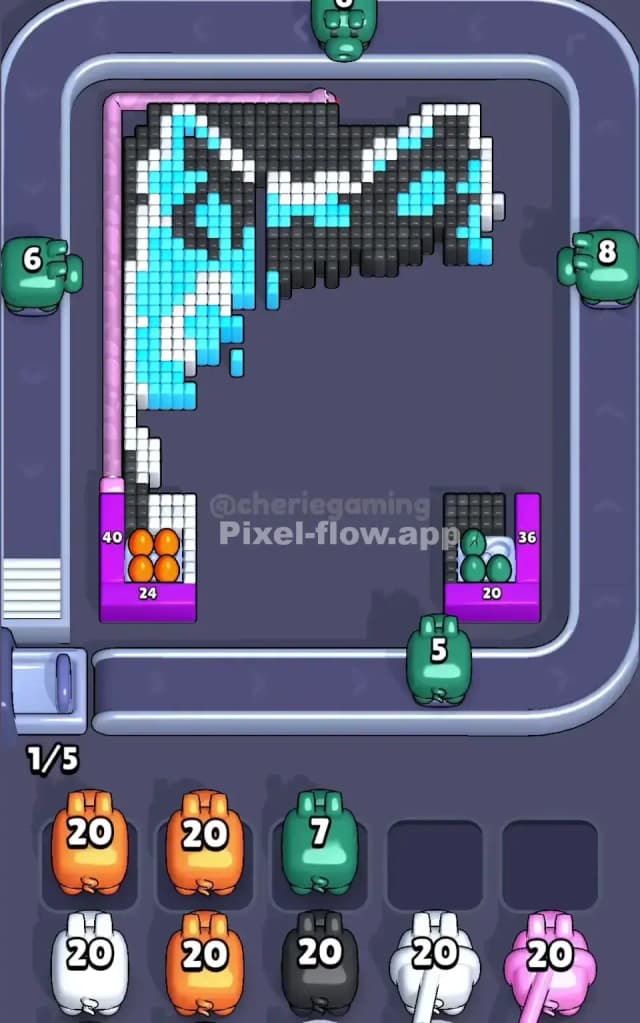
You are looking at a striking, split-face wolf design that is going to test your patience with ammo management. The board is dominated by three primary colors: a bright White on the left, a deep Dark Grey/Black on the right, and a vibrant Cyan that stitches both halves together. There are also smaller pockets of Orange and Green tucked into the bottom corners, acting as blockers for the main structure.
The rule here is strict: do not let your waiting slots fill up with pigs that have no targets. Because the wolf design is dense and interlocking, it is easy to accidentally pull a pig that only has three valid targets, leaving you with 37 wasted ammo clogging your board. This is a logic puzzle disguised as a coloring book. Is it hard? I’d classify this as a very hard level, mostly because the "eyes" and "fur" create jagged, isolated pixels that are easy to miss until it's too late.
Pixel Flow Level 515 Overview
This isn't just a random assortment of blocks; it’s a portrait of a "Cyber Wolf." The composition is heavily asymmetric, which is the most dangerous thing in Pixel Flow 515.
The left hemisphere of the wolf is the "Light Side." It is composed of large, vertical chunks of White pixels mixed with Cyan markings. This side is relatively safe. The shapes are blocky and connected.
The right hemisphere is the "Shadow Side." This area is Dark Grey and Black, representing the wolf in shadow. This side is dangerous. The pixels here are jagged, simulating fur texture. They don't form nice, clean rectangles. Instead, you have stair-step patterns and single-pixel islands that can easily trap a high-ammo pig.
Finally, look at the bottom corners. You have static containers of Orange (left) and Green (right) spheres. These aren't part of the wolf's face. They are barriers. Until you clear these corner pockets, the pigs cannot easily reach the bottom-most rows of the wolf's chin. The board feels claustrophobic until these corners are gone.
Step by step solution walkthrough for Pixel Flow Level 515
First Color Zone to Erase in Pixel Flow Level 515
I start by shaving off the White fur on the left side.
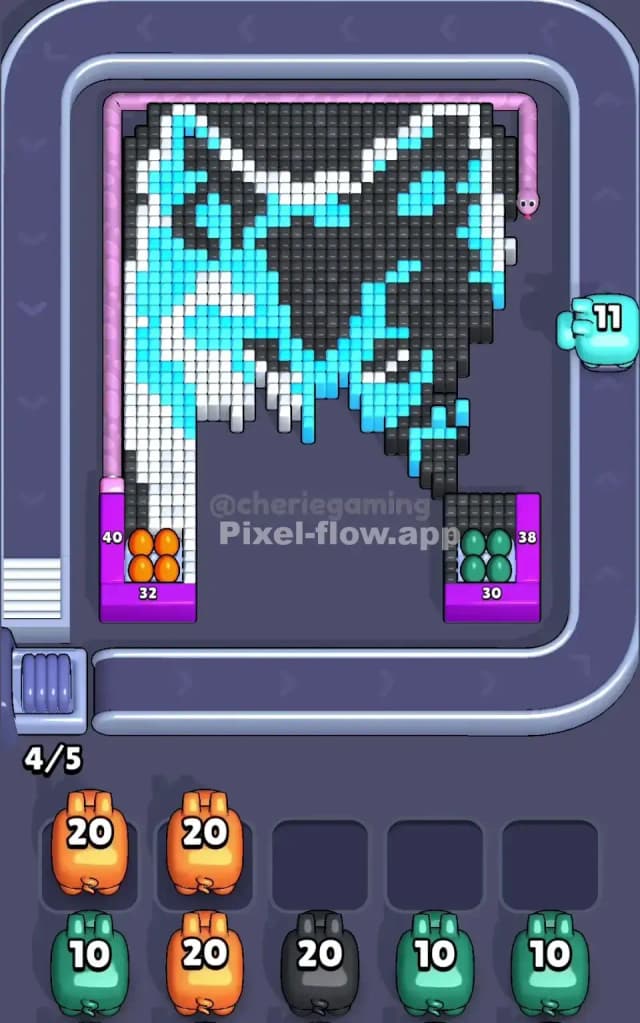
Here is the logic: The White section creates the largest continuous surface area on the board. When you see a White pig, grab it immediately. It will likely find 20+ targets instantly along the left cheek and ear of the wolf. Clearing the White layer accomplishes two things. First, it drains a high-ammo pig quickly, keeping your slot rotation healthy. Second, removing the white "bulk" exposes the jagged edges of the central Cyan lightning bolt pattern running down the middle of the face.
Do not try to force the Dark Grey right side too early. The grey pixels are often staggered behind the Cyan or tucked into the ear. If you pull a Grey pig too soon, it might shoot 5 pixels and then sit in your tray, blocking you while you desperately wait for the board to rotate. Stick to the White left side to open up the map.
How to pass Pixel Flow Level 515 without power ups or boosters
The mid-game is where most players lose Pixel Flow Level 515. At this stage, you have likely cleared the big White blocks and maybe the Orange/Green corner pockets. Now you are left with the skeleton of the wolf: the Cyan markings and the Dark Grey shadow fur.
This is the danger zone. The image looks half-destroyed. The Cyan pixels form a "web" that connects the left and right sides.
You must switch your priority to the Cyan pigs now. Why? Because the Cyan color touches almost every other color on the board. By clearing the Cyan, you create "air gaps" between the remaining Black/Grey clusters. This isolates the remaining dark pixels, making it easier for the game logic to target them.
However, watch the "Eyes." The wolf’s eyes usually contain single, isolated pixels (sometimes white or black) surrounded by Cyan. If you clear the Cyan too fast, you might leave a single Black pixel floating in the middle of nowhere. Before you finish the Cyan layer, ensure you have cleared the Dark Grey surrounding the eyes. You want to peel the layers from the outside in, not drill a hole in the center.
Last Details You Clean Up in Pixel Flow Level 515
You are in the final stretch. The wolf is gone, mostly. What remains are usually the "dregs"—the single pixels that were hiding behind the main image.
In Pixel Flow Level 515, the last cubes are almost always hiding in two places:
- The very tip of the wolf's ears (top corners).
- The bottom row, right above where the Orange/Green blockers used to be.
These spots are tricky because of the camera angle. The bottom row pixels are often obscured by the bumper of the conveyor belt. You might think the board is clear, but a Dark Grey pig refuses to leave your slot. This means there is a single grey pixel hiding at the bottom right. Look closely at the baseline. If you have a pig with 15 ammo and only 1 target left, don't panic. Let it sit. Wait for a new color to spawn that matches a larger group. Do not fill your other 4 slots while waiting for that one straggler pixel to die. Patience kills the wolf.