Pixel Flow Level 750 Solution | Pixel Flow 750 Walkthrough
How to beat Pixel Flow Level 750: Video solution & walkthrough. The fastest way to pass Pixel Flow 750.
Is this the wrong level layout?🤔
Pixel Flow randomizes levels for different players. Don't worry, just upload a screenshot of your board, and our AI will find the correct video instantly.


Pixel Flow Level 750 Walkthrough
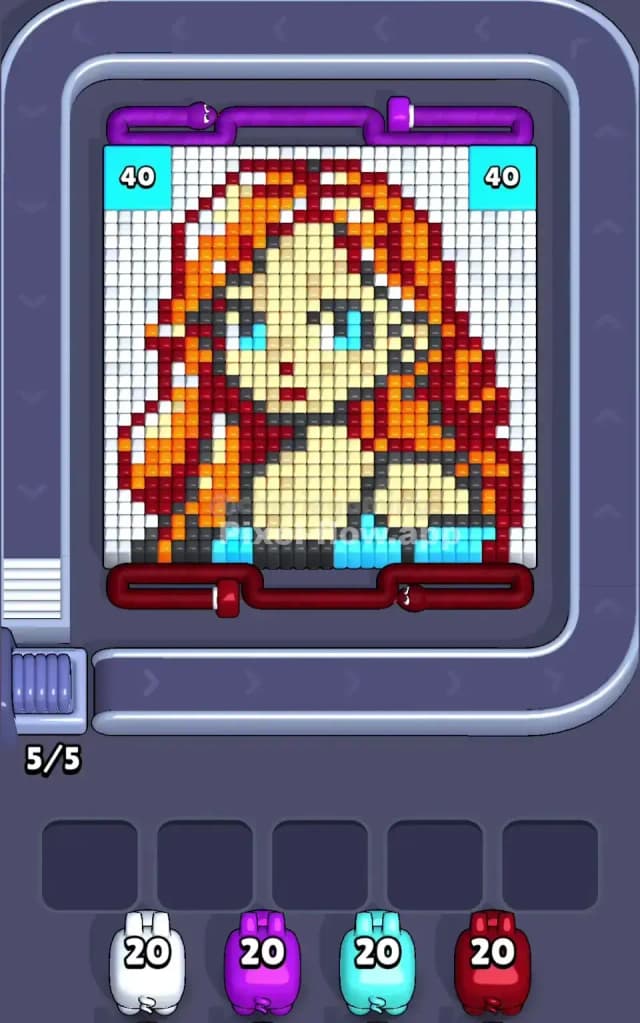
This level features a striking pixel art portrait of a red-headed woman. The main colors are white (background), orange and dark red (hair), pale yellow/cream (skin), and distinct blocks of cyan (eyes/clothing) and dark grey (shadows).
The rule to beat Pixel Flow Level 750 is strict layer management. You cannot just blindly fire at the pretty face. The massive white background blocks the sides, and the hair is a complex mix of orange and red that will jam your slots if you aren't careful. Because of the density of the hair and the restricted access to the face, I judge this to be a very hard level.
Pixel Flow Level 750 Overview
The artwork depicts a stylized female character with voluminous, flowing red and orange hair. She has large blue eyes and pale skin. The composition is centered, but the layers are deceptive.
- The White Background: This is the most dangerous part of the board. Two massive vertical columns of white pixels flank the character on the left and right. Until these are gone, you cannot hit the sides of her hair or shoulders.
- The Hair: It’s a mix of vibrant Orange and Dark Red. These colors are interlaced. You might see a patch of orange, but it's often sitting on top of or behind a patch of red. Firing the wrong pig here clogs your waiting slots instantly.
- The Face: The pale yellow skin tones are mostly buried in the center. You have to tunnel through the hair or the white background to reach enough surface area to clear the skin efficiently.
- The Bottom: There is a distinct strip of Dark Grey and Cyan at the very bottom. These are "foundation" blocks. Clearing them early can sometimes cause the pixels above to shift or become accessible, but they are often blocked by the white sides.
Step by step solution walkthrough for Pixel Flow Level 750
First Color Zone to Erase in Pixel Flow Level 750
Start with White.
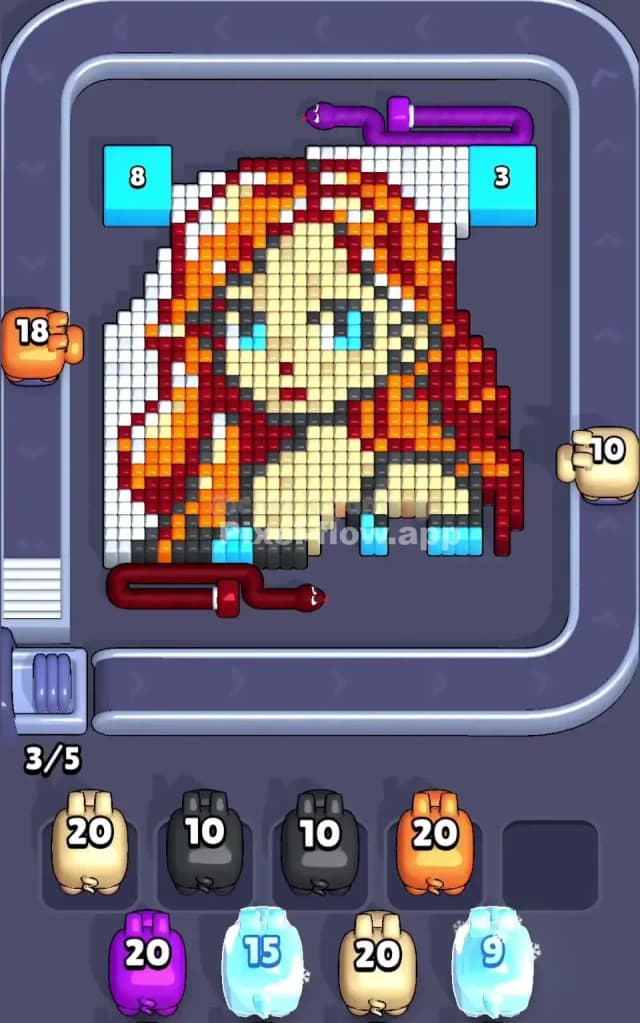
Narratively, you are "unboxing" the portrait. Logically, those two white pillars on the left and right are the only "safe" moves. They are huge, solid blocks of a single color.
- Look for White Pigs. They are your highest priority right now.
- The white columns are roughly 4-5 pixels wide on each side. A single White pig usually carries 20-40 ammo. One or two pigs can clear almost the entire background.
- Why this matters: If you try to attack the orange hair first, you will likely hit a stray white pixel or run out of valid orange targets because the white blocks shield the edges of the hair. By clearing white first, you expose the entire outline of the hair, doubling your valid target area for the Red and Orange pigs that come next.
How to pass Pixel Flow Level 750 without power ups or boosters
Once the white background is gone, the picture looks "naked"—just the character floating in space. This is the danger zone. The board is now a mix of Orange, Dark Red, Cream (skin), Cyan, and Grey.
The "Hairball" Strategy: You must alternate between Orange and Dark Red very carefully. Do not commit to one color exclusively.
- Check the Belt: If you see an Orange pig, scan the board. Is there a big block of orange hair exposed? Or is it mostly red specks? If it's mostly red, let the Orange pig pass.
- The Grey/Cyan Trap: At the bottom, you have a row of dark grey and cyan. These look easy to clear, but they often require specific pigs that might not spawn frequently. If a Grey pig appears and you have a clear shot at the bottom row, take it immediately to clear that bottom lane. It opens up angles for the skin tone later.
- Tunneling for Skin: The cream-colored face is the "core." You can't really clear it until you peel back the hair. Once you have shaved off the outer layer of Red/Orange hair, the Cream pixels become exposed. Only then should you start grabbing Cream/Yellow pigs. If you grab them too early, they will sit in your slots with 15 ammo and nowhere to shoot, choking your game.
Last Details You Clean Up in Pixel Flow Level 750
In the final phase, you usually have a "swiss cheese" looking board. The main hair is gone, the background is gone.
- The Eyes: The blue/cyan eyes are often deep in the stack. You might have 4-5 cyan pixels left that were hiding behind skin pixels. Watch for a Cyan pig. Even if it has 20 ammo and you only need 4 shots, take it. You need those pixels gone to reach the layer behind them.
- The Shadows: There are often stray Dark Red or Dark Grey pixels that act as shading under the chin or hair strands. These are the ones that kill you. You might think you are done with Red, but three single pixels remain. Keep one slot open for a "cleanup" pig of these colors.
- Final Move: Your board should end with the deep layers. Usually, the last things to go are the bits of the neck/shoulders that were buried deepest under the hair layers. Don't rush. If you see the final color coming on the belt, wait for it. Don't fill your slots with trash hoping to cycle the belt faster; that's how you lose on the last 5%.