Pixel Flow Level 112 Solution | Pixel Flow 112 Walkthrough
How to beat Pixel Flow Level 112: Video solution & walkthrough. The fastest way to pass Pixel Flow 112.
Is this the wrong level layout?🤔
Pixel Flow randomizes levels for different players. Don't worry, just upload a screenshot of your board, and our AI will find the correct video instantly.

Pixel Flow Level 112 Overview
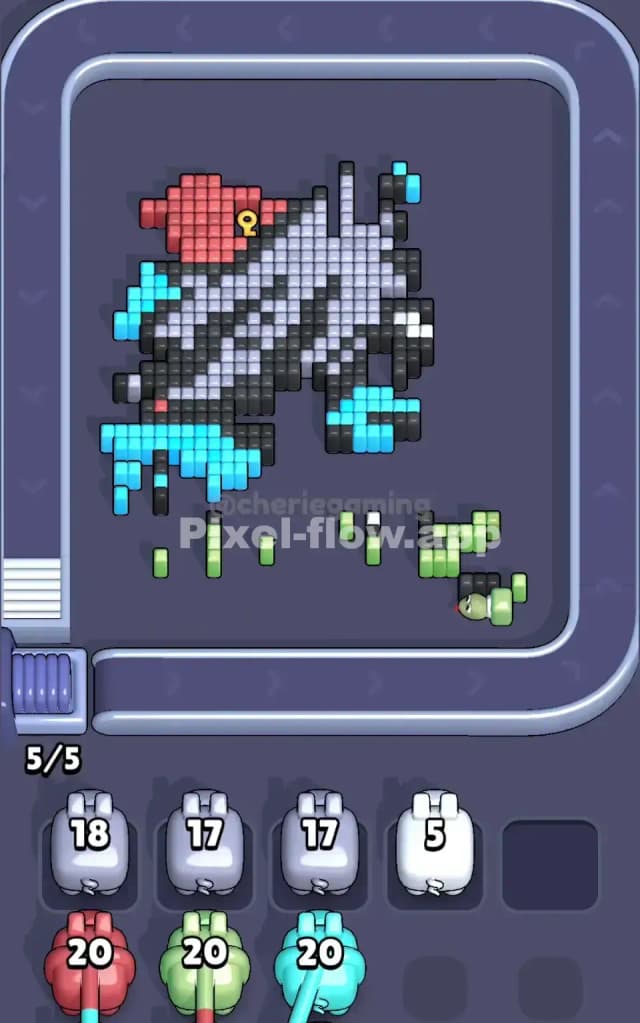
The Board Layout and Main Challenge
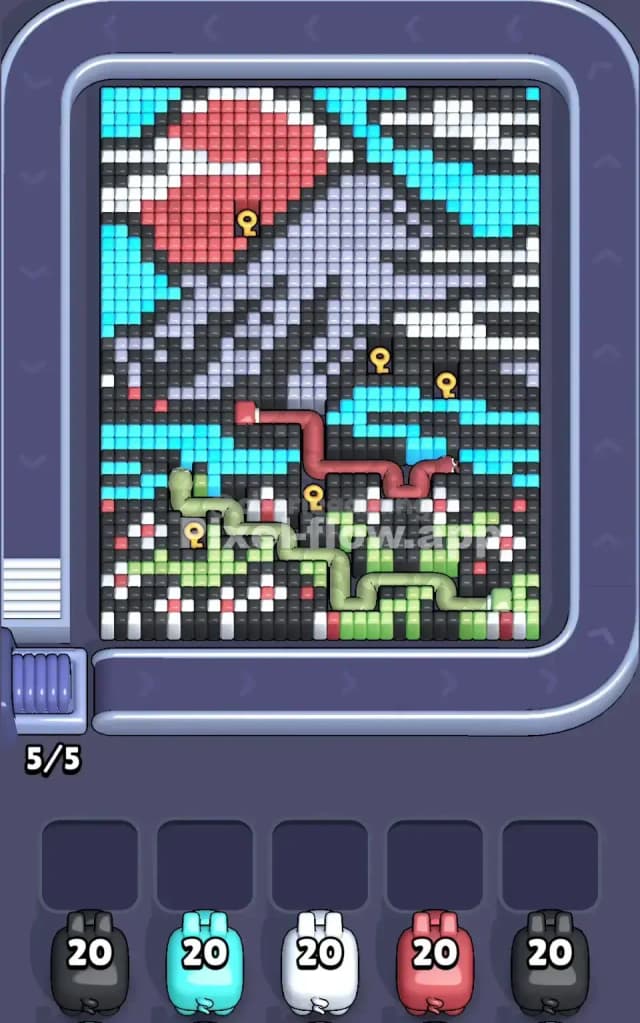
Pixel Flow Level 112 presents a detailed voxel scene packed with multiple color regions that demand careful sequencing. The board features a striking composition with cyan cubes dominating the upper right and sides, a substantial red block in the upper-middle area, a large light purple/lavender section spread across the center-right, white cubes scattered throughout as connective tissue, black voxels forming structural shadows and depth, soft green cubes populating the lower-left quadrant, and accent red cubes peppered across various layers. This isn't a simple single-color sweep—you're looking at a layered pixel art image where colors sit in front of and behind one another. The waiting slots below show five pigs: gray (20 ammo), cyan (20 ammo), white (20 ammo), red (20 ammo), and another gray pig (20 ammo). Each pig will shoot cubes of its own color, and once a pig runs out of valid targets despite having ammo remaining, it drops into a waiting slot and becomes "stuck."
Win Condition and Deterministic Gameplay
To clear Pixel Flow Level 112, you must destroy every single voxel cube on the board—no partial victories here. The game is entirely deterministic: pig order is fixed, ammo counts never change, and the board layout never shifts mid-level. This means your victory hinges on planning the exact sequence of pig releases so that each one has enough targets to spend all its ammo before it gets stuck. If you miscalculate and send out a pig that can't find 20 matching cubes, you'll waste a waiting slot and risk jamming the buffer. Understanding that every move is foreseeable gives you enormous power—you're not gambling; you're solving a puzzle with perfect information.
Why Pixel Flow Level 112 Feels So Tricky
The Primary Bottleneck: Cyan and Black Saturation
The biggest obstacle in Pixel Flow Level 112 is that cyan and black cubes are everywhere. Cyan occupies major zones in the upper right, left side, and lower section—it's nearly 25% of the board. Black cubes form shadows and structural elements throughout, hiding behind other colors and creating visual chaos. When you fire your cyan pig early, you might clear 15 cubes quickly, but then you're left hunting for that final 5th cyan cube buried under layers of red or white. This hunt exposes the real problem: if you don't expose deeper layers in the right order, your cyan pig will run dry of targets while still holding 5 ammo, forcing it into a waiting slot and clogging your buffer. The black pig faces a similar trap—black cubes form scattered pockets that only become accessible once you've cleared surface colors, so launching black too early guarantees failure.
Tricky Color Patches and Hidden Layers
Pixel Flow Level 112 hides several subtle tricks. The white cubes, though plentiful, sit in two separate clusters—the upper-middle band and lower scattered patches. If you fire white without clearing red first, you'll only hit 12–15 white cubes and waste ammo on invisible targets underneath. The red block in the upper area is surrounded by white and black, meaning you can't reach all red cubes until those neighbors move. Even trickier, the light purple section in the center-right is partially masked by white and black; you might think there are fewer purple cubes than actually exist, leading you to underestimate how many pigs you need to clear that zone. The green cubes in the lower left form a connected snake-like pattern, and they're partially blocked by red and white accents—fire green too early and you'll clear surface cubes while deeper greens remain untouchable.
The Frustration Point and "Aha" Moment
I'll be honest: Pixel Flow Level 112 stumped me for a solid ten attempts. I kept firing cyan early because it's so visually dominant, only to watch it get stuck after 18 cubes. Then I'd desperately launch white or red to try to unblock cyan, but that just wasted more slots. The turning point came when I stopped thinking about "which pig can clear the most" and started thinking about "which pig must go first to expose the others?" Once I realized that red had to come out before cyan could finish, and that black had to stay in the buffer until the final stretch, suddenly the level opened up. It's that shift from reactive to strategic thinking that makes Pixel Flow Level 112 click.
Step-by-Step Strategy to Clear Pixel Flow Level 112
Opening: Start with Red and White in Lockstep
Your first three moves in Pixel Flow Level 112 should be surgical. Fire the red pig first—yes, first. Red occupies the upper-middle region and is largely exposed; your red pig should clear most or all of its 20 cubes on the first run. This removes a major visual obstacle and exposes white cubes beneath it. Immediately follow with the white pig. White will now have access to cubes in both the upper band (freshly exposed) and the lower patches. White should spend roughly 18–20 ammo and leave your waiting slots nearly empty. This opening double move is crucial because it clears the shallowest layer without jamming you—you'll still have 3 free slots and a clear board underneath. Keep one waiting slot free as a buffer; never fill all five slots at once.
Mid-Game: Sequence Cyan and Green Around Black
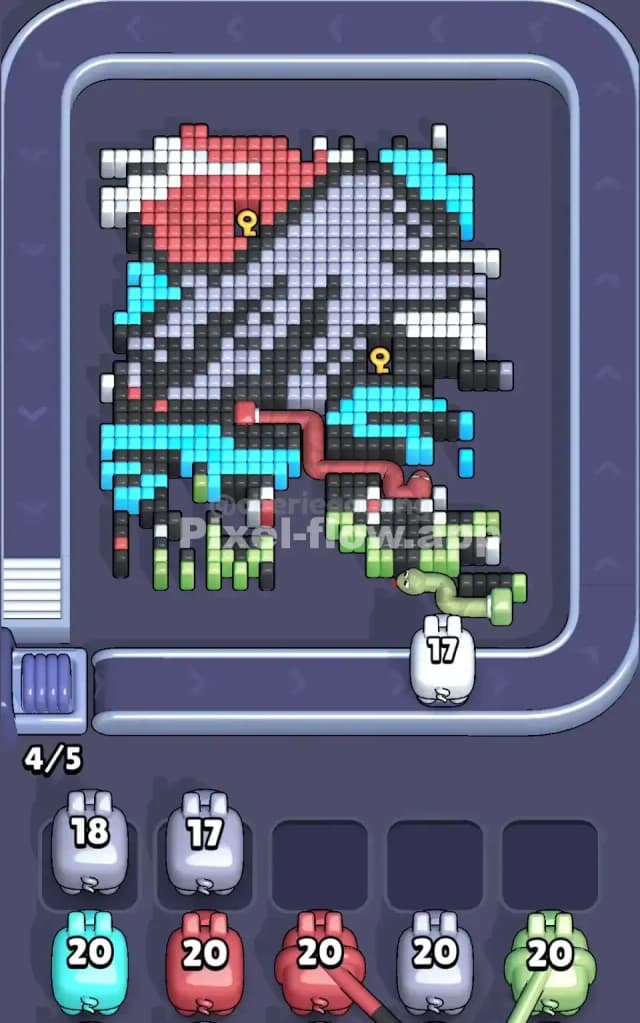
Once red and white are history, launch cyan next. Your cyan pig now faces a much cleaner board; the red overlay is gone, and cyan cubes in the upper area are fully visible. Cyan should clear 18–20 of its cubes without trouble. Don't panic if it doesn't quite finish—sometimes one cyan cube hides behind a green or black accent, and that's okay for now; cyan will drop into a waiting slot with 1–2 ammo left. Now fire the green pig. Green dominates the lower left and will find plenty of targets because red and white have already cleared the surface. Green should spend all 20 ammo and drop the cyan pig back into the buffer when it clears that final hidden cyan cube. This "bounce" mechanic—where a new pig forces a stuck pig out of the waiting slot by freeing targets—is your secret weapon in Pixel Flow Level 112.
End-Game: Finish with Gray and Black for the Cleanup
By now, your board is mostly purple, black, and scattered leftover accents. Fire one gray pig—gray is highly versatile and will clear dark accents and black patches you've left exposed. Gray should spend 15–18 ammo and park itself in a waiting slot. Next, unleash the final gray pig; it'll clean up any remaining gray and dark voxels, forcing the first gray pig back out if it has targets to finish. Your black pig is your final card. Black comes out last because black is scattered across the entire board as shadow and structure; it can't spend ammo effectively until every other color has been mostly cleared. Black should finish the remaining dark cubes and complete Pixel Flow Level 112. The waiting slots should empty as each new pig forces stuck pigs out, until on your final move, all five pigs have cycled through and every cube is gone.
The Logic Behind This Pixel Flow Level 112 Plan
Exploiting Pig Order and the Bounce Mechanic
The strategy above works because it respects the layering of Pixel Flow Level 112. By starting with red and white, you remove the surface camouflage and expose every color beneath. This allows cyan to spend its full ammo instead of getting stuck early. The bounce mechanic—where a newly released pig shoots a hidden cube and forces a stuck pig out—is pure power. In Pixel Flow Level 112, cyan starts stuck after 18 cubes, but when green fires and exposes that final cyan cube, cyan bounces back into the queue and finishes the job. Black works the same way; by holding it until the end, you ensure it has targets scattered across the entire remaining board. Pig order isn't random—it's a puzzle solution, and in Pixel Flow Level 112, firing colors in the order red → white → cyan → green → gray → gray → black aligns perfectly with the board's layer structure.
Staying Calm and Counting Ammo Two Moves Ahead
Here's the mental discipline that separates success from frustration in Pixel Flow Level 112: watch the pig queue, count visible targets of each color, and plan two or three pigs ahead. Before you fire any pig, ask yourself: "Will this pig have 20 targets?" If the answer is "probably not," wait. Release a different pig first to expose new cubes. As each pig fires, track how many ammo it spends and predict where the next stuck pig will land. In Pixel Flow Level 112, keeping a rough count—"red will use 20, white will use 19, cyan will use 18 then bounce back for 2 more"—prevents the scramble and panic that leads to waiting-slot jam. The level demands patience and forethought, but it rewards you with a clean, satisfying cascade of clears. Trust the system, and Pixel Flow Level 112 is yours.