Pixel Flow Level 130 Solution | Pixel Flow 130 Walkthrough
How to beat Pixel Flow Level 130: Video solution & walkthrough. The fastest way to pass Pixel Flow 130.
Is this the wrong level layout?🤔
Pixel Flow randomizes levels for different players. Don't worry, just upload a screenshot of your board, and our AI will find the correct video instantly.
Pixel Flow Level 130 Walkthrough
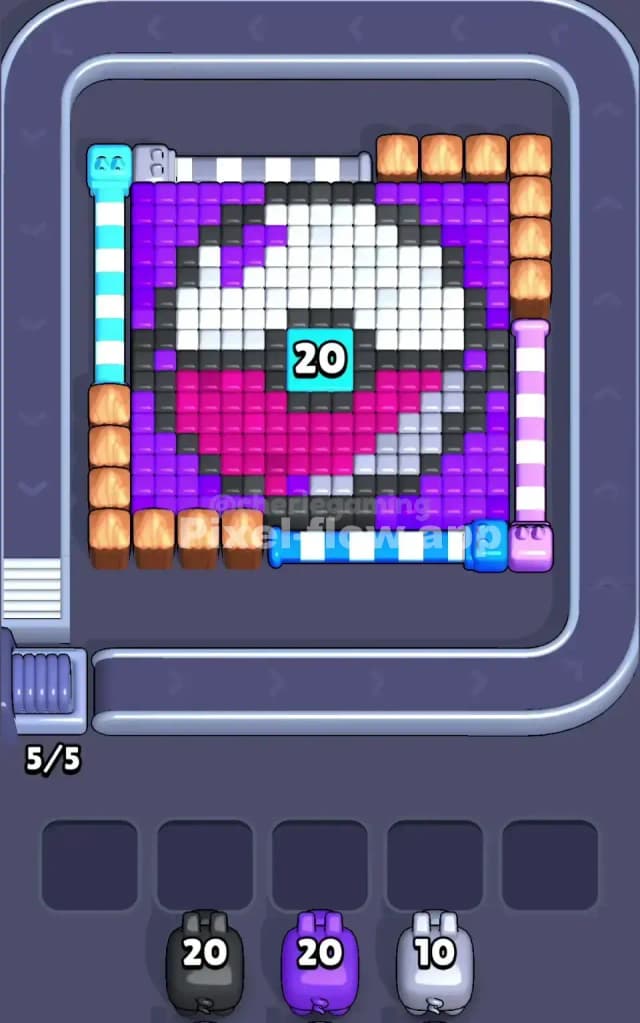
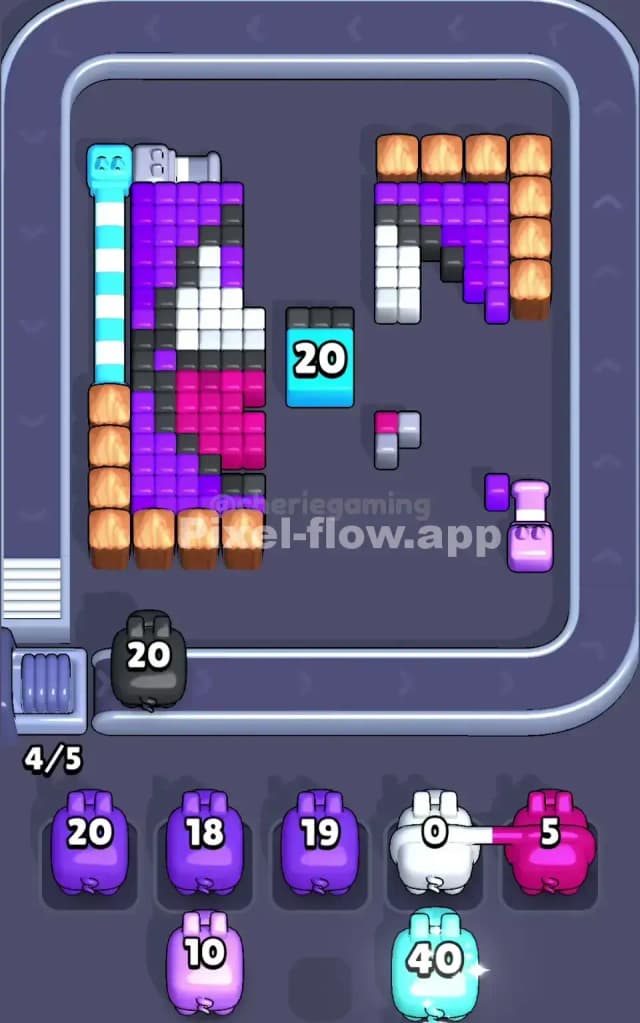
This level features a giant pixel-art sphere—resembling a classic Master Ball—floating in a dense sea of purple background pixels. The core artwork is layered: a white top half, a pink bottom half, a black dividing band, and a sturdy teal button in the dead center labeled "20".
The rule to beat Pixel Flow Level 130 is strictly about lane management. You are heavily barricaded by wooden crates and "pipe" structures on three sides. If you fire blindly from the wrong angle, your pigs will hit indestructible walls, fail to discharge their ammo, and clog up your five waiting slots. Once those slots are full of useless pigs, it's Game Over. Because of these tight restrictions and blocked sightlines, this is a very hard level.
Pixel Flow Level 130 Overview
Imagine a heavy vault door protected by debris. The central sphere is your prize, but it is completely surrounded. The background is a solid field of purple voxels.
The visual trap here is the perimeter.
- The Top Edge is the only "clean" opening. It exposes the purple background directly.
- The Corners and Sides are choked with obstacles. You have wooden crate stacks on the bottom-left, top-right, and right-side edges.
- The "Pipes": You will see vertical and horizontal striped bars (Cyan top-left, Blue bottom, Pink right). These look like solid metal, but they are actually destructible voxel clusters. They are blocking your shots, but they can be removed if you hit them with the correct color or simply wear them down.
This asymmetry forces you to play "top-down" for the first half of the match. The conveyor belt spins the pigs around the whole square, but for a long time, the top of the screen is the only place you can safely tap.
Step by step solution walkthrough for Pixel Flow Level 130
First Color Zone to Erase in Pixel Flow Level 130
Start exclusively with Purple Pigs at the Top.
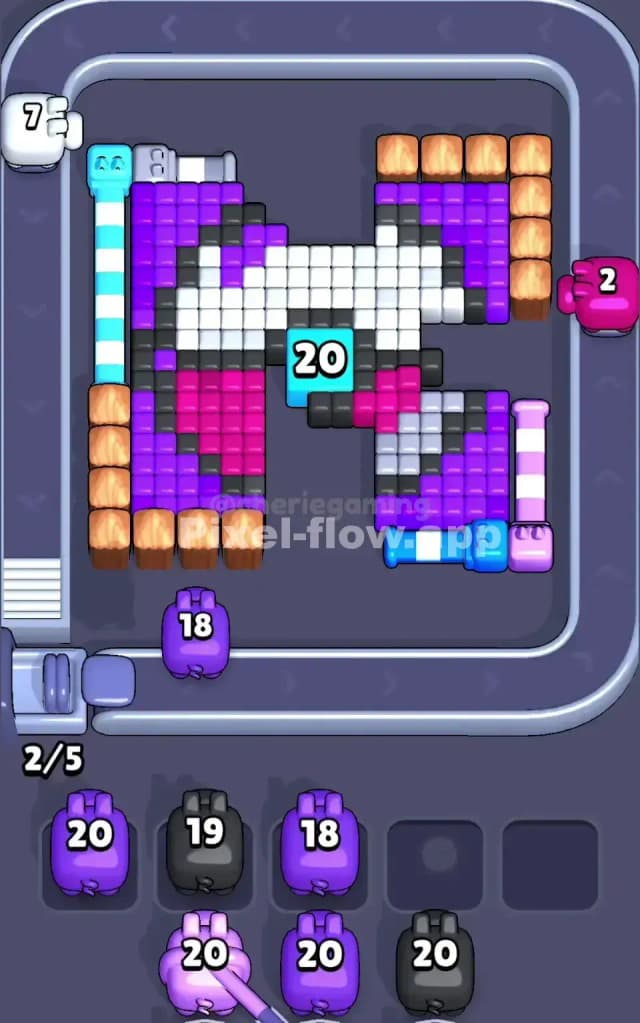
Logically, you have no other choice. The wooden crates are indestructible walls. If you try to shoot the purple background from the right side, the "Pink Pipe" structure and crates block your line of sight. If you shoot from the bottom, the "Blue Pipe" gets in the way.
You must be patient. Let the Purple Pigs ride the conveyor belt all the way to the top edge of the board before tapping. This allows them to strip away the purple background layer by layer, working downwards. Do not tap purple pigs when they are on the sides; they will likely find no valid target and drop into your waiting slots, creating a traffic jam immediately.
How to pass Pixel Flow Level 130 without power ups or boosters
The mid-game is where players lose because they misjudge the "Pipes."
Once the top half of the purple background is gone, you will start exposing the white top of the ball. You will also start getting different colored pigs (Cyan, Blue, Pink).
- Destroy the Fakes: The striped "pipes" on the left (Cyan), bottom (Blue), and right (Pink) are actually just piles of pixels. You need to clear them to open up shooting lanes. For example, use the Cyan Pig (you get a big one with 40 ammo later) to obliterate the cyan structure in the top-left.
- Open the Side Lanes: Once the "Pink Pipe" on the right is destroyed (using Pink pigs), you suddenly have a clean shot at the right side of the ball. This is crucial because the top-down angle can't reach the deep corners protected by the crate stacks.
- Ammo Conservation: Do not spam clicks. If a Black pig appears, do not fire it until the purple "sea" has receded enough to expose the black band of the ball. If you fire too early, it clogs a slot.
Last Details You Clean Up in Pixel Flow Level 130
By the end, the purple background and the fake pipes should be gone. You will be left with the core sphere and the wooden crates (which stay forever).
- The Teal Button (20): The center of the ball has a block with the number 20. This is a high-health block. Save a high-ammo pig (like the Cyan 40 or a full Black pig) specifically for this center shot. Don't waste it on straggler pixels.
- The Bottom Corners: The hardest pixels to hit are the pink ones tucked directly behind the bottom-left crates. You will need to clear the bottom "Blue Pipe" structure to get a clear horizontal shot from the bottom lane to clean these up.
Keep your waiting slots empty. If you see a pig with 5 or less ammo that has no clear shot, it's better to let it ride the belt for another loop than to bank it and block a slot for a critical color.