Pixel Flow Level 136 Solution | Pixel Flow 136 Walkthrough
How to beat Pixel Flow Level 136: Video solution & walkthrough. The fastest way to pass Pixel Flow 136.
Is this the wrong level layout?🤔
Pixel Flow randomizes levels for different players. Don't worry, just upload a screenshot of your board, and our AI will find the correct video instantly.

Pixel Flow Level 136 Walkthrough
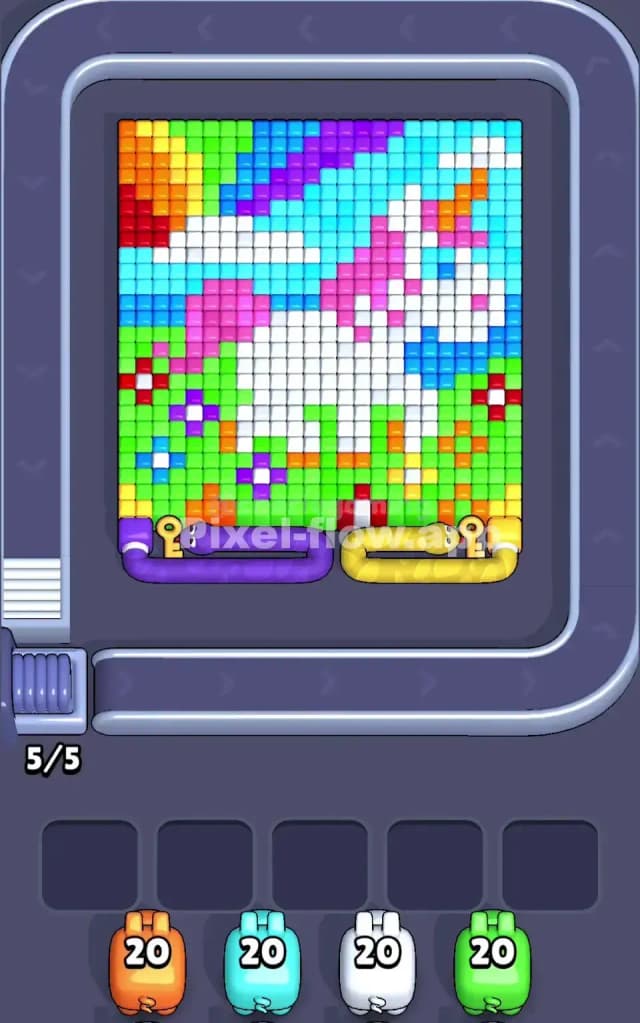
This level is a trap disguised as a pretty picture. You are looking at a fantasy scene featuring a white unicorn with a pink mane, prancing through a meadow. The background is a mix of light blue sky, purple atmospheric stripes, and a blazing orange and yellow sun in the top-left corner. The bottom half is the real danger zone: a field of green grass dotted with tiny, single-voxel flowers in red, purple, and blue.
The rule to beat Pixel Flow Level 136 is aggressive color isolation. Because the flowers are single pixels scattered apart, they are nightmares for your ammo management. If you pull a Red pig too early, it will shoot three flowers and then sit in your waiting slot with 17 ammo left, blocking you. You must clear the big, solid colors (Green and White) to expose enough targets for the smaller colors. Due to the high risk of clogging your slots with the flower colors, this is a very hard level.
Pixel Flow Level 136 Overview
Think of this artwork as two distinct battles. The top half is the "Sky Battle." It’s composed of large, chunky horizontal rows. You have the Light Blue sky, the thick Purple stripes, and the White head of the unicorn. This area is safe. It’s easy to predict where the shots will land.
The bottom half is the "Meadow Mess." This is where you lose the game. The Green grass acts as a mortar holding everything together. Embedded in this green mortar are isolated pixels of Red, Dark Blue, and Purple (the flowers). There are also two massive snake-locks at the very bottom—one Purple, one Yellow—guarding the final rows.
The asymmetry here is vertical. The top is blocky and safe; the bottom is speckled and dangerous. Your eyes will naturally want to look at the unicorn's face, but your strategy needs to focus entirely on that grassy minefield at the bottom.
Step by step solution walkthrough for Pixel Flow Level 136
First Color Zone to Erase in Pixel Flow Level 136
I start by obliterating the Green.
This is the only logical opening move. The green grass covers the entire bottom 40% of the board. It connects all the isolated flower islands. If you try to shoot the White unicorn body first, you leave the dangerous bottom section untouched. If you try to shoot the Red or Blue flowers first, your pigs will fail immediately because those colors are buried behind the green layer or are too spread out to consume a full ammo clip.
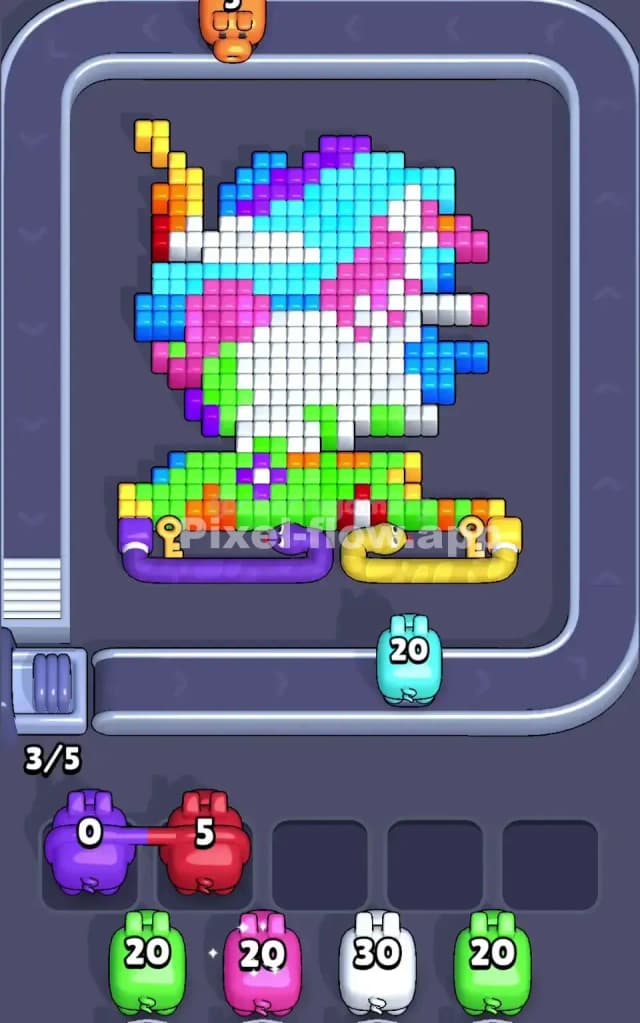
Grab the Green pigs immediately. Clearing the green effectively "shaves" the meadow. It turns the bottom half of the board from a solid wall into a Swiss cheese of floating flower pixels. This visibility is essential. You need to see exactly how many Red or Dark Blue blocks are actually exposed before you commit a pig to them.
How to pass Pixel Flow Level 136 without power ups or boosters
Once the Green is stripped away, the picture looks half-destroyed. You will see the White core of the unicorn floating in the middle, and the Sky (Light Blue) weighing down from the top. The danger now is the "Flower Trap."
You will see small clusters of Red, Purple, and Dark Blue pixels remaining where the grass used to be. Do not reflexively grab a pig just because you see a matching color. Count the blocks.
If you see only 4 Red blocks, but your Red pig has 20 ammo, ignore the Red pig. Let it cycle past.
Instead, switch your focus to the White (Unicorn body) and Light Blue (Sky). These are your "ammo dump" colors. They are massive, connected shapes. Use them to keep your waiting slots empty. If your slots fill up with Red or Dark Blue pigs that can't finish their ammo, you die. Only summon the specific flower colors (Red/Purple) when you have cleared enough surrounding blocks to reveal deep layers of them, or when you are forced to.
Also, keep an eye on the Pink mane. It connects the head to the body. It’s a safe mid-game color because the blocks are usually grouped together, allowing for a clean ammo dump.
Last Details You Clean Up in Pixel Flow Level 136
The end game of Pixel Flow Level 136 usually revolves around the top-left corner and the bottom locks.
The Orange/Yellow Sun in the corner is often deeper than it looks. You might think you cleared the sky, but a few yellow voxels will hide behind the blue. Save a Yellow/Orange pig for the very end.
Finally, those Snake Locks at the bottom (Purple and Yellow) will likely be the last things to go. They often block the final few pixels of the bottom row. You usually need to clear the specific color "key" blocks adjacent to them or wait for the board logic to unlock them once the upper layers are gone. Expect the final shots to be fired at the unicorn’s horn (orange) or the last hidden pixel of a purple flower that was stuck behind a lock. Keep one slot open for that specific color.