Pixel Flow Level 138 Solution | Pixel Flow 138 Walkthrough
How to beat Pixel Flow Level 138: Video solution & walkthrough. The fastest way to pass Pixel Flow 138.
Is this the wrong level layout?🤔
Pixel Flow randomizes levels for different players. Don't worry, just upload a screenshot of your board, and our AI will find the correct video instantly.

Pixel Flow Level 138 Walkthrough
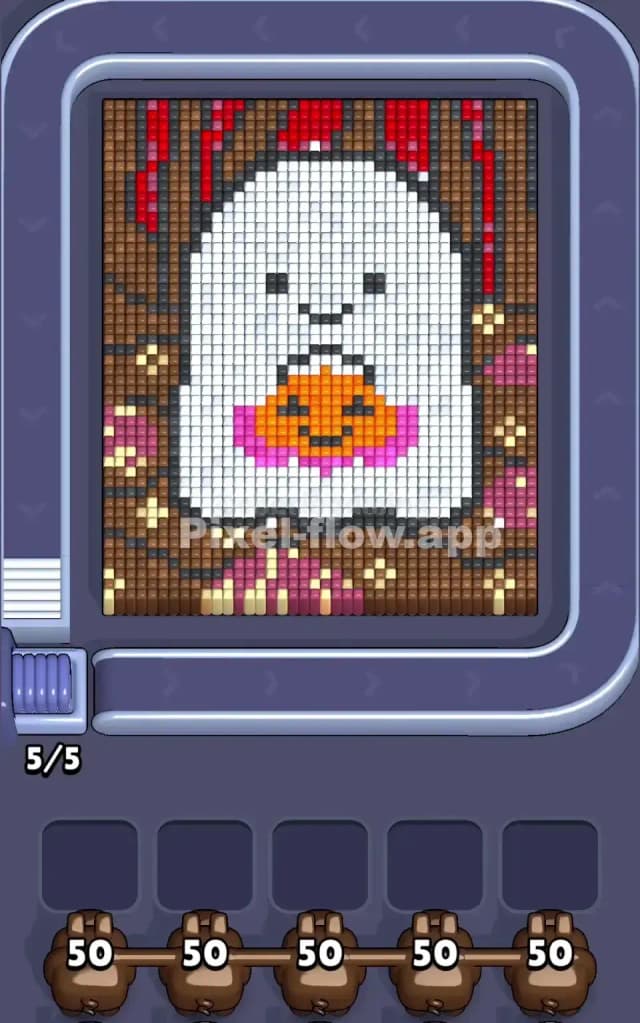
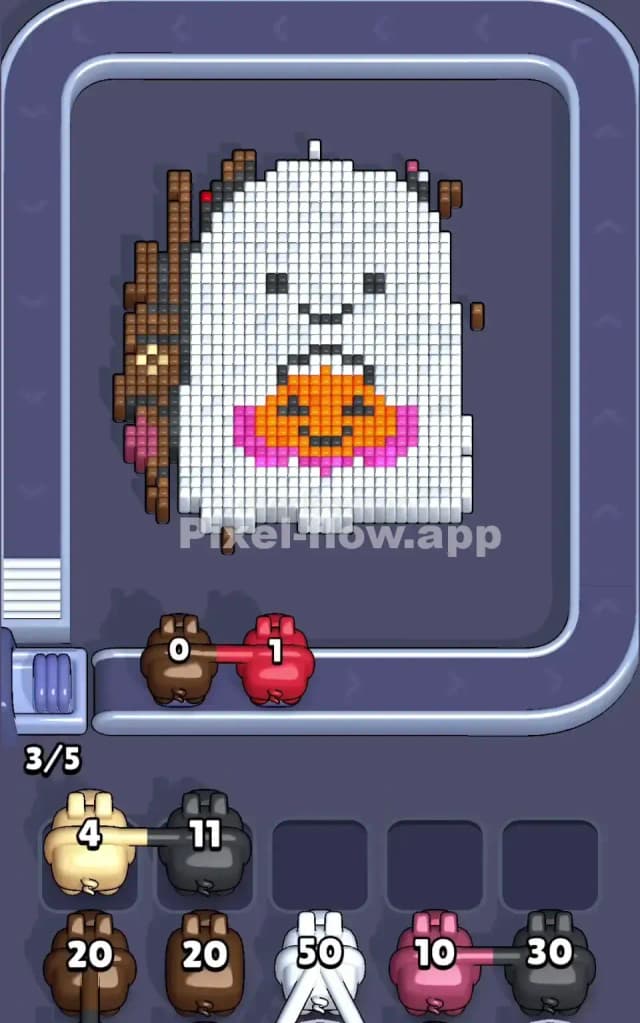
This level features a spooky-cute white ghost holding a small orange pumpkin, set against a dark, textured background. The central figure is massive and mostly white, dominating the center of the board. Surrounding the ghost is a complex background of dark brown, reddish accents at the top, and scattered pinkish details.
To beat Pixel Flow Level 138, you need to manage the massive white block in the middle while carefully chipping away at the cluttered background. You have limited slots (5) for your pigs. If you fill these slots with pigs that can't shoot because their target color is blocked by a different color layer, you lose.
Is this level hard? Yes, it is very hard. The sheer volume of white pixels can trick you into ignoring the background layers, which often leads to clogging your waiting area with brown or red pigs that have nowhere to fire.
Pixel Flow Level 138 Overview
The artwork depicts a large, pixelated ghost character. It has a simple face with two black eyes and a smile. On its chest sits a jack-o'-lantern pumpkin, bright orange with a pink ruff or collar underneath. The background suggests a dark forest or perhaps a wooden wall, composed primarily of dark brown blocks. At the very top, there are vertical streaks of red, almost like dripping paint or autumn leaves. On the left and bottom edges, you'll see scattered pink and beige pixels mixed into the brown.
The asymmetry here is subtle but dangerous. The White Ghost is the "foreground," meaning it sits physically higher than the background. However, the background colors (brown, red, pink) wrap tightly around the edges. The danger lies in the top corners. The red streaks are often buried deep or sit flush with the brown, making them hard to target unless you clear the neighboring pixels first. The bottom area is also messy, with pink and beige clusters that can easily trap a pig if you aren't paying attention to the layer depth.
Step by step solution walkthrough for Pixel Flow Level 138
First Color Zone to Erase in Pixel Flow Level 138
Your instinct might be to start blasting the giant white ghost because it's the biggest target. Do not do this immediately.
Start with the Dark Brown background edges.
Narratively, you want to clear the "forest" around the ghost so you don't get stuck later. Logically, the brown pixels are the outermost layer on the sides. If you look closely at the edges, the brown pixels often block access to the red and pink details underneath or adjacent to them. If you start pulling White pigs, you might clear the ghost's body, but you will likely end up with a hand full of Brown or Red pigs clogging your slots because their specific targets are still blocked by a stray brown pixel you missed.
Prioritize Brown pigs first to shave down the left and right borders. Once the outer edge is clean, the deeper layers (red at the top, pink at the bottom) become accessible.
How to pass Pixel Flow Level 138 without power ups or boosters
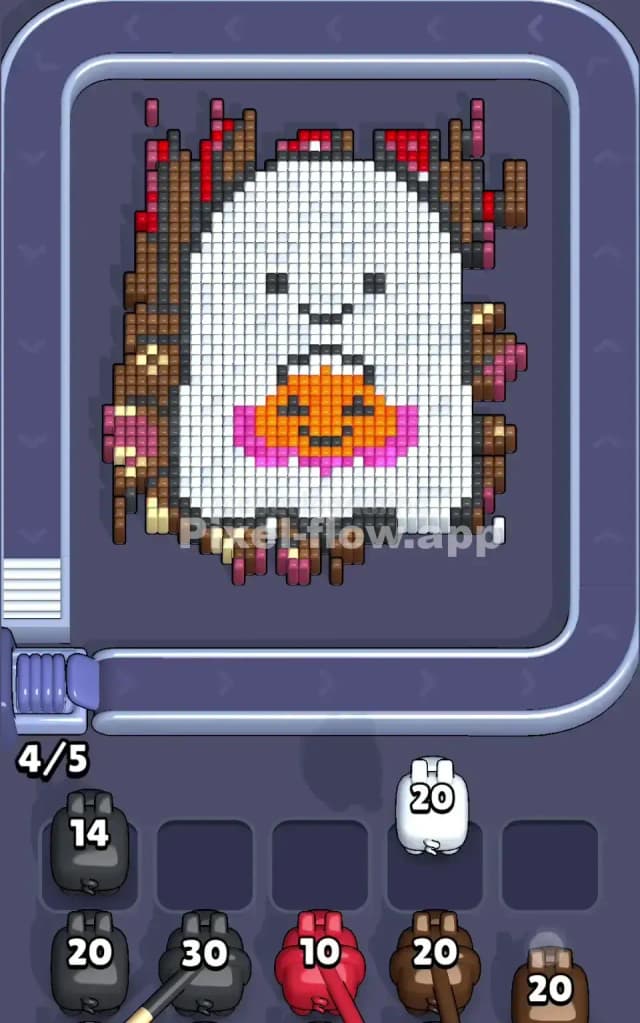
Mid-way through the level, the board usually looks like a floating white blob. You've stripped away most of the brown wood texture. Now you face a critical decision.
You will likely have the Ghost (White) remaining, along with the Pumpkin (Orange/Pink) and the facial features (Black).
- The White Trap: The white area is huge. It takes a lot of ammo. Do not pull a White pig unless you are sure you can let it sit there for a while, OR if you have multiple White pigs in a row on the belt.
- Focus on the Pumpkin: The orange and pink pumpkin creates a "hole" in the white blocks. Often, clearing the orange/pink section helps "break up" the solid white block, creating more valid surface area for your white pigs to hit. If you see Orange or Pink pigs, prioritize them to clear that central detail.
- The Black Eyes: Be careful with Black pigs. The eyes and mouth are tiny targets (only a few pixels). A Black pig with 50 ammo is a liability here. It will shoot 3-4 blocks and then sit in your waiting slot forever, useless. Only pull a Black pig if you have no other choice or if the waiting slots are mostly empty. If you are forced to take a Black pig, try to clear the surrounding white pixels first so the black pig has a clear line of sight to the eyes immediately.
Last Details You Clean Up in Pixel Flow Level 138
In the final phase, you should just have the Ghost's main body left.
- The Residual Reds: Check the very top edge of the board. Sometimes a single column of red pixels hides behind the ghost's "head." Ensure you didn't miss these when clearing the brown background.
- The Massive White Block: Your end game is just churning through White pigs. Since the target is so big, these pigs will empty their ammo fast. This is the safe zone. As long as you didn't clog your slots with a high-ammo Black pig earlier, you can just spam the White pigs to finish the level.
- The Last Stand: The final few pixels are usually the bottom corners of the ghost. Watch out for any lingering beige or pink pixels that might have been hiding at the ghost's "feet." Clear them the moment they are exposed so they don't block the final white shots.