Pixel Flow Level 142 Solution | Pixel Flow 142 Walkthrough
How to beat Pixel Flow Level 142: Video solution & walkthrough. The fastest way to pass Pixel Flow 142.
Is this the wrong level layout?🤔
Pixel Flow randomizes levels for different players. Don't worry, just upload a screenshot of your board, and our AI will find the correct video instantly.

Pixel Flow Level 142 Walkthrough
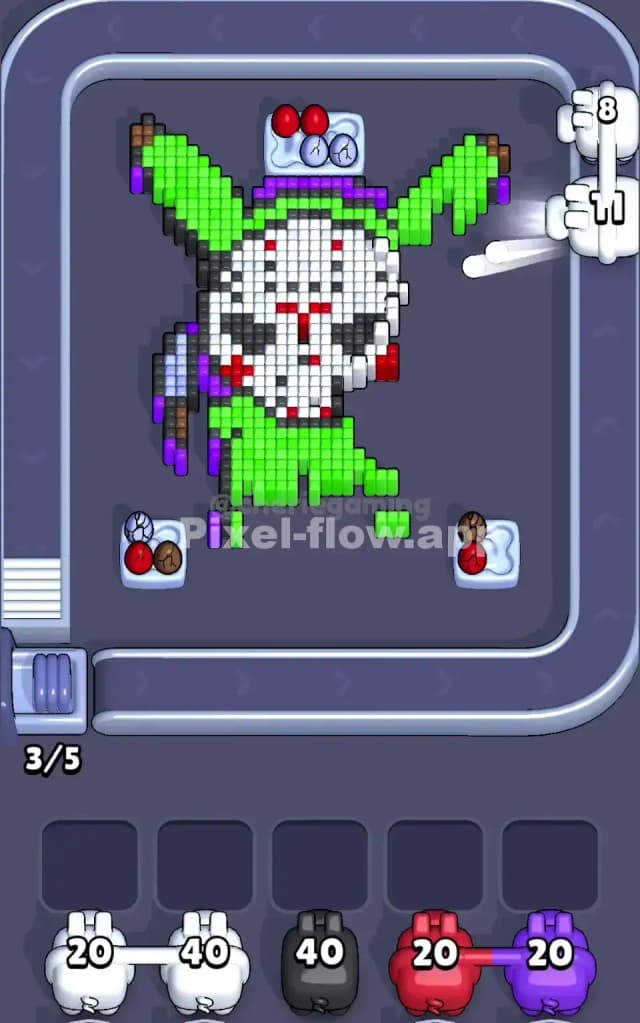
This level features a quirky mashup character: a person in a bright lime green bunny suit wearing a white "Jason Voorhees" hockey mask. The primary challenge here is the thick Purple outline that encases almost the entire figure. Until you crack that purple shell, you cannot reach the massive Green zones or the White mask underneath.
The rule to beat Pixel Flow Level 142 is strict color prioritization: peel the outer layers (Purple) to expose the inner bulk (Green and White). Do not waste pig slots on inner colors until the path is clear. Is it a very hard level? No. It's moderate difficulty, mostly testing your patience with the outline.
Pixel Flow Level 142 Overview
Imagine a slasher movie villain trying to be cute. You are looking at a voxel figure standing dead center. The suit is overwhelmingly Lime Green. The head is dominated by a White hockey mask with Red triangular markings and Black eye holes. In the left hand (viewer's left), the character holds a weapon (likely a machete) with a Grey blade and Brown handle.
The critical feature of this board is the Purple Outline. It acts as a shield.
- The Shield: A thick Purple border runs around the ears, down the arms, and along the legs.
- The Trap: The top three sensors (the little egg-looking things) are blocked by the bunny ears. The side sensors are blocked by the arms. You have very limited angles of attack until you thin out that character.
- Asymmetry: The left side holds the weapon, meaning there is a mix of Grey and Brown pixels that isn't present on the right side. The right side is cleaner—mostly just Green suit and Purple outline.
Step by step solution walkthrough for Pixel Flow Level 142
First Color Zone to Erase in Pixel Flow Level 142
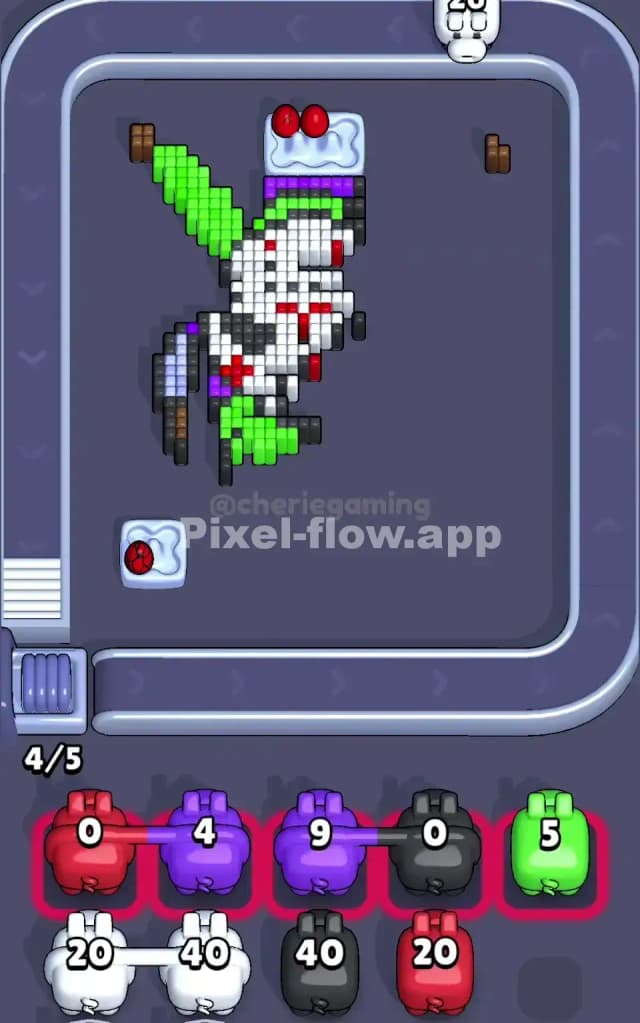
Purple is your absolute priority. I start by targeting the Purple outline because it physically blocks the green pixels from being hit by the side sensors.
Look at the ears and the feet. The Purple layer is the "crust" of this pixel pie. If you place a Green pig immediately, it will likely waste ammo hitting nothing or get stuck in a slot because the Green pixels are buried behind Purple ones.
- Wait for Purple Pigs: Let the conveyor belt run until you see Purple pigs.
- Target the Ears and Feet: Drop the Purple pigs to strip away the outline. This exposes the Lime Green interior.
- Check for Grey/Brown: Once the outline on the left is gone, you might expose the weapon handle. If a Grey or Brown pig appears, use it immediately to clear that small clutter so it doesn't block shots meant for the main body later.
How to pass Pixel Flow Level 142 without power ups or boosters
Once the Purple shell is broken, the picture will look half-destroyed. You will see a massive block of Lime Green pixels (the bunny suit) and the White mask.
Here is the danger zone: The White Mask vs. The Green Suit. The White mask is located centrally, often protected by the Green suit pixels around the neck and shoulders.
- Prioritize Green: The Green area is huge. It takes up 60% of the board. You need to aggressively place Green pigs whenever they appear. Do not hold out for "perfect" shots; just get the bulk down. Clearing the Green suit opens up lines of sight to the White mask from the bottom and sides.
- The Red/Black Detail Trap: The mask has tiny Red and Black spots. Often, these are on the surface layer of the mask. If you see a Red pig, look closely at the mask. If a Red pixel is visible and blocking a White pixel behind it, take the shot. If the Red pixel is buried, let the pig pass.
- Slot Management: You have 5 waiting slots. If you fill 3 of them with White pigs while the mask is still covered by Green pixels, you will choke your board. Only accept White pigs if you can see at least 5-10 white pixels exposed.
Last Details You Clean Up in Pixel Flow Level 142
In the final phase, you are usually left with the "face" debris. The Green suit is gone, the Purple outline is history.
- The Eyes and Cheeks: You will likely have a few Black pixels (eyes) and Red pixels (cheeks) floating in mid-air or attached to the last few White blocks.
- The Sensor Angle: Be careful here. Sometimes a single Red pixel on the cheek blocks a whole column of White pixels behind it. If you don't clear that Red pixel, your White pigs will sit in the slots uselessly.
- Finish with White: The last moves are almost always clearing the bulk of the White mask. Ensure your slots are empty enough to accommodate a stream of White pigs to finish the level.