Pixel Flow Level 202 Solution Walkthrough | Pixel Flow 202
How to solve Pixel Flow level 202? Get instant solution for Pixel Flow 202 with our step by step solution & video walkthrough.


Pixel Flow Level 202 Overview
The Board Layout and Starting Conditions
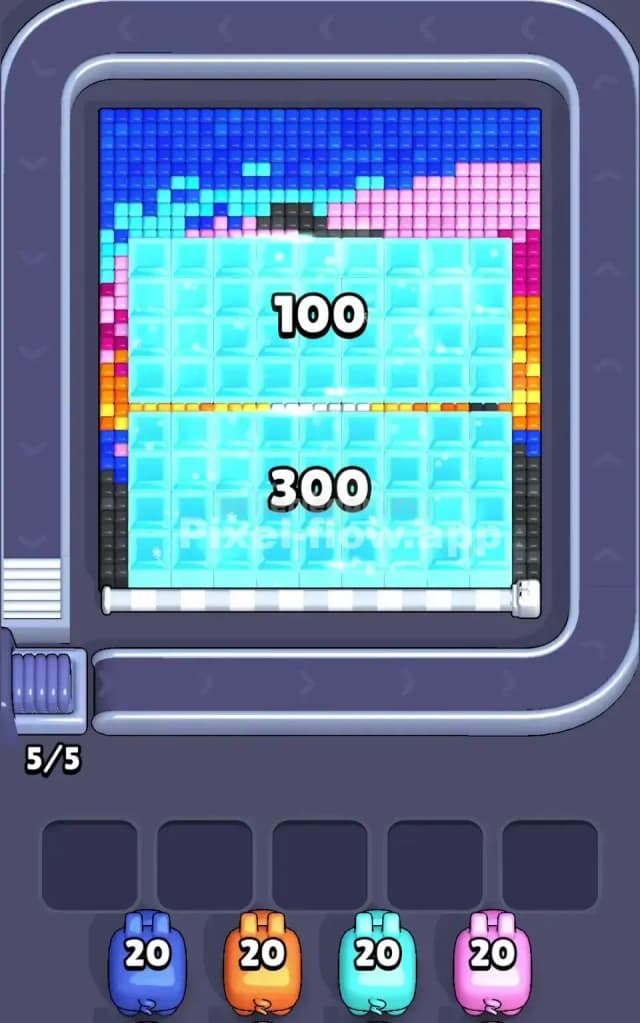
Pixel Flow Level 202 presents a visually appealing but mechanically demanding puzzle. The board showcases a layered voxel composition dominated by cyan (light blue) cubes that form the bulk of the visible play space. Above this cyan foundation sits a decorative pixel art header featuring a striking gradient: deep blue at the edges transitions through cyan and pink tones, with hints of gray and darker accents that suggest a subtle design element. The right and left edges are framed by vertical strips of magenta, orange, and yellow cubes, adding both visual contrast and strategic complexity.
You're looking at exactly 400 cubes to clear in total—100 in the upper section and 300 in the lower section, as indicated by the on-screen counters. Your arsenal consists of four pigs waiting in the queue: a blue pig with 20 ammo, an orange pig with 20 ammo, a cyan pig with 20 ammo, and a pink pig with 20 ammo. This perfectly balanced setup means you've got 80 total shots to work with, and every single one must land on a matching-colored cube somewhere on this puzzle.
The Win Condition and Deterministic Nature
To conquer Pixel Flow Level 202, you need to clear every last voxel from the board. The game won't accept partial solutions—it's all or nothing. The good news? This level is completely deterministic. The pig order never changes, their ammo counts are fixed, and the cube locations don't shift. That means there's a logical solution lurking here, and once you find the right sequence, you can execute it perfectly every single time. Your job is to figure out which pig to deploy when, ensuring that each color's ammo gets spent exactly on that color's cubes, and that you never jam your five waiting slots with pigs that have nowhere left to shoot.
Why Pixel Flow Level 202 Feels So Tricky
The Cyan Bottleneck
Here's where Pixel Flow Level 202 gets genuinely challenging: cyan dominates the board with an overwhelming majority of cubes. Your cyan pig arrives third in the queue and carries only 20 ammo, yet there are easily 60+ cyan cubes staring you in the face across both sections. This creates a massive trap. If you're not careful about exposing deeper layers and revealing cyan cubes hidden beneath the top colorful border, you'll send your cyan pig downrange, watch it blow through 20 shots on easily visible targets, and then find yourself staring at 40+ cyan cubes that remain untouched. That's when the cyan pig drops into a waiting slot with zero ammo left—completely stuck, clogging your buffer and inching you toward failure.
The real danger isn't that cyan cubes exist; it's that you'll shoot cyan too early without having cleared the overlying colors first, leaving you unable to access the deeper cyan layers that only reveal themselves once you've dismantled the decorative border above.
Awkward Color Pockets and Hidden Depth
The secondary problem with Pixel Flow Level 202 lies in the colored frame surrounding the cyan bulk. Those magenta strips on the sides, the orange and yellow accent cubes, and the gray/darker details in the top design section create isolated pockets of color that don't align neatly with your pig sequence. You've got a pink pig and an orange pig, sure, but spotting exactly which cubes belong to each color—and whether there are hidden layers beneath them—requires careful observation. If you fire your orange pig at the first 20 orange cubes you see without realizing there's a second layer of orange hiding underneath cyan that you'll need to expose later, you've just wasted ammo that could've been used elsewhere.
Similarly, those magenta cubes on the vertical edges might seem optional or decorative, but they're integral to clearing the board. Missing even one color entirely guarantees failure, and Pixel Flow Level 202 is designed to punish hasty assumptions about which cubes are actually reachable.
The Personal "Aha" Moment
I'll be honest: my first few attempts at Pixel Flow Level 202 left me frustrated. I kept thinking the puzzle was broken because my cyan pig would barrel through its ammo and I'd still see cyan everywhere. Then it clicked—I wasn't supposed to target cyan first. I needed to clear the colored border and the gray accents, expose the inner architecture, and only then deploy cyan to mop up the cubes that had been hiding beneath. Once I shifted my mindset from "hit what's visible" to "clear in layers," Pixel Flow Level 202 transformed from impossible to perfectly solvable.
Step-by-Step Strategy to Clear Pixel Flow Level 202
Opening: Start with Blue and Orange to Clear the Border
Your opening move sets the tone for everything that follows. Deploy your blue pig first. Blue appears in the upper-left area and in small accents scattered through the border. Twenty ammo of blue should cleanly eliminate all visible blue cubes without overkill. This isn't a wasted move—it's essential because blue sits on the perimeter, and clearing it opens sight lines to the colors beneath.
Next, send out your orange pig. Orange clusters appear along the right edge and scattered through the decorative header. Again, you've got 20 ammo, and orange cubes should number close to 20. Fire your orange pig, watch those side-edge cubes disappear, and keep at least three waiting slots empty as you progress. The goal here isn't to solve the puzzle; it's to demolish the outer shell so the actual interior puzzle becomes visible.
Mid-Game: Pink, Then Cyan—But Watch Your Timing
Here's where strategy matters most in Pixel Flow Level 202. After blue and orange have done their job, your pink pig takes the stage. Pink cubes form that right-edge magenta strip and scattered accents in the header. Your pink pig carries 20 ammo, and pink cubes should align closely with that count. Fire your pink pig and watch as the remaining border crumbles.
Now comes the critical moment: your cyan pig is next in the queue, and this is when you absolutely must have exposed the full depth of cyan on the board. If you've successfully peeled away the blue, orange, and pink outer layers, you should now see two distinct regions of cyan—the upper 100-cube section and the lower 300-cube section. Your cyan pig has exactly 20 ammo, which means it will only target 20 of the visible cyan cubes. This is intentional: there's clearly more cyan hidden beneath, waiting to be exposed as the top layer clears.
The trick is to fire your cyan pig strategically, choosing which 20 cyan cubes to eliminate first. I recommend targeting cyan cubes that sit directly above gray or other colored cubes in the deeper layers. This way, as those top-layer cyan cubes vanish, you expose the interior colors, giving you a complete picture of what's actually hiding in the lower sections.
End-Game: Managing the Final Phases
After your four main pigs have emptied their ammo, you'll likely still have cubes remaining on Pixel Flow Level 202. That's completely normal and expected—your four pigs don't carry enough total ammo to clear everything alone. This is where the waiting slots become your strategic reserve.
Here's the critical rule: once all five pigs from the queue have been deployed and four of them have dropped into waiting slots (because they ran out of ammo), a fifth pig will spawn from the queue. This new pig will have the same color as one of the stuck pigs, and it will carry its full ammo load. This isn't a failure state; it's the game's way of ensuring you can always make progress, provided you haven't completely jammed all five slots with pigs that have zero ammo and no valid targets.
Monitor your waiting slots obsessively. If you see a stuck cyan pig in slot two and you still have 40 cyan cubes visible on the board, you're fine—that pig will eventually drop back into the queue and respawn fresh when another matching color comes around. But if you've got four different colors stuck with zero ammo and no valid targets, and you've got 10+ unclearable cubes of a fifth color still on the board, you've painted yourself into a corner.
To avoid this, always count ammo before you fire. Always scan the board to verify that the color you're about to shoot actually exists in sufficient quantity. And always leave yourself an escape hatch—a waiting slot or two that remains empty—so you've got room to absorb a pig that runs out of ammo prematurely.
The Logic Behind This Pixel Flow Level 202 Plan
Exploiting Pig Order and Deterministic Ammo
The genius of Pixel Flow Level 202 lies in its mathematical precision. Every element—pig sequence, ammo counts, cube totals—is carefully balanced to have exactly one optimal solution. By deploying your pigs in the given order (blue, orange, cyan, pink) and trusting that their ammo counts were chosen by the designer for a reason, you're working with the puzzle instead of against it.
Your blue pig isn't weak because it only has 20 ammo; it's perfectly calibrated to clear exactly the blue cubes in the border and no more. Once blue is gone, orange's 20 ammo does the same job for orange. This is the designer's way of saying, "Clear the border first, in this specific order, and the interior will reveal itself." Fighting this structure—say, by trying to shoot cyan before clearing the border—wastes ammo and leaves you stranded.
Staying Calm and Counting Ahead
The psychological challenge of Pixel Flow Level 202 is resisting the urge to panic-fire at the first target you see. Instead, cultivate the habit of looking two or three pigs ahead in the queue. Before you send out your blue pig, glance down and remind yourself that orange, cyan, and pink are coming. This mental preview helps you spot patterns: "Blue and orange are border colors; cyan dominates the interior; pink is a final accent." This framework prevents you from accidentally using a pig's ammo on the wrong target or in the wrong order.
Additionally, always count the cubes you're about to target before firing. It takes five seconds and can save you from catastrophic ammo waste. If you're about to fire blue and you count 22 blue cubes but your blue pig only has 20 ammo, you know immediately that not all blue cubes are accessible yet—there must be blue hiding beneath another color. Adjust your strategy accordingly.
The final piece of staying calm is accepting that your pigs will drop into waiting slots. It's not a mistake; it's part of the puzzle flow. Watch those waiting slots, respect their five-slot capacity limit, and trust that respawning pigs will arrive when you need them. Pixel Flow Level 202 is designed to test your patience and planning, not your reflexes. Take your time, think clearly, and you'll cut through it.