Pixel Flow Level 214 Solution | Pixel Flow 214 Walkthrough
How to beat Pixel Flow Level 214: Video solution & walkthrough. The fastest way to pass Pixel Flow 214.
Is this the wrong level layout?🤔
Pixel Flow randomizes levels for different players. Don't worry, just upload a screenshot of your board, and our AI will find the correct video instantly.


Pixel Flow Level 214 Walkthrough
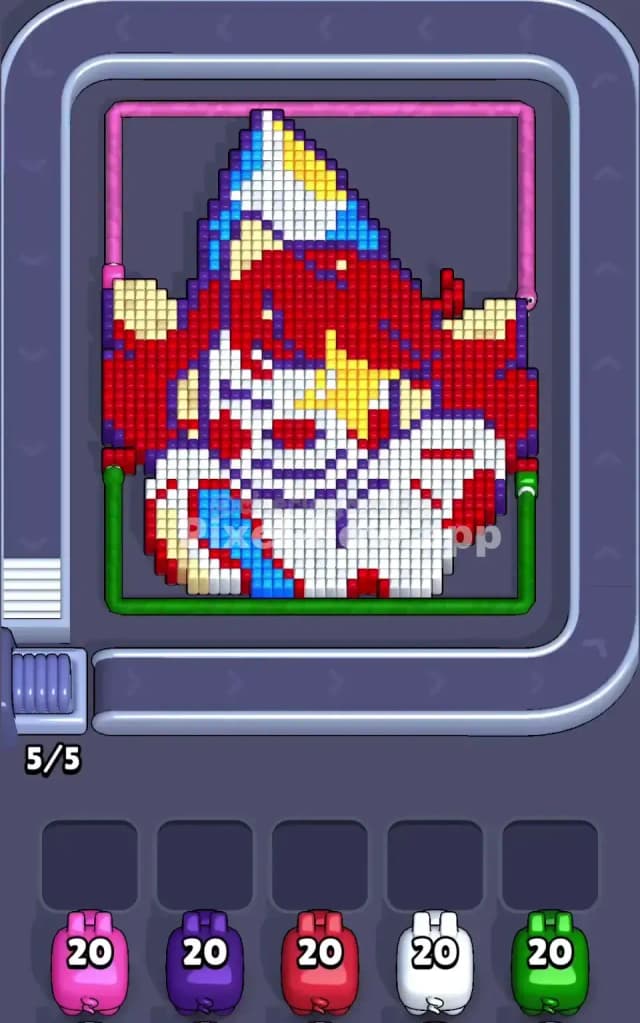
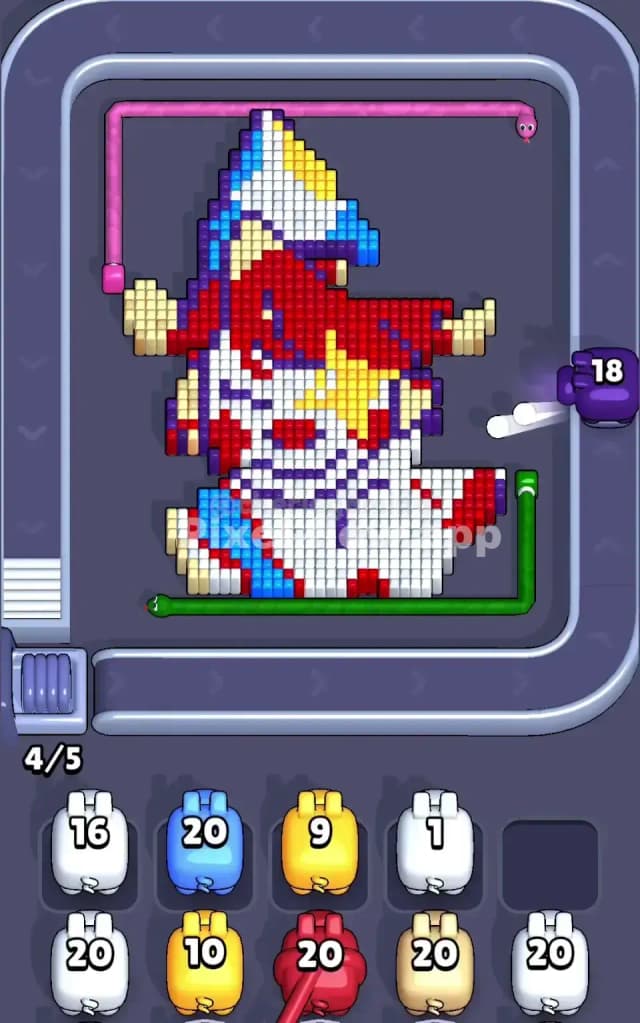
You are looking at a pixel art portrait of a cheerful clown or jester. The main colors here are massive blocks of Red (the hair), White (the face and collar), and a striped hat made of Blue, Yellow, and White. To beat Pixel Flow Level 214, you simply need to clear the voxels layer by layer without letting your five waiting slots get clogged with useless pigs. You must pick pigs that match the outermost, exposed layer of the 3D image.
Is this level difficult? Yes. The mix of large color patches and tiny, precise details in the hat makes Pixel Flow Level 214 very hard.
Pixel Flow Level 214 Overview
This level features a festive clown character that dominates the center of the board. The composition is top-heavy. You have a giant, bushy mass of Red hair that spans the middle section, sitting right on top of a wide White face. Perched awkwardly on top is a triangular party hat with diagonal stripes of Blue, Yellow, and White.
The board feels crowded. The Red hair extends almost to the pipes on the left and right edges. The bottom section is a solid wall of White pixels representing the clown's shirt or hands.
The visual trap here is the asymmetry in the details. The hat tilts slightly, meaning the blue and yellow pixels aren't perfectly aligned in rows. There is also a sneaky Yellow star shape on the clown’s right cheek (your right) that is buried slightly deeper than the red hair around it. You might think you can clear the red easily, but that yellow star will block your shots if you aren't careful. The left side of the hat also has some tricky Purple shading mixed in with the blue.
Step by step solution walkthrough for Pixel Flow Level 214
First Color Zone to Erase in Pixel Flow Level 214
I start by attacking the Red hair immediately.
Here is the logic: The red section is the largest, most "extruded" part of the model. It sits physically higher or more forward than the details on the face. If you look at the board, the red pixels on the left and right flanks are totally exposed.
Selecting Red pigs early is safe. They have plenty of targets. You will rarely waste a Red pig in the opening moves because the "hitbox" for the hair is gigantic. Clearing the red hair opens up the sides of the board, exposing the edges of the white face and the lower rim of the hat. If you try to start with Blue or Yellow, you will likely fail. Those colors are mostly on the hat, which is further back or shielded by the red mass. You'll end up with a Blue pig sitting in your slot, doing nothing, clogging your flow.
How to pass Pixel Flow Level 214 without power ups or boosters
The mid-game of Pixel Flow Level 214 is dangerous. This is usually when the big Red block is mostly gone, leaving behind a jagged, half-eaten portrait.
At this stage, the White face and the Yellow star become your priority. You will see the board look messy. The smooth outer shell is gone. Now you have the internal structure exposed.
Stick to the plan:
- Drain the White: Once the Red hair is thinned out, the White face is the next biggest "ammo dump." Use White pigs to clear the bottom half of the screen. This is crucial because the conveyor belt wraps around the bottom. If the bottom is clear, your pigs have a better line of sight to the upper layers.
- Watch the Hat: Do not grab a Blue pig unless you are 100% sure a Blue stripe is the front-most object. The hat is layered. Often, a White or Yellow stripe blocks the Blue one. If you grab a Blue pig too early, it will sit in your slot until you clear the obstructing layer.
- The Yellow Star: On the right side, inside the red hair area, a yellow star emerges. Treat this carefully. Only grab a Yellow pig if the Red pixels covering the star are completely gone.
If you refuse to use boosters, your patience with the Waiting Slots is key. Never fill your 4th or 5th slot with a "maybe" color. Only pick a pig if you see a clear shot.
Last Details You Clean Up in Pixel Flow Level 214
The final moments of Pixel Flow Level 214 are always the hat.
The face and hair will be long gone. All that remains is the floating triangle at the top. This area is annoying because it uses alternating colors: Blue, White, Yellow, Blue.
You will likely have one or two stubborn pixels of Purple or Blue on the far left tip of the hat. These are easy to miss because they blend into the background or look like shadows. Save your precision shots for this. Do not spam pigs here. One pig at a time. Watch the pig shoot, confirm the layer is gone, then pick the next color. The very last cube to vanish is usually the very tip of the hat or a stray pixel on the bottom collar.