Pixel Flow Level 247 Solution | Pixel Flow 247 Walkthrough
How to beat Pixel Flow Level 247: Video solution & walkthrough. The fastest way to pass Pixel Flow 247.
Is this the wrong level layout?🤔
Pixel Flow randomizes levels for different players. Don't worry, just upload a screenshot of your board, and our AI will find the correct video instantly.

Pixel Flow Level 247 Walkthrough
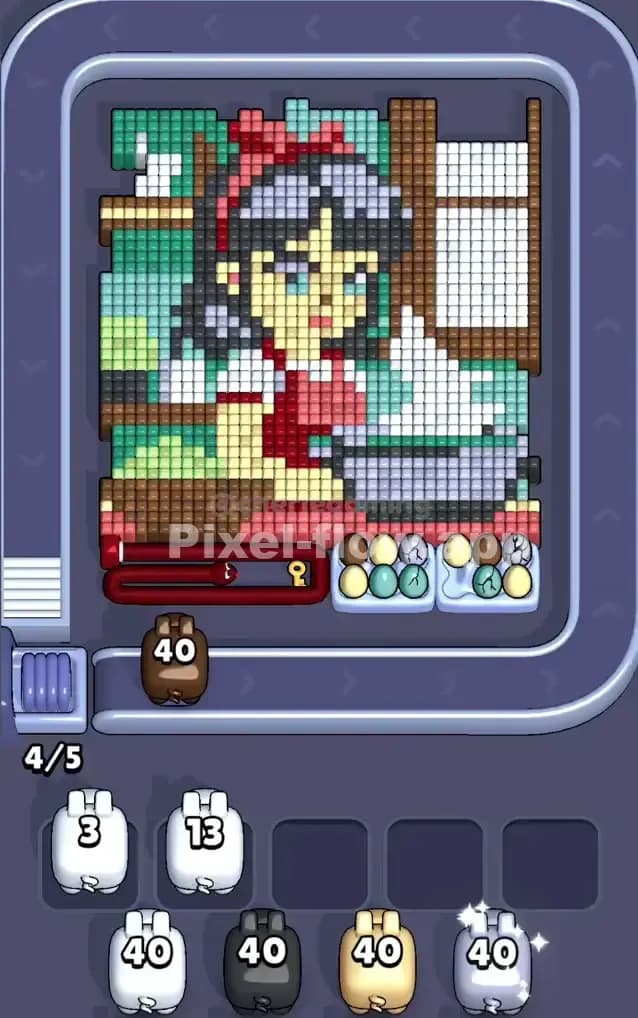
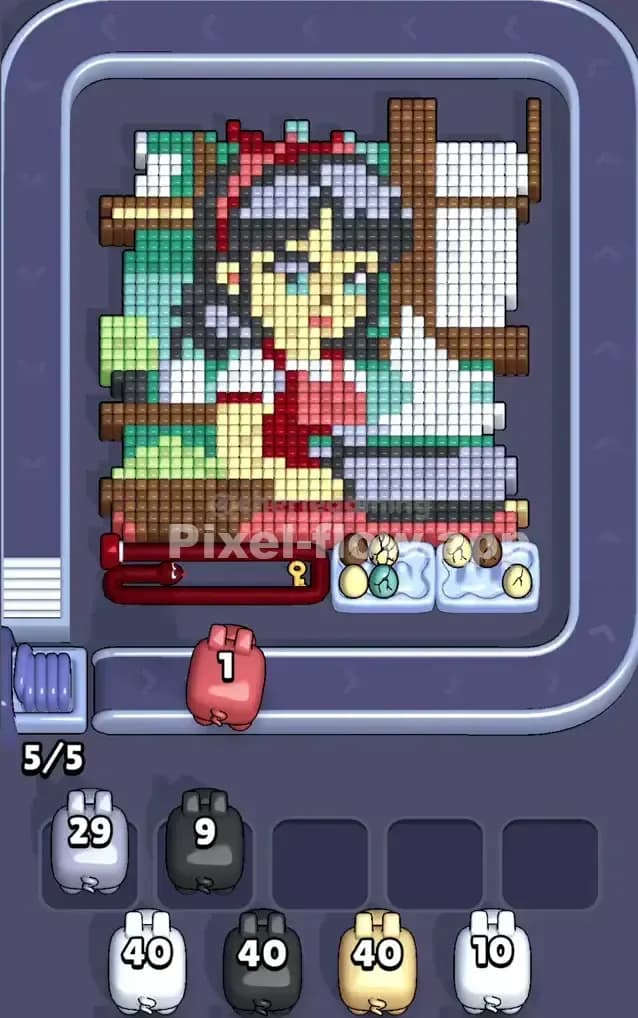
This level features a detailed portrait of a girl cooking, likely in a kitchen setting. The board is dense. You have large distinct zones of color: a massive grey cooking pot at the bottom right, green tiling on the left, and a brown window frame on the right. Because of the sheer number of overlapping layers—especially around the girl’s face and the steam rising from the pot—this is a very hard level.
To beat Pixel Flow Level 247, you must prioritize stripping the "loudest" outer layers first. If you try to snipe the background pixels (like the green wall) before clearing the foreground (the pot and girl), your waiting slots will jam instantly.
Pixel Flow Level 247 Overview
The artwork here is charming but dangerous. It depicts a girl with dark grey hair and a red bow, wearing a red apron over a white shirt. She stands behind a large grey cauldron or pot. White steam billows out of the pot, obscuring part of the background.
The background itself is split. The left side is a wall of varied green tiles (teal and light green). The right side is a wooden window structure (browns) with bright white glass panes.
The asymmetry here is your biggest enemy. The left is heavy on greens/teals. The right is heavy on browns/whites. The center is a mix of red, skin tones, and greys. This means a Green Pig is useless on the right side of the board, and a Brown Pig is useless on the left. You cannot just spam shots; you have to wait for the specific angle where the pig lines up with its color zone.
Also, notice the bottom left corner. There is a red velvet rope barrier with a lock icon. This typically guards the bottom-most rows. You won't be able to clear the very bottom line of red/brown pixels until the layers above are stripped away and the lock condition is met (usually by clearing specific key blocks or just eroding the layer above it).
Step by step solution walkthrough for Pixel Flow Level 247
First Color Zone to Erase in Pixel Flow Level 247
You need to start with White. Look at the queue in the initial state: you have two White pigs with 40 ammo each. This is a gift.
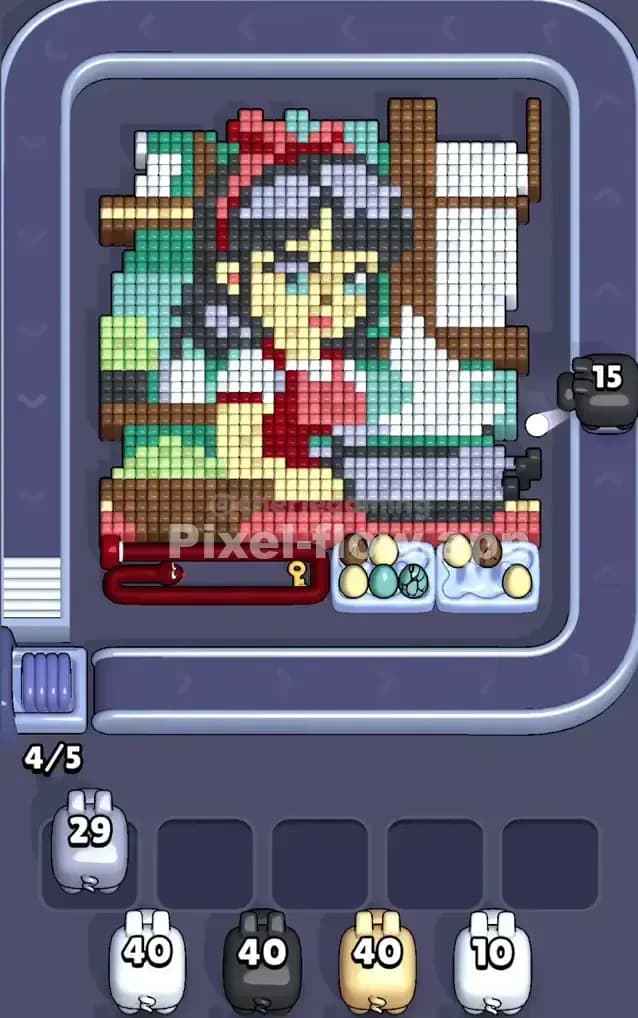
Narratively, the white pixels make up the "steam" rising from the pot and the window panes in the background. Logically, these are high-volume surface layers. The steam sits physically in front of the brown window frame and the green wall. If you don’t clear the white steam, you cannot access the background colors, and any Brown or Green pigs you pick up will just sit in your waiting slots, useless, until you lose.
Focus the first White pig on the right side to blow out the window panes. Focus the second White pig on the center to evaporate the steam rising from the grey pot. This immediately declutters the visual field and exposes the brown wood and the girl's face.
How to pass Pixel Flow Level 247 without power ups or boosters
Once the white steam is gone, the picture looks half-destroyed, but the danger spikes. You are now left with the girl's solid figure (Red apron, Skin tone face, Grey hair) and the background walls.
At this mid-point, you will likely see Grey and Red pigs appear.
- Attack the Grey Pot: The grey pot at the bottom right is a massive "blocker" object. It is thick. It hides the girl's body and the bottom background. Use every Grey pig to hammer this pot. Do not waste Grey ammo trying to snipe individual hair pixels yet; dump the ammo into the big pot target to clear the bottom right quadrant.
- The Red Trap: The girl’s dress and bow are Red. However, check the ammo count. Red pigs often have lower ammo (like 20). Be precise. Aim for the solid block of the red apron in the center. Avoid shooting at the red barrier rope at the bottom unless the game explicitly highlights a key block there. Usually, you just need to clear the pixel art above it.
- The Background Split: Now you have a choice between Green (left wall) and Brown (right window frame). Choose Brown first. The window frame is intricate and interlocks with the white pixels you already cleared. It’s easier to finish off the right side completely than to chip away at the solid green wall on the left. By clearing the right side (Brown + White), you create a massive empty void. This allows pigs to shoot across the board without hitting obstacles, making it safer to target the complex center later.
Last Details You Clean Up in Pixel Flow Level 247
The final phase of Pixel Flow Level 247 is usually just the Skin Tone and the deep Green background.
The girl's face (beige/skin tone) is the deepest layer in the center. You couldn't hit it earlier because the grey hair and red bow were in the way. Now, with the accessories gone, the face is exposed. Watch out for the eyes; they might be white or blue pixels that require a specific pig you haven't seen in a while.
Finally, the Green wall on the left. It’s a boring, solid block. Save it for last. It doesn't block anything crucial, so it’s the safest color to ignore while you deal with the complex, layered center. Once the girl is gone, you can just let the Green pigs empty their clips into the left wall to finish the level.