Pixel Flow Level 286 Solution | Pixel Flow 286 Walkthrough
How to beat Pixel Flow Level 286: Video solution & walkthrough. The fastest way to pass Pixel Flow 286.
Is this the wrong level layout?🤔
Pixel Flow randomizes levels for different players. Don't worry, just upload a screenshot of your board, and our AI will find the correct video instantly.


Pixel Flow Level 286 Walkthrough
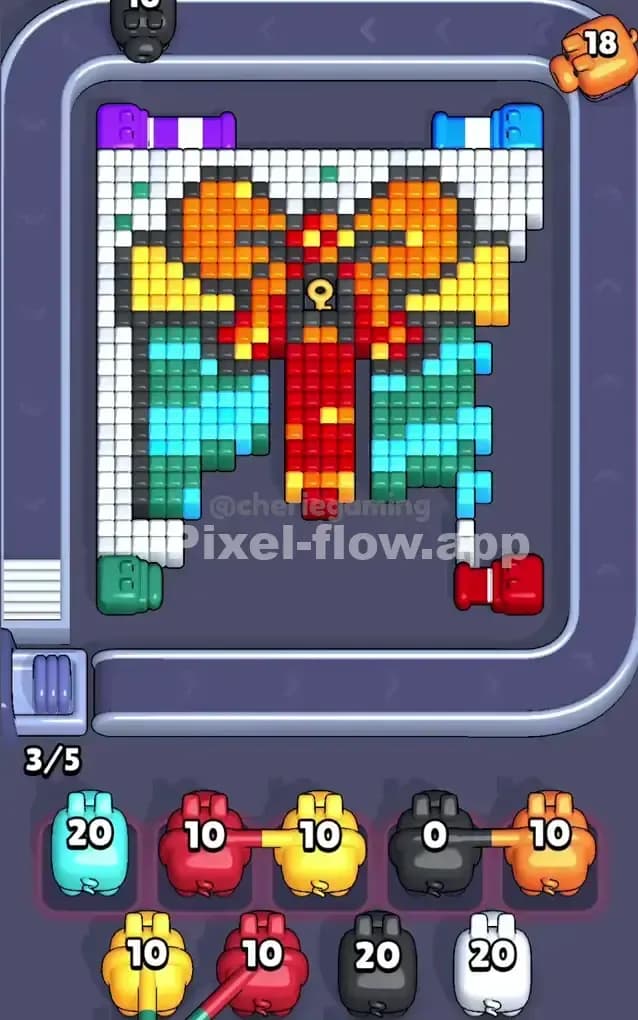
This level is a massive, pixelated gift box waiting to be unwrapped. Literally. The visual is a teal present with a bright red vertical ribbon, a yellow-orange bow on top, and a distinctive keyhole icon right in the center knot. The entire object is bordered by a thick dark grey outline and encased in a huge field of white pixels.
The rule to beat Pixel Flow Level 286 is simple but punishing: layer discipline. The white background is vast and covers the sides completely. The colored "gift" (teal, red, yellow) is buried underneath. If you pull pigs for the inner colors before you’ve cleared the white outer shell, your waiting slots will jam instantly.
Is it hard? Yes, very hard. The layering is deceptive. You see the big red ribbon and want to shoot it, but you can't touch it until you chew through at least two outer layers of white and black.
Pixel Flow Level 286 Overview
Imagine a classic birthday present sitting in a snowdrift. That’s the board. The central figure is a large, rectangular box. The box itself is patterned in teal and light blue stripes. Running straight down the middle is a thick red ribbon that flares out into a yellow and orange bow at the top.
The crucial detail here is the Dark Grey/Black outline. It acts as a hard border between the gift and the background.
The background isn't just "empty space"; it is filled with White pixels that must be destroyed. This white layer is thickest on the left and right sides of the box.
Topologically, the level is symmetric, but your threats are not. The center column—the red ribbon—is the deepest layer. The sides—the teal box parts—are middle layers. The white perimeter is the top layer. You have to think of this as an excavation. You are digging from the outside in. If you try to dig the core (Red) before the crust (White) is gone, you lose.
Step by step solution walkthrough for Pixel Flow Level 286
First Color Zone to Erase in Pixel Flow Level 286
Your priority is the White Background. Ignore everything else.
Narratively, you need to clear the snow before you can open the box. Logically, the white pixels are the only valid targets for roughly 40% of the board's surface area. Look at the conveyor belt. If you see a White pig, prioritize it above all others. If a White pig is buried behind a Red or Yellow pig in the queue, you must carefully move the blocking pigs into your waiting slots to access the White pig.
Why? Because the White layer blocks line-of-sight to the Black outline. And the Black outline blocks line-of-sight to the Teal box.
Be extremely careful with Red and Yellow pigs in the early game. The Red pixels are exclusively located in the vertical center stripe and the bow knot. They are protected by everything. If you fill your waiting slots with three Red pigs early on, you will likely game over before the white layer is even half gone. Only accept a Red pig if your slots are empty and you need to get to a White or Black pig behind it.
How to pass Pixel Flow Level 286 without power ups or boosters
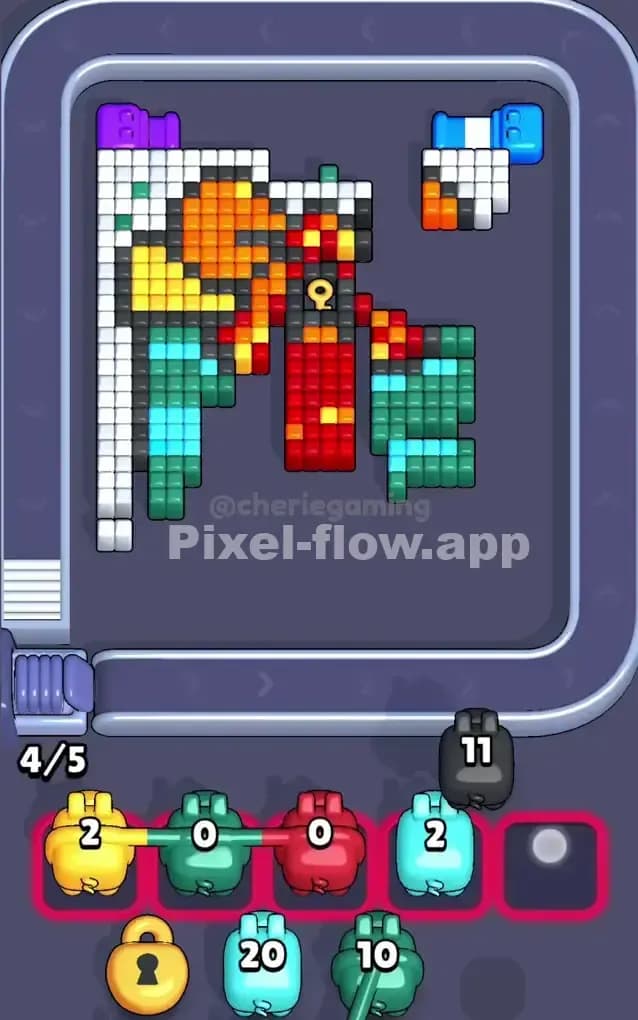
Once the white "snow" is mostly cleared, the board enters a dangerous mid-game state. You will see the Black/Dark Grey outline fully exposed. This is your new primary target.
At this stage, the picture looks like a floating wireframe. The white edges are gone, leaving the dark border. You must focus on Black pigs now. Destroying the outline is the only way to "unlock" the massive blocks of Teal and Light Blue that make up the gift box itself.
Here is the strict priority list for the mid-game of Pixel Flow Level 286:
- Black (Outline): Clears the fence.
- Teal/Light Blue (Box body): These are large, easy targets once the outline is gone. They help you dump ammo quickly.
- Purple/Green (Corners): The screenshot shows small purple and green pipes or accents in the corners. Clear these if they obstruct the main box, but don't obsess over them.
Do not get greedy for the center. You will see the Red ribbon and want to clear it. Resist. The Red ribbon is often flanked by Teal blocks. If you have a Teal pig, use it to shave down the sides of the box. Clearing the sides creates "holes" that allow your shots to reach the deeper layers or travel across the board to hit other targets.
If your waiting slots start to fill up (3/5 or 4/5 full), stop looking at colors and look at ammo counts. A pig with 2 ammo is a blessing; a pig with 20 ammo is a burden. If you have a clogged board, prioritize playing low-ammo pigs just to free up a slot, even if they don't hit a high-value target.
Last Details You Clean Up in Pixel Flow Level 286
The end game of Pixel Flow 286 is almost always the Red Ribbon and the Yellow Bow.
By now, the white background is a memory, the black outline is shattered, and the teal sides are crumbling. You are left with a T-shape in the middle: the vertical Red stripe and the horizontal Yellow bow structure.
This is where you finally unleash those Red pigs you’ve been dreading all game. The "Keyhole" symbol in the center of the ribbon is usually the last thing to go. Watch out for stray pixels of Orange inside the Yellow bow—sometimes the game treats Orange and Yellow as separate layers, so make sure you don't waste a Yellow pig on an Orange pixel if the angle isn't right.
Clean up the center knot, watch the ammo counters drop to zero, and the level is yours.