Pixel Flow Level 29 Solution | Pixel Flow 29 Walkthrough
How to beat Pixel Flow Level 29: Video solution & walkthrough. The fastest way to pass Pixel Flow 29.
Is this the wrong level layout?🤔
Pixel Flow randomizes levels for different players. Don't worry, just upload a screenshot of your board, and our AI will find the correct video instantly.



Pixel Flow Level 29 Walkthrough
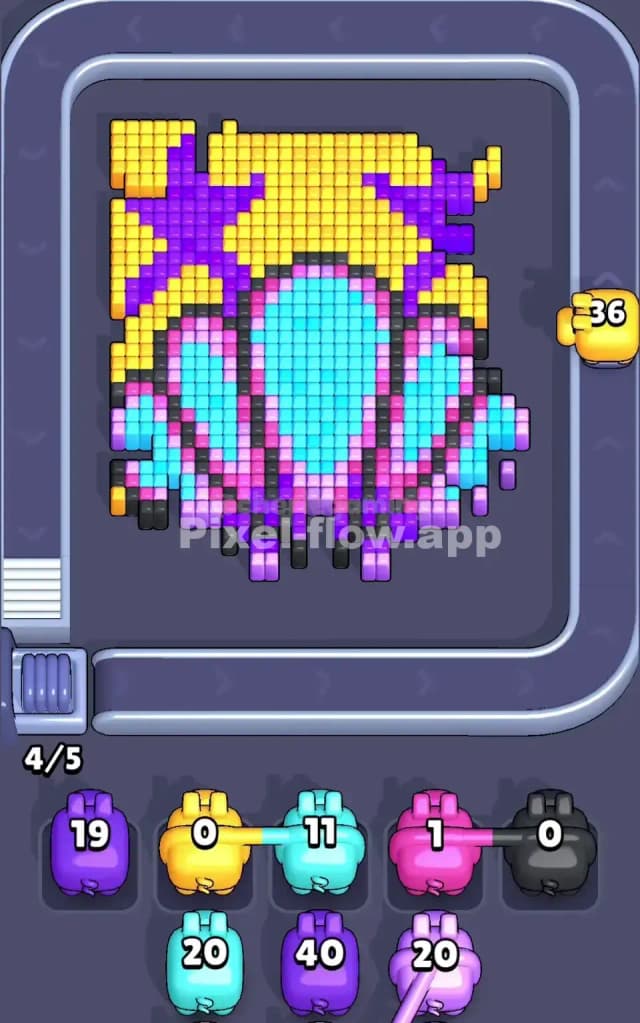
This level features a large, fan-shaped seashell resting on what looks like a sandy seabed. The shell is the centerpiece, dominated by bright cyan and pink stripes, all encased in a thick black and grey border. Behind it lies a background of yellow sand interrupted by jagged purple shapes—perhaps abstract starfish arms or coral shadows.
To beat Pixel Flow Level 29, you must peel away the background "sand" (yellow) and purple shapes first. The game forces you to clear these outer layers before you can meaningfully attack the central shell. While the ammo management here is tricky due to the scattered purple pixels, this is not a very hard level. It’s mostly about patience with the background noise before destroying the main subject.
Pixel Flow Level 29 Overview
Imagine finding a pristine seashell on a beach towel. That’s the vibe here. The central object is a large scallop shell standing upright. It has vertical bands of color: icy blue (cyan) in the center, flanked by stripes of hot pink and lighter pink. The whole shell is outlined in a rigid, dark voxel border (black and dark grey).
The background is where the chaos lives. It's a checkerboard of yellow pixels mixed with purple zig-zags. The top corners are heavy with yellow and purple, while the bottom corners have smaller patches of yellow.
Asymmetry plays a role here. The purple shapes in the background are irregular. The purple band on the top left is thick and connected, but on the right, it's more broken up. This matters because a purple pig might clear the left side efficiently but get stuck with leftover ammo on the right side if you aren't careful. The shell itself is perfectly symmetrical, which makes the endgame much easier than the start.
Step by step solution walkthrough for Pixel Flow Level 29
First Color Zone to Erase in Pixel Flow Level 29
I start by targeting the Yellow background immediately. Narratively, you need to dig the shell out of the sand. Logically, yellow is the most abundant "top layer" color. It surrounds the shell completely and blocks access to the black border beneath.
Look at the waiting slots in the screenshots. You often get high-capacity Yellow pigs (holding 20-40 ammo). Dropping one of these early is safe because there are huge, uninterrupted blocks of yellow at the top center and bottom corners. Clearing the yellow exposes the purple layer more fully and begins to reveal the black outline of the shell. If you try to target the shell's cyan or pink interior first, you'll likely fail; those pixels are buried too deep underneath the black border layer.
How to pass Pixel Flow Level 29 without power ups or boosters
Once the yellow is mostly gone, you hit the "mid-level mess." The board looks ragged. You'll see floating chunks of purple and the now-exposed black outline of the shell.
Here is where players get stuck: The Purple Trap. The purple pixels are not one solid block; they are scattered in zig-zags. If you drop a Purple pig with 30 ammo, but only 10 purple pixels are exposed, that pig will sit in your waiting slot, clogging up the board until you clear more yellow or black to reveal more purple.
To survive without boosters:
- Prioritize Black/Grey Borders: Once the yellow sand is cleared, start hitting the black/grey outline. This outline acts as a cage. Breaking it opens up access to the pink and cyan stripes inside the shell and often reveals hidden purple pixels stuck behind the shell's edge.
- Use Low-Ammo Pigs for Purple: If a purple pig appears with low ammo (e.g., 8 or 10), use it immediately to clear the scattered background bits. Save high-ammo purple pigs for when you have exposed a lot of the board.
- Ignore the Cyan/Pink Center: Do not clutter your waiting slots with Cyan or Pink pigs yet. Those colors are the "meat" of the shell and are deeply buried. Until the black border is shattered, those pigs are useless dead weight.
Last Details You Clean Up in Pixel Flow Level 29
The end game is satisfyingly simple. Once the black cage is broken, the shell is just vertical stripes of color.
You will likely be left with the Cyan center and the Pink bands. These are dense, vertical columns. A single high-ammo Cyan pig can often wipe out the entire middle of the shell in one go. The last few moves are usually cleaning up the bottom corners of the shell where the pink stripes meet the remaining black base. Watch out for single stray pixels of dark grey at the very bottom of the shell—they can be hard to see against the dark background of the UI. Clear the stripes, destroy the base, and the level is yours.