Pixel Flow Level 360 Solution Walkthrough | Pixel Flow 360
How to solve Pixel Flow level 360? Get instant solution for Pixel Flow 360 with our step by step solution & video walkthrough.


Pixel Flow Level 360 Overview
The Starting Board and Key Visual Elements
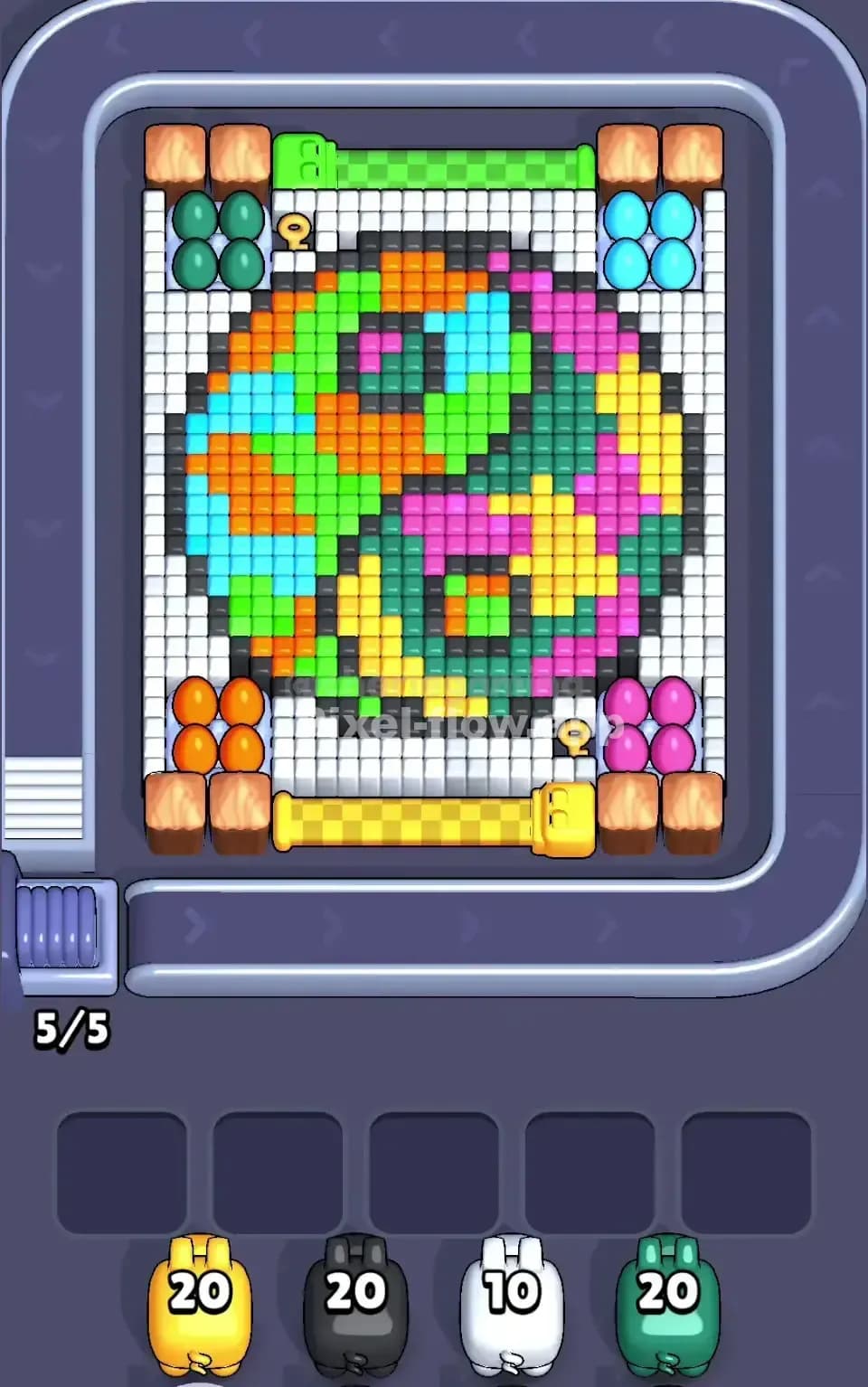
Pixel Flow Level 360 presents a vibrant, multi-layered voxel portrait that demands careful color sequencing to fully reveal. The board is dominated by a rich mix of cyan, orange, lime green, magenta, yellow, and dark teal cubes arranged in a complex pixelated design. You'll notice the image has clear depth—lighter, more saturated colors sit on the surface while darker shades lurk underneath, waiting to be exposed once their overlaying cubes vanish. The portrait features distinct regions: bright cyan patches on the left side, warm orange and yellow tones occupying the center and lower areas, magenta and pink highlights creating contrast on the right, and a dark teal-green shadow layer threading through the middle. This layered construction is what makes Pixel Flow Level 360 genuinely challenging, because you can't simply blast away colors randomly—you have to think in three dimensions and plan which pigs to deploy when.
Your pig queue consists of a yellow pig with 20 ammo, a black pig with 20 ammo, a white pig with 10 ammo, and a green pig with 20 ammo. The win condition is straightforward: clear every single voxel cube from the board. However, Pixel Flow Level 360 won't let you brute-force your way through. You need to sequence these four pigs so that each one spends all its ammo before the level ends, and you can't allow three or more pigs to pile up in the waiting slots simultaneously, or you'll lock yourself into an unwinnable state.
Understanding the Win Condition and Deterministic Mechanics
Every time you send a pig down the conveyor belt, it automatically targets and destroys all matching-colored cubes within its range, consuming one ammo per cube destroyed. The key insight that makes Pixel Flow Level 360 solvable is that the board state and pig behavior are completely deterministic—there's no randomness. Once you understand which colors exist on the board and how many cubes each pig needs to destroy, you can map out the exact sequence that clears everything cleanly. Your goal isn't just to eliminate cubes; it's to orchestrate pig deployments so that no pig ever runs out of ammo before all its targets are gone, and no pig ever gets stuck waiting with unused ammunition.
Why Pixel Flow Level 360 Feels So Tricky
The Critical Bottleneck: Overlapping Colors and Hidden Layers
The biggest threat in Pixel Flow Level 360 is the dark teal and black shadow layer woven throughout the portrait. These deeper colors are completely hidden under the brighter surface cubes, which means you can't target them until you've cleared away the overlying cyan, orange, and green voxels. This creates a nasty catch-22: the black pig with 20 ammo can't do anything until enough cubes disappear to expose its targets, but if you deploy it too early, it'll find nothing to shoot and drop into a waiting slot, potentially clogging your buffer. The dark teal cubes have the same problem—they're scattered in pockets throughout the board, and you'll only see them once other colors vanish. Pixel Flow Level 360 punishes impatience because committing a pig to the wrong order leaves you scrambling to recover.
The Subtle Problem Spots
There's an awkward concentration of orange and yellow cubes stacked together in the lower-center region of Pixel Flow Level 360. Your yellow pig has exactly 20 ammo, and while that seems generous, you need to be certain it doesn't waste shots on phantom targets. If you send yellow down before enough overlays are cleared, it might destroy some cubes, then run dry before the hidden orange cubes underneath become accessible. Meanwhile, the orange cubes on the surface are vulnerable to yellow's shots, which means yellow will chip away at the orange population, making it harder for the black pig (which should logically handle black cubes) to land clean kills. The cyan-to-magenta transition zone on the right side of Pixel Flow Level 360 is similarly treacherous because these bright colors sit very close together, and deploying the wrong pig first means leaving orphaned cubes that no remaining pig can target.
When the Level Clicked for Me
I'll admit, my first ten attempts at Pixel Flow Level 360 felt chaotic and overwhelming. I kept sending pigs down in whatever order seemed logical, watching them burn through ammo on visible targets, then panicking when I realized I'd exposed colors the remaining pigs couldn't touch. The frustration peaked when I got down to one pig in the queue with three stuck pigs in the waiting slots—all those unused ammo points just sitting there while I helplessly watched the board. But then I forced myself to stop and actually count. I listed every visible color, estimated the ammo needed, and traced which pig logically had to go first to unlock secondary layers. That discipline transformed everything. Suddenly Pixel Flow Level 360 went from maddening to satisfying, because I realized the solution was always there—I just needed to trust the math and plan three moves ahead instead of reacting one move at a time.
Step-by-Step Strategy to Clear Pixel Flow Level 360
Opening: Establish a Safe Foothold
Start Pixel Flow Level 360 by deploying your green pig first. Green has 20 ammo and can target all the bright lime-green cubes scattered across the portrait—these are plentiful and highly visible, making green a reliable opener that will definitely spend ammo without risk of jamming. As green destroys green cubes, you'll begin to expose the darker shadow layer beneath, and you'll also clear visual space so you can better assess what colors are truly available on the remaining board. Don't rush to send your next pig immediately; pause and scan the board after green finishes. You want to keep at least two waiting slots empty as you progress through Pixel Flow Level 360, so you have a buffer if a pig needs to park temporarily. Green's 20 shots should clear a meaningful chunk of the surface, and critically, it won't compete with any other pig in your queue, so there's zero risk of ammo conflict.
Mid-Game: Sequence Pigs to Expose Inner Layers and Avoid Jams
Once green has cleared the lime-green layer, your next move in Pixel Flow Level 360 depends on what's newly visible. If you see abundant cyan cubes exposed, deploy the white pig. Yes, white only has 10 ammo—fewer than your other pigs—but that's actually ideal here because cyan is likely a lighter color that sits on the surface, and 10 ammo is probably just enough to handle the exposed cyan without overshooting or falling short. Send white down, let it do its 10 shots, and watch for the magenta and yellow zones that emerge underneath. Now you should have two pigs left: yellow and black, both with 20 ammo each. This is where Pixel Flow Level 360 demands careful observation. Count the visible orange cubes—your yellow pig can destroy those. Count the visible yellow cubes—yellow can also destroy those, but so can black if we're not careful. The trick is deploying yellow next to clear all orange and exposed yellow voxels, which will then open up the dark teal layer and any remaining magenta patches. Yellow going second (after green and white) should find a healthy target count in the 15–18 range, leaving it with a small cushion and a waiting slot available if it needs to park.
Finally, black pig with 20 ammo takes the stage last, now that the dark teal and shadow layers are mostly or fully exposed. Black should finish Pixel Flow Level 360 by destroying all remaining dark cubes. If your sequencing has been precise, black will spend all 20 ammo and clear the board entirely without jamming your buffer.
End-Game: Empty the Buffer Cleanly
By the time you're in the final stretches of Pixel Flow Level 360, you should ideally have no more than one pig in a waiting slot. As black pig executes its final shots, watch the board shrink. The moment black finishes and you've cleared all voxels, you've won. But the real skill of Pixel Flow Level 360 lies in never letting it get to a point where you have three or more pigs waiting helplessly. If, during yellow's turn, you notice that you've miscounted and there aren't enough orange or yellow cubes to fully spend yellow's ammo, immediately pause and reassess. In some scenarios, yellow might land only 15 shots before running out of valid targets, leaving 5 ammo unused. That's okay—yellow drops into a waiting slot. Then black can come down and finish, assuming black has enough targets to keep all 20 ammo engaged. The worst-case scenario in Pixel Flow Level 360 is a gridlock where you've sent pigs in the wrong order and two or three of them are now stuck with unspent ammo, with no remaining cubes for them to target. Avoiding that requires looking ahead and mentally simulating the pig order before you commit.
The Logic Behind This Pixel Flow Level 360 Plan
Exploiting Determinism and Order
The entire strategy for Pixel Flow Level 360 rests on a simple principle: the board is fixed, and pig ammo is fixed, so the only variable you control is order. By sending green first (a high-ammo pig targeting abundant surface cubes), you eliminate the risk of an early jam and establish a clean foundation. White goes second because it has the fewest ammo and should only target lighter surface colors, keeping its role narrow and predictable. Yellow and black, both power-hitters with 20 ammo each, go last when the board has fewer total cubes and the deeper layers are exposed, so their ammo counts align better with the remaining targets. This ordering isn't arbitrary; it's a cascading logic where each pig creates the conditions the next pig needs to succeed. Pixel Flow Level 360 rewards this kind of systems thinking far more than lucky guessing.
Staying Calm and Counting Ahead
When you're playing Pixel Flow Level 360, resist the urge to instantly deploy the next pig. Instead, pause for three seconds after each pig finishes and conduct a quick audit: How many visible red cubes remain? How many orange? How many dark teal? Do I have a pig that can hit each color? Once you know the answers, you can predict whether your next pig will burn all its ammo or get stuck. Counting ammo is equally crucial. If you see 18 cyan cubes and white has 10 ammo, white will definitely drop into a waiting slot after its turn—that's fine, plan for it. But if you see only 3 cyan cubes and white has 10 ammo, you've got a problem; white should never go until more cyan is visible. This kind of deliberate, forward-looking play transforms Pixel Flow Level 360 from a frustrating puzzle into a satisfying logic game where you feel in control. The level is solvable once you stop reacting and start planning.