Pixel Flow Level 510 Solution | Pixel Flow 510 Walkthrough
How to beat Pixel Flow Level 510: Video solution & walkthrough. The fastest way to pass Pixel Flow 510.
Is this the wrong level layout?🤔
Pixel Flow randomizes levels for different players. Don't worry, just upload a screenshot of your board, and our AI will find the correct video instantly.



Pixel Flow Level 510 Walkthrough
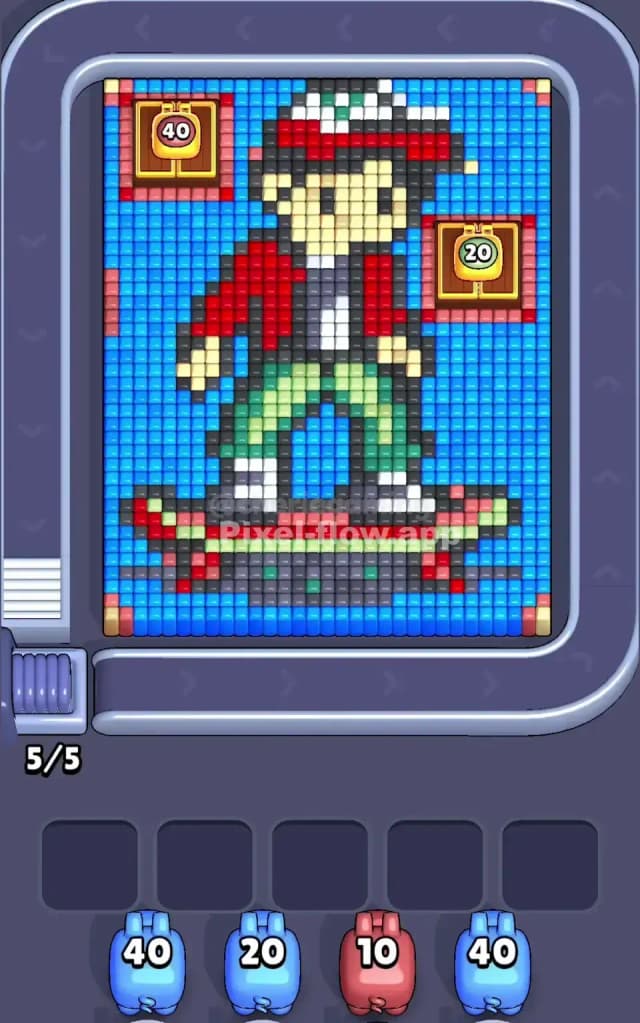
This level features a nostalgic character straight out of 80s sci-fi: a boy in a red puffy vest and a baseball cap riding a hoverboard. The board is densely packed with a massive light blue background that frames the character completely. There are also two chest icons embedded in the top corners (one brown/gold with "40" and one with "20") sitting on red square patches.
The rule is simple: clear the top layers to expose the voxels underneath so your pigs always have a target. If your pigs jam the waiting slots with unused ammo, you lose. Because of the heavy layering and specific color blocking, Pixel Flow Level 510 is a very hard level.
Pixel Flow Level 510 Overview
The artwork depicts a cool skater kid mid-ride. He occupies the center vertical slice of the board. He has a white and red cap, a tan face with black eyes, a white t-shirt under a distinct red vest, green pants, and white shoes. He is standing on a grey and red skateboard (or hoverboard).
The most critical feature of this level isn't the character, though. It's the Blue Ocean. The entire background is a solid wall of light blue voxels.
This background isn't just filler; it's a trap. It surrounds the character on all sides—left, right, and bottom.
- Top Corners: Notice the red square outlines in the top left and right corners. These hold "Chest" icons (which are just decorative obstacles here).
- The Red Vest: The character's torso is a dense block of red.
- The Green Pants: His legs are a mix of light green and darker green/blue shades.
Asymmetry plays a role here. The blue background is heavier on the bottom and sides than the top. You have to chip away at this blue frame to get to the juicy center.
Step by step solution walkthrough for Pixel Flow Level 510
First Color Zone to Erase in Pixel Flow Level 510
Blue is your priority.
Look at your starting pigs. You likely have a mix, but the board is drowning in Light Blue.
- Why Blue? The light blue background is the "outermost" layer for 70% of the board. It covers the bottom, the sides, and frames the character. Until you remove this blue frame, you cannot access the character's feet, the skateboard, or the sides of his vest.
- The Strategy: Grab any Light Blue pig (like the 40 ammo or 20 ammo ones shown in the queue) immediately. Do not touch the Red pigs yet. Red is concentrated in the vest and the corner boxes, but those red pixels might be on a lower layer than the blue frame surrounding them. If you pick Red first, the pig might fire three shots and then sit in your slot, clogging it up because the rest of the red is buried under blue.
Clear the blue to "unlock" the board. Once the blue frame is gone, the shape of the boy becomes the new edge.
How to pass Pixel Flow Level 510 without power ups or boosters
Once the massive blue background is significantly reduced, the board looks messy. You'll have the skater boy floating in the middle, and maybe some red outline boxes left in the top corners.
Here is the danger zone logic:
- The Red Vest vs. The Red Corners: You have red pixels in the center (vest) and red pixels in the top corners (boxes). Be careful. Sometimes the game layers these differently. If you send a Red pig and it clears the corners but can't reach the vest because of a black outline or a white shirt pixel blocking the line of sight, you are in trouble.
- The Skateboard: The board at the bottom is a mix of Dark Grey, Black, and Red. This area is usually the last to clear because it is at the very bottom of the "stack."
- Pig Management:
- Don't horde small pigs. If you see a pig with 10 ammo that matches an exposed color (like the White on the hat or shoes), use it. It clears a slot quickly.
- Save high-ammo pigs for big blocks. Use 40-ammo pigs only when you see a massive chunk of color (like the Green pants or the Red vest). If you use a 40-ammo Red pig when only 5 red pixels are visible, that pig will jam your slot forever.
Focus on stripping the character from head to toe. The hat (White/Red) usually sits high up. The face (Tan) is often exposed early. Clear the top of the sprite to prevent pigs from shooting "over" the character and hitting nothing.
Last Details You Clean Up in Pixel Flow Level 510
As you near the end, the board usually leaves the "densest" or "deepest" parts for last. In Pixel Flow 510, this is often the Dark Grey/Black of the skateboard and the outlines.
- The Feet: The sneakers are white, but they are often blocked by the green pants. Once the pants are gone, make sure you have a White pig ready for the shoes.
- The Outline: The black voxels outlining the character are often the very bottom layer. You might end up with just a wireframe "ghost" of the boy. Save your Black/Dark Grey pigs for this specific moment. If you use them too early, they will hit the few exposed black pixels (eyes, belt) and then get stuck.
Watch out for the single stray pixels at the very bottom of the skateboard. These can be hard to spot against the dark floor of the level. Ensure your last pig has enough ammo to sweep the board clean.