Pixel Flow Level 9 Solution | Pixel Flow 9 Walkthrough
How to beat Pixel Flow Level 9: Video solution & walkthrough. The fastest way to pass Pixel Flow 9.
Is this the wrong level layout?🤔
Pixel Flow randomizes levels for different players. Don't worry, just upload a screenshot of your board, and our AI will find the correct video instantly.

Pixel Flow Level 9 Walkthrough
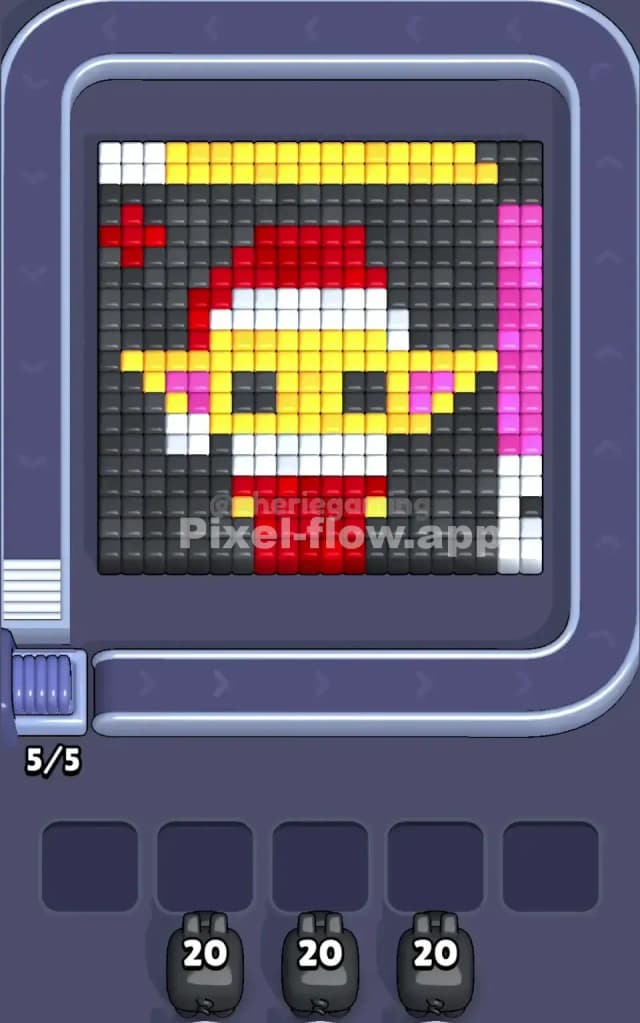
This level features a festive voxel portrait of a familiar-looking green alien baby wearing a Santa Claus outfit. The board is dense. You have a massive amount of Dark Grey background blocks surrounding the central figure, a distinct Yellow stripe across the top, and a Pink vertical bar running down the right side. The character itself is built from a core of Yellow (face), Red (hat and robe), and White (trim).
To beat Pixel Flow Level 9, you have to peel this image like an onion. The background and border stripes are blocking the main character. You must clear those outer layers first to get clear shots at the center. Is this a very hard level? No. It looks intimidating because of the solid blocks, but the color separation is clean. It’s not very hard, provided you don't let the high-ammo pigs clog your waiting slots.
Pixel Flow Level 9 Overview
The artwork is clearly a "Baby Alien" character dressed for the holidays. He has big pointy ears, a red Santa hat with a white pom-pom, and a red robe. The vibe is cute but blocky. The scene feels enclosed because of the heavy framing.
There is significant asymmetry here that you need to watch out for.
- The Top: A solid bar of Yellow runs across the ceiling. This acts as a shield for the top of the Santa hat.
- The Right: A strange vertical column of Pink blocks creates a wall on the right edge.
- The Left: A small Red cross (or sparkle) floats in the top left corner, disconnected from the main red hat.
These asymmetric borders (Yellow top, Pink right) are dangerous. They sit on the "surface" layer. If you try to shoot the alien's face before clearing these borders, your shots will likely be blocked or wasted.
Step by step solution walkthrough for Pixel Flow Level 9
First Color Zone to Erase in Pixel Flow Level 9
You absolutely must start with the Dark Grey (Black) background.
This is a logical necessity. Look at the screenshot—you have pigs loaded with 20 ammo. The only color zone large enough to absorb 20 shots without leaving leftover ammo is that dark background. If you try to use a Red or Pink pig first, you might run out of targets before the pig is empty, forcing it to sit in a waiting slot and choke your board.
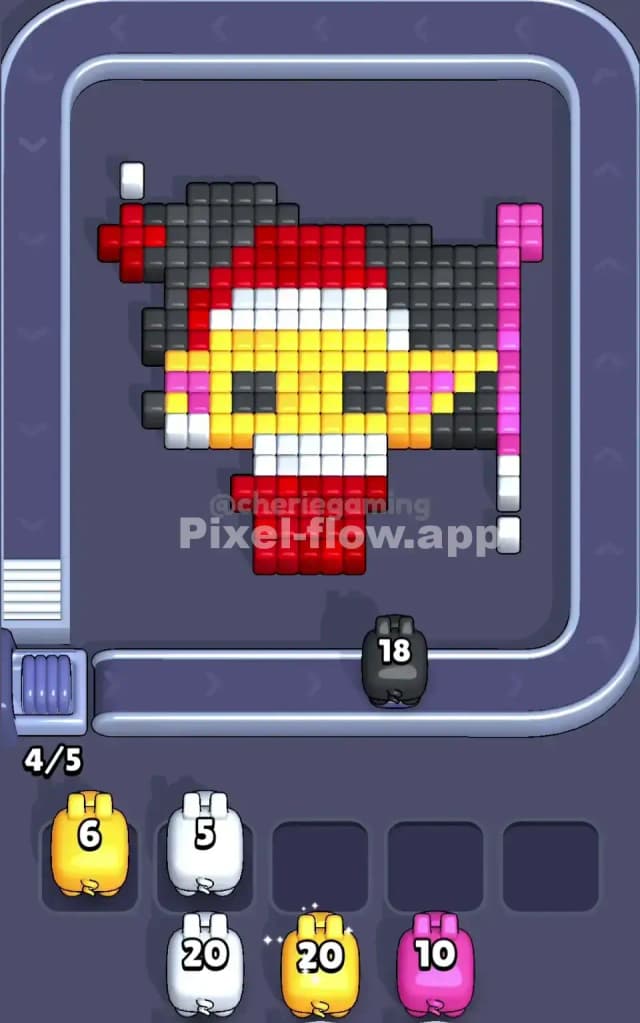
Focus your Black pigs on the left and right columns first. Clearing the dark grey blocks opens up shooting angles for the inner figure. Until the background is gone, the "Baby Alien" is trapped.
How to pass Pixel Flow Level 9 without power ups or boosters
Once the dark background is shaved away, the board looks half-empty. The alien's shape is clear. Now you hit the "mid-game" danger zone. You likely have Yellow and Red pigs coming down the chute.
Here is the trap: The Yellow top bar and the Yellow face are on different depths. I prioritize the Yellow stripe at the very top. Why? Because it spans the whole width. If you clear the top stripe, you expose the white trim of the Santa hat. If you ignore the top stripe, it acts as a roof, blocking vertical shots from reaching the upper hat area.
Do not use power ups. Just rotate your strategy. If a Red pig appears, attack the big red block of the body at the bottom. It’s an easy, wide target. Clearing the body lowers the total voxel count fast. Avoid shooting at the tiny red sparkle in the top left corner until the end—it's too easy to miss and waste a shot.
Last Details You Clean Up in Pixel Flow Level 9
The final moments of Pixel Flow Level 9 are usually about the eyes and the ears.
The Black eyes of the alien are often buried deep inside the yellow face. You might think you cleared all the black blocks earlier, but these two voxels hide until the face is thinned out. Save a small-ammo Black pig for the very end to snipe these.
Also, check the Pink stripe on the right. Sometimes a single White block hides behind it near the bottom right corner. Make sure you peel that pink strip completely so you don't get stuck with a white pig and no visible targets. Clear the face, pop the eyes, and you’re done.